


Workflow
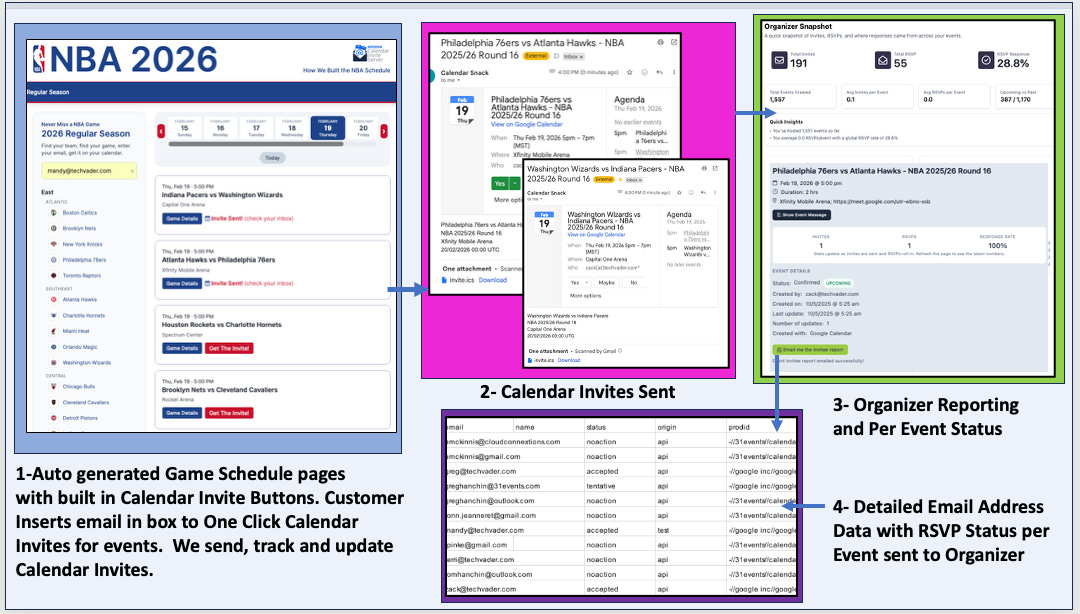
The auto-generated game schedules are deployed by the organizer using the calendar invite server API’s.
The customer enters their email address, selects the games from the schedule with a single click, and receives a calendar invite for those games.
The organizer can review the status of customer calendar invite receipts in the reporting console and receive a detailed CSV report with a one-click in the reporting panel.
The Demo site is available here.
https://nba2026.calendarsnack.com
Populating the Calendar Invite Server with Data
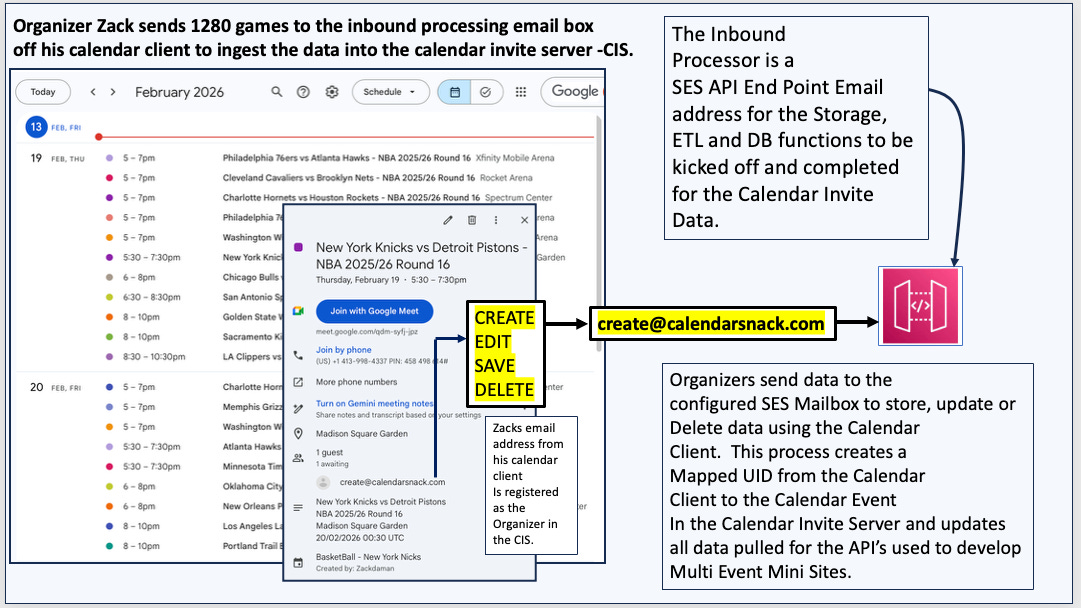
Organizer Zack sends 1280 games to the inbound processing email inbox via his calendar client, ingesting the data into the calendar invite server (CIS).
The Inbound Processor is an SES API endpoint email address that triggers and completes the Storage, ETL, and DB functions for the Calendar Invite Data.
Organizers send data to the configured SES Mailbox to store, update, or delete data using the Calendar Client. This process creates a Mapped UID from the Calendar Client to the Calendar Event in the Calendar Invite Server and updates all data pulled for the API’s used to develop Multi-Event Mini Sites.
Details: Inbound data processor for the Calendar Invite Server
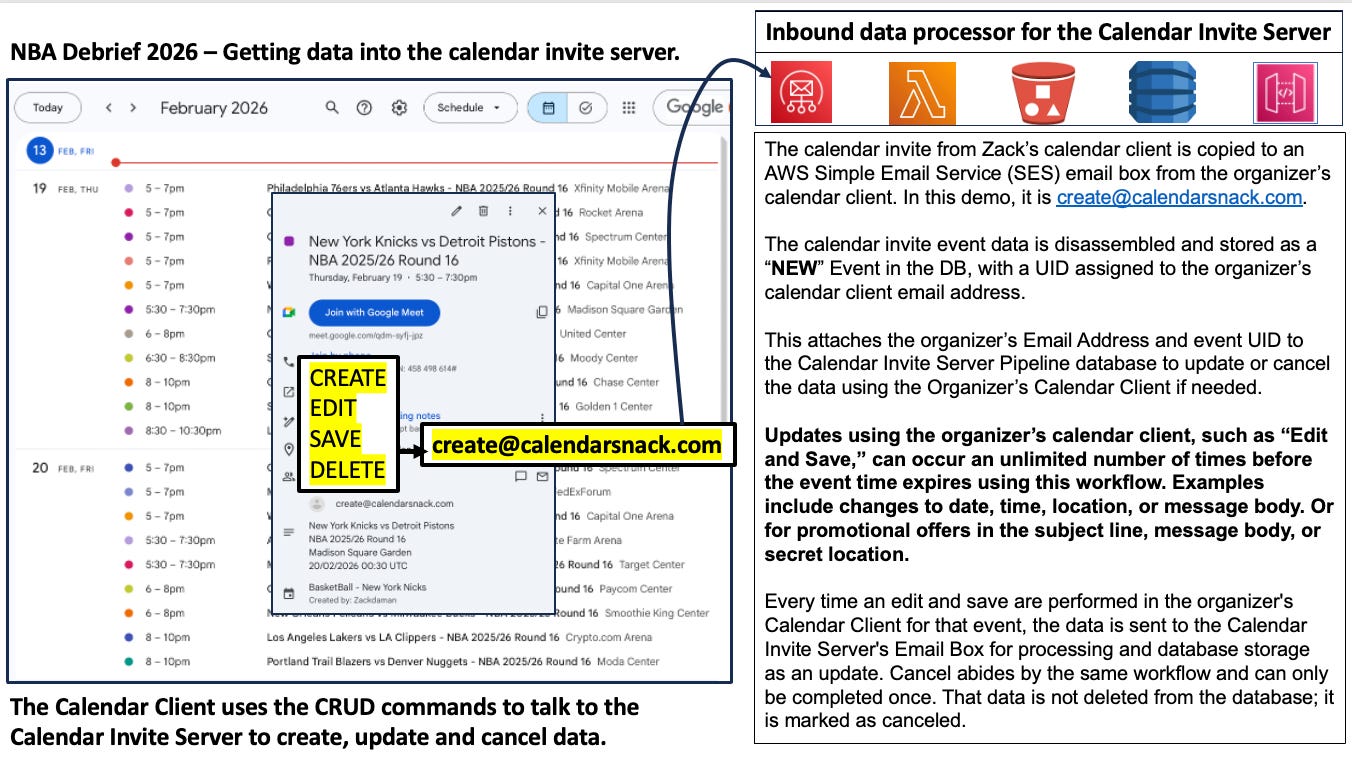
The calendar invite from Zack’s calendar client is copied to an AWS Simple Email Service (SES) email box from the organizer’s calendar client. In this demo, it is create@calendarsnack.com.
The calendar invite event data is disassembled and stored as a “NEW” Event in the DB, with a UID assigned to the organizer’s calendar client email address.
This attaches the organizer’s Email Address and event UID to the Calendar Invite Server Pipeline database to update or cancel the data using the Organizer’s Calendar Client if needed.
Updates using the organizer’s calendar client, such as “Edit and Save,” can occur an unlimited number of times before the event time expires using this workflow. Examples include changes to date, time, location, or message body. Or for promotional offers in the subject line, message body, or secret location.
Every time an edit and save are performed in the organizer's Calendar Client for that event, the data is sent to the Calendar Invite Server's Email Box for processing and database storage as an update. Cancel abides by the same workflow and can only be completed once. That data is not deleted from the database; it is marked as canceled.
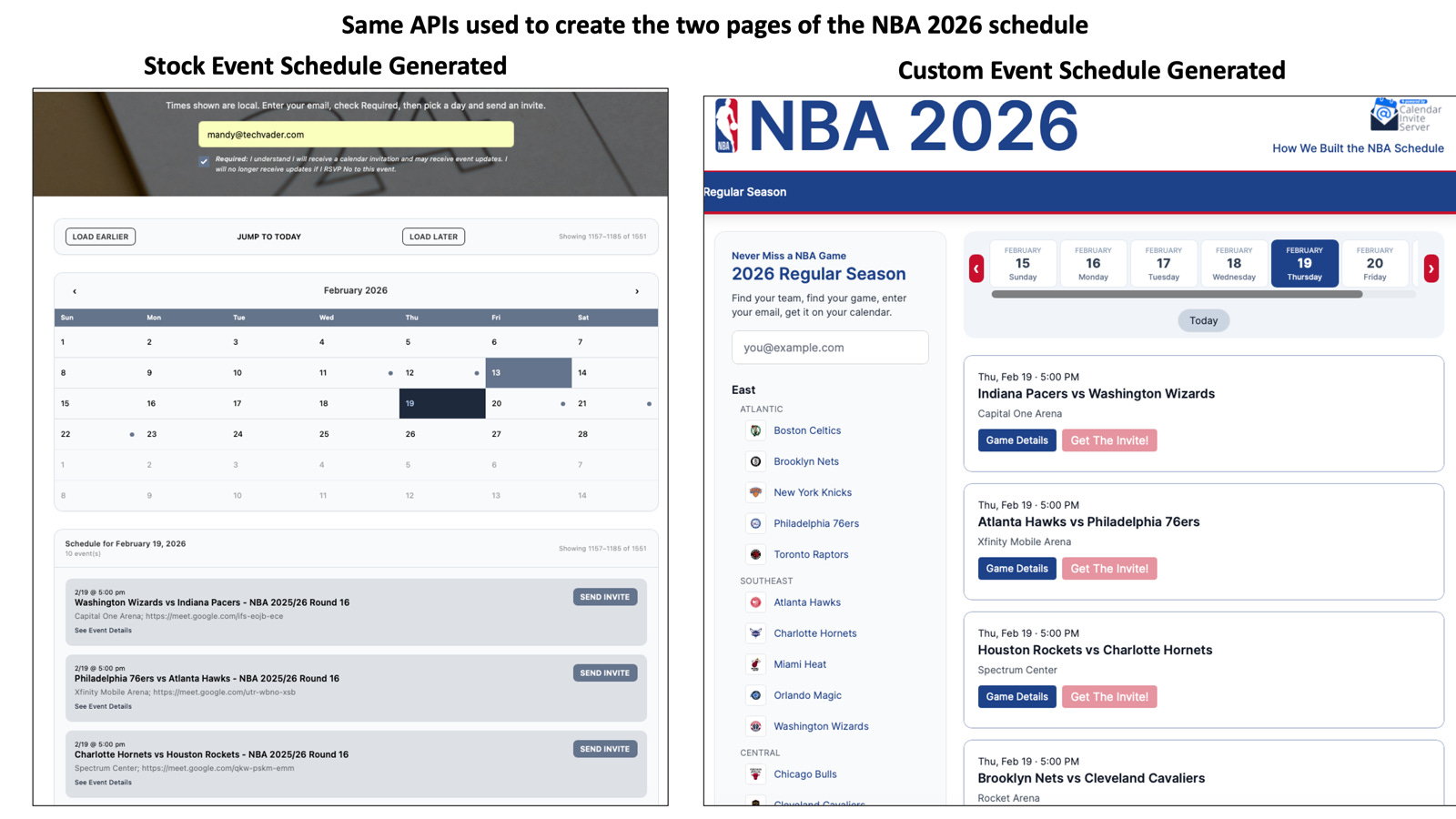
Same Calendar Invite Server APIs are used to generate the stock NBA schedules and the custom event schedule
There are 5 Single Organizer, Single Event APIs, 2- All Events Single Organizer APIs, and 2- System/Admin APIs for All Organizers / All Events.
These APIs are used to generate pages for NBA Game schedules and to auto-populate calendar-invite REST APIs into those pages for Single-Click Calendar Invite Sending and Tracking.
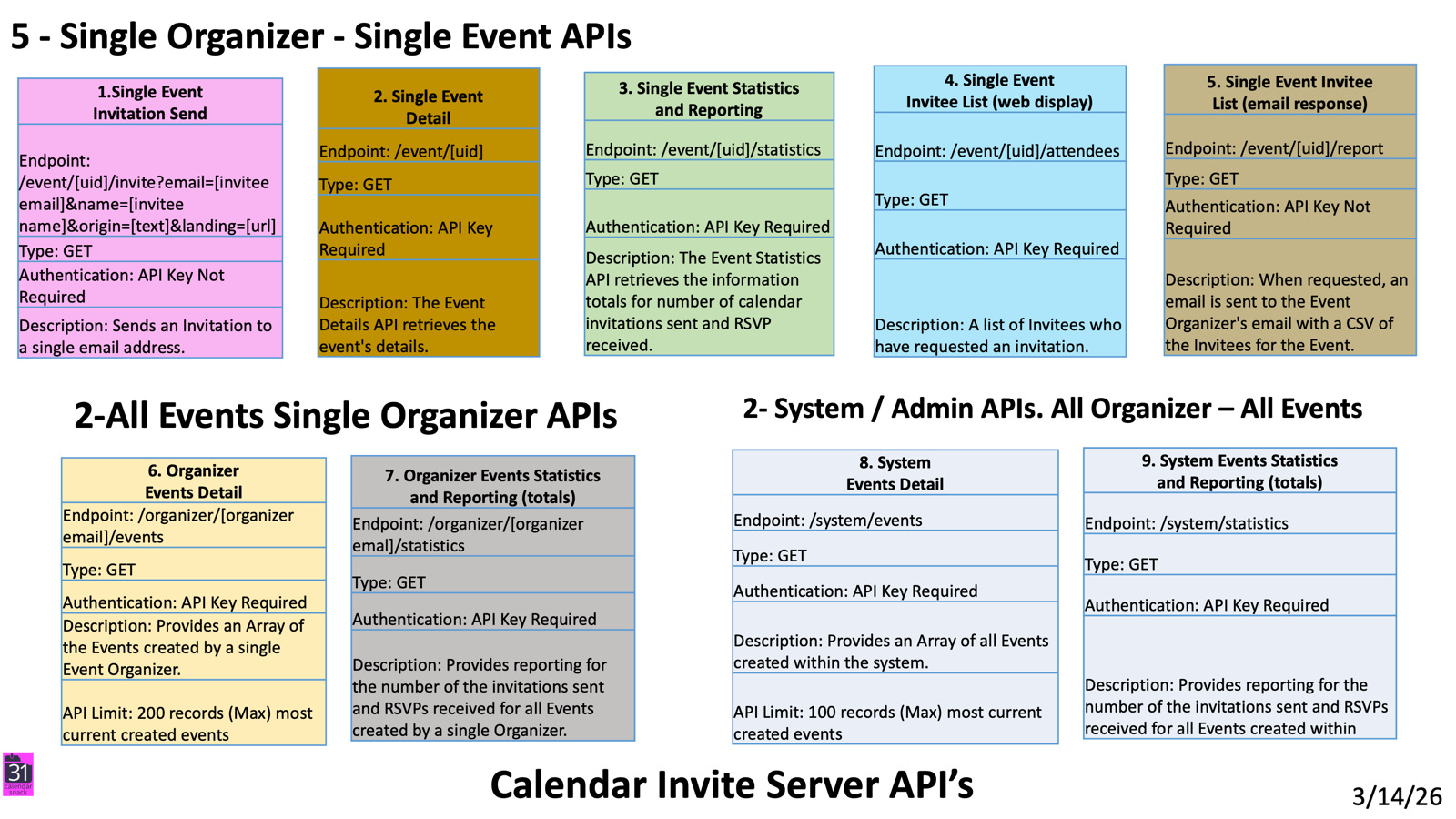
The Stock Schedule page for the NBA using the API Kit.
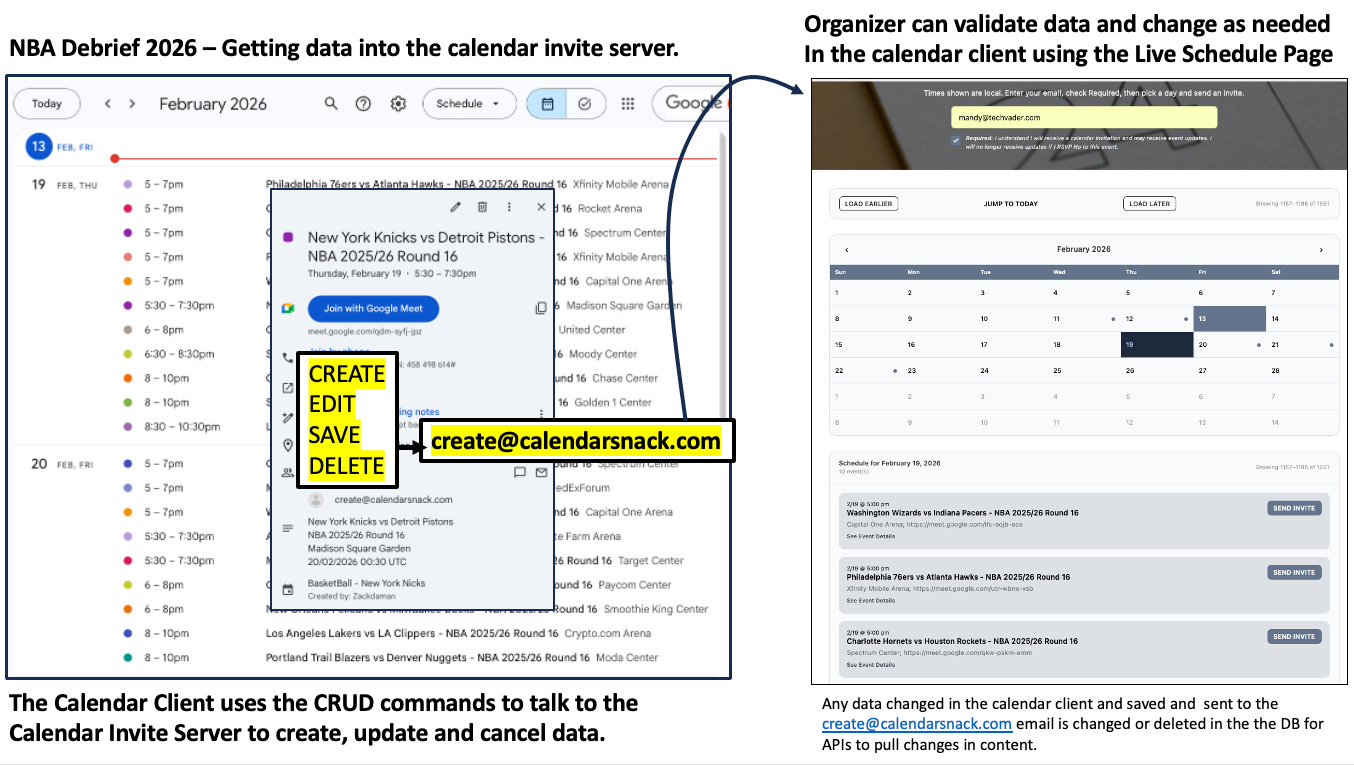
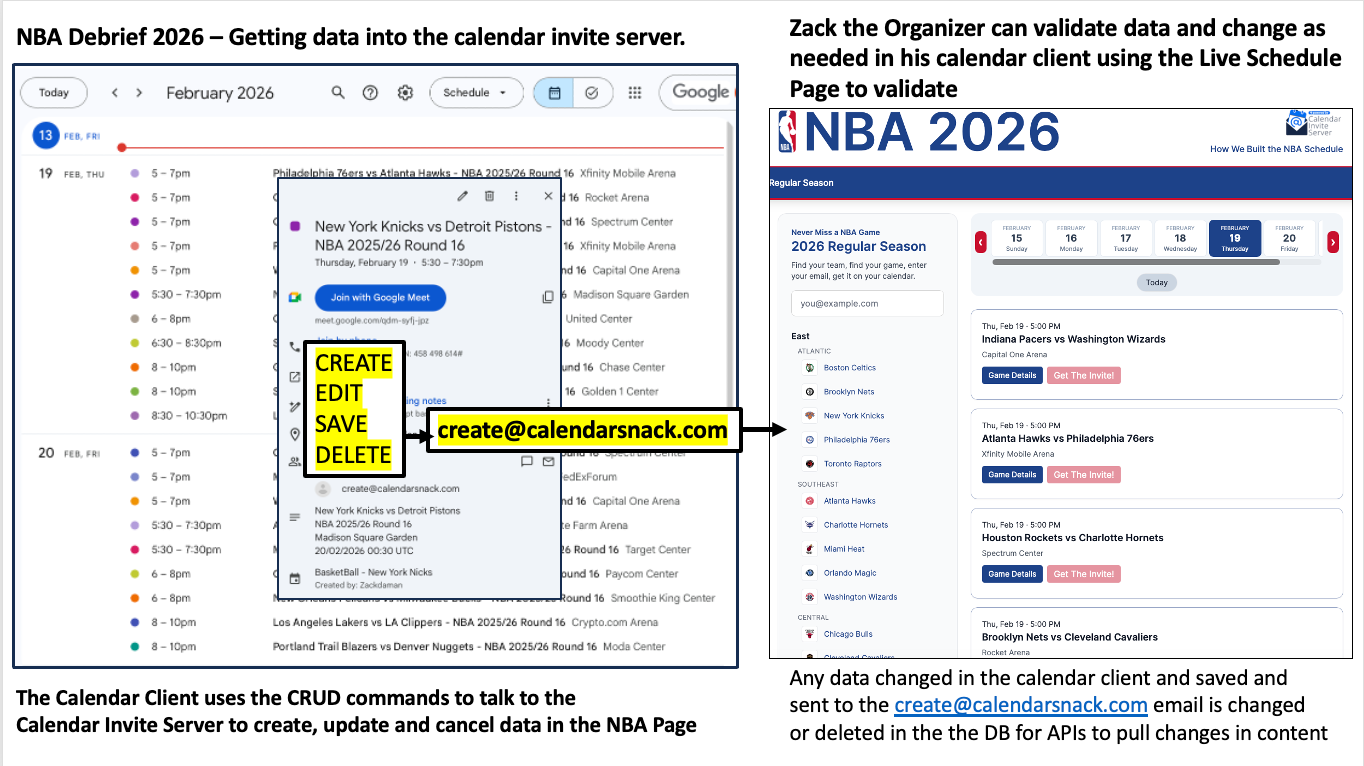
The Calendar Client uses CRUD operations to interact with the Calendar Invite Server to create, update, and delete data in the Inbound processor Email box for SES.
The organizer can validate and modify data in the calendar client using the auto-generated NBA Live Schedule Page as a test target.
Any data changed in the calendar client and saved or sent to create@calendarsnack.com is updated or deleted in the DB for APIs to pull content changes.
The Custom Schedule page for the NBA using the API Kit.
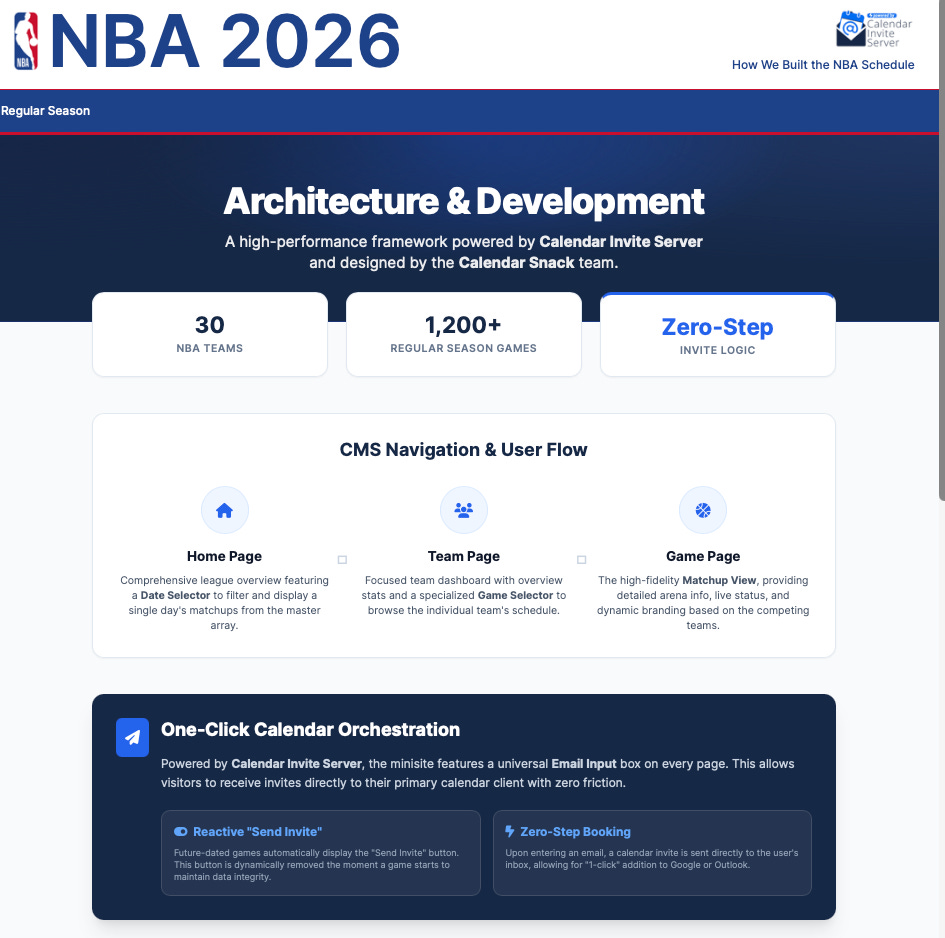
The same APIs are used to retrieve the same data for the same organizer account, but in a custom format: JSON definition files are used to retrieve logos and provide demo data.
You can see it live here while the season is on. The site auto-populates game data as each game ends to give an overall recap.
https://nba2026.calendarsnack.com
The Outbound Processor
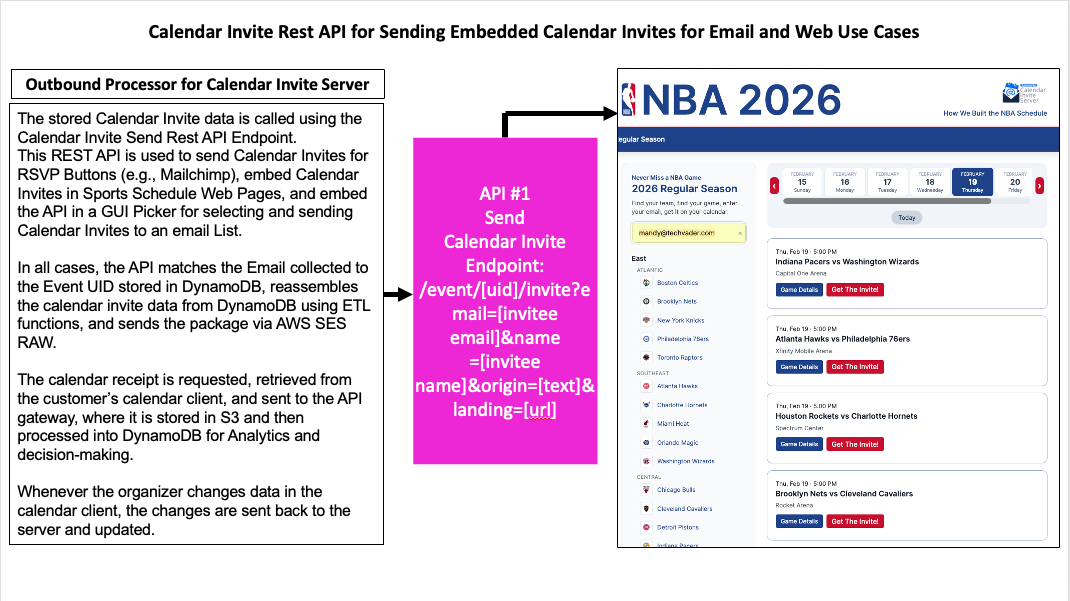
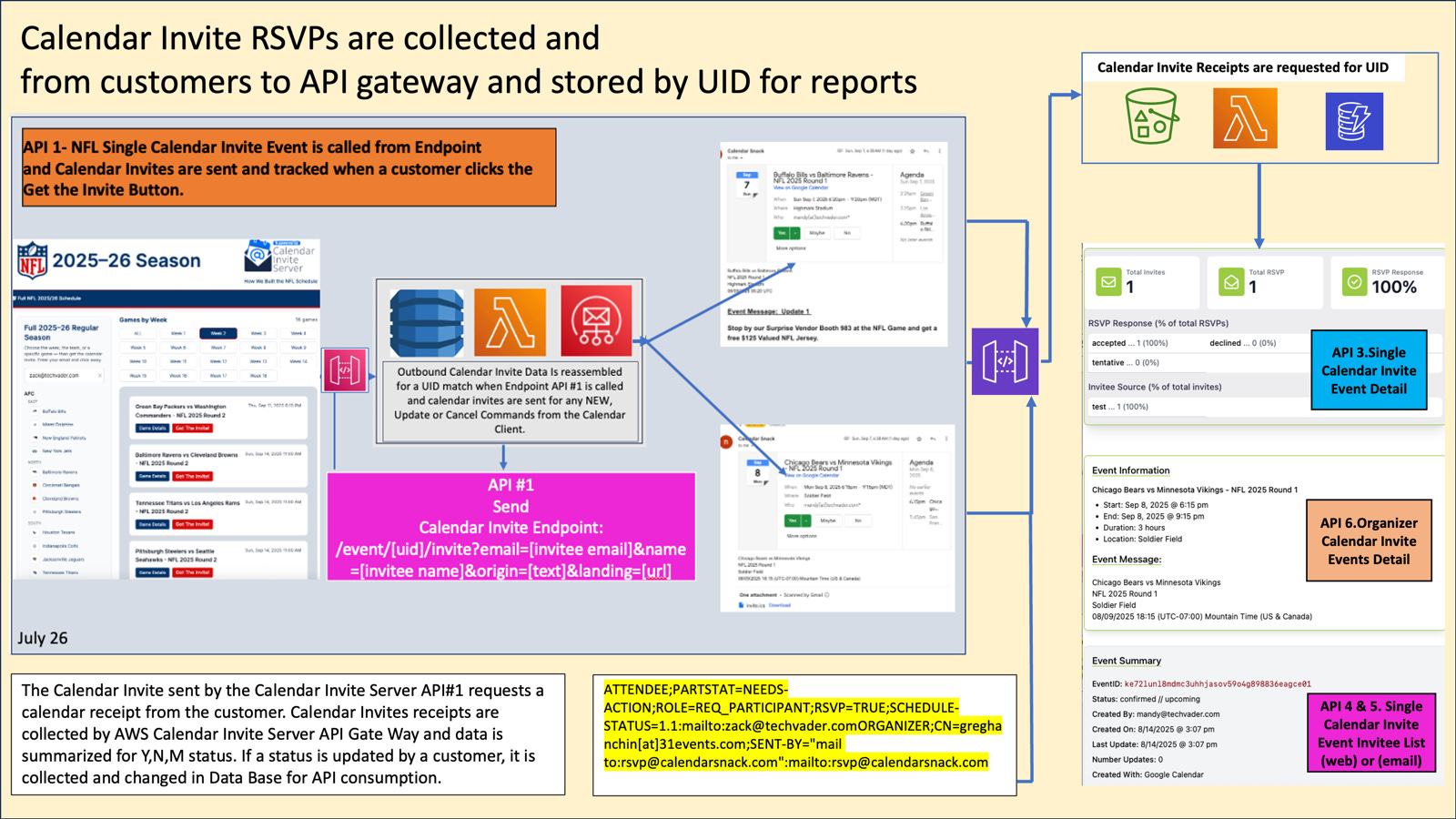
The stored Calendar Invite data is called using the Calendar Invite Send Rest API Endpoint.
This REST API is used to send Calendar Invites for RSVP Buttons (e.g., Mailchimp), embed Calendar Invites in Sports Schedule Web Pages, and embed the API in a GUI Picker for selecting and sending Calendar Invites to an email List.
In all cases, the API matches the Email collected to the Event UID stored in DynamoDB, reassembles the calendar invite data from DynamoDB using ETL functions, and sends the package via AWS SES RAW to the email address.
The calendar receipt is requested from the customer’s calendar client, retrieved, and sent to the API gateway, where it is stored in S3 and then processed in DynamoDB for Analytics and decision-making.
Whenever the organizer changes data in the calendar client, the changes are sent back to the server and updated.
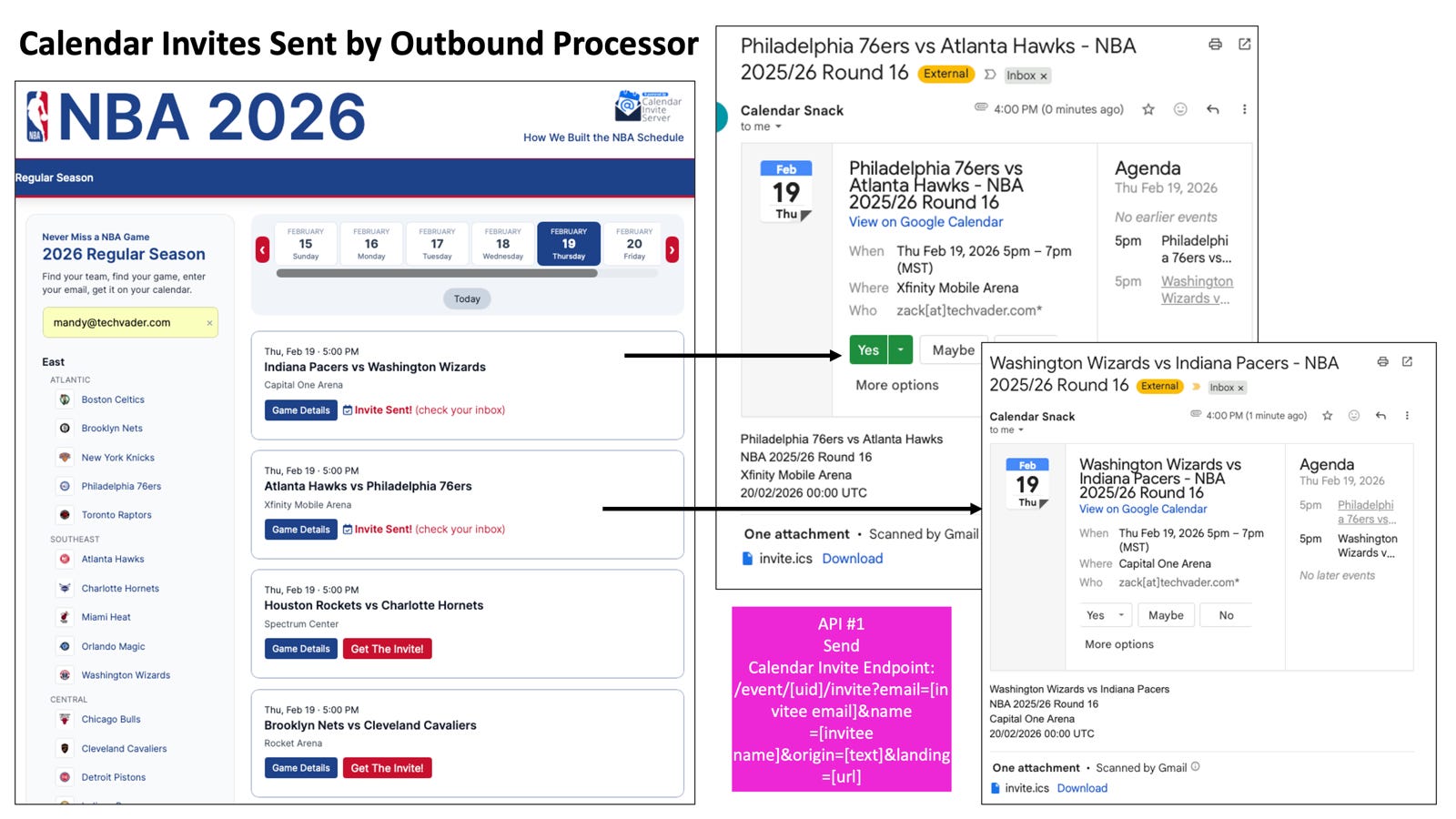
Calendar Invites Sent by Outbound Processor
API #1 is auto-embedded into CTA buttons in Web Pages and Email Marketing software using our technology stack: API #1 Send Calendar Invite Endpoint: /event/[uid]/invite?email=[invitee email]&name =[invitee name]&origin=[text]&landing=[url].
On the Stock or Custom Game Schedule pages, the organizer's event array is sorted, styled with Tailwind, and displayed according to the design, with API #1 embedded to send one-click calendar invites to the email address provided in the email box.
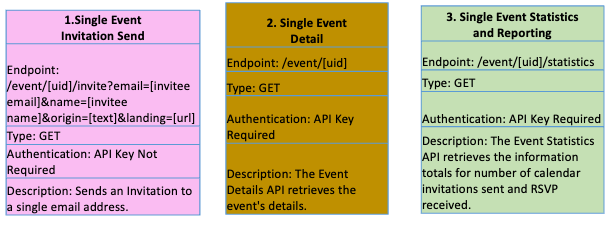
APIs #2 and #3 are used to populate the schedule page data, along with API #1.
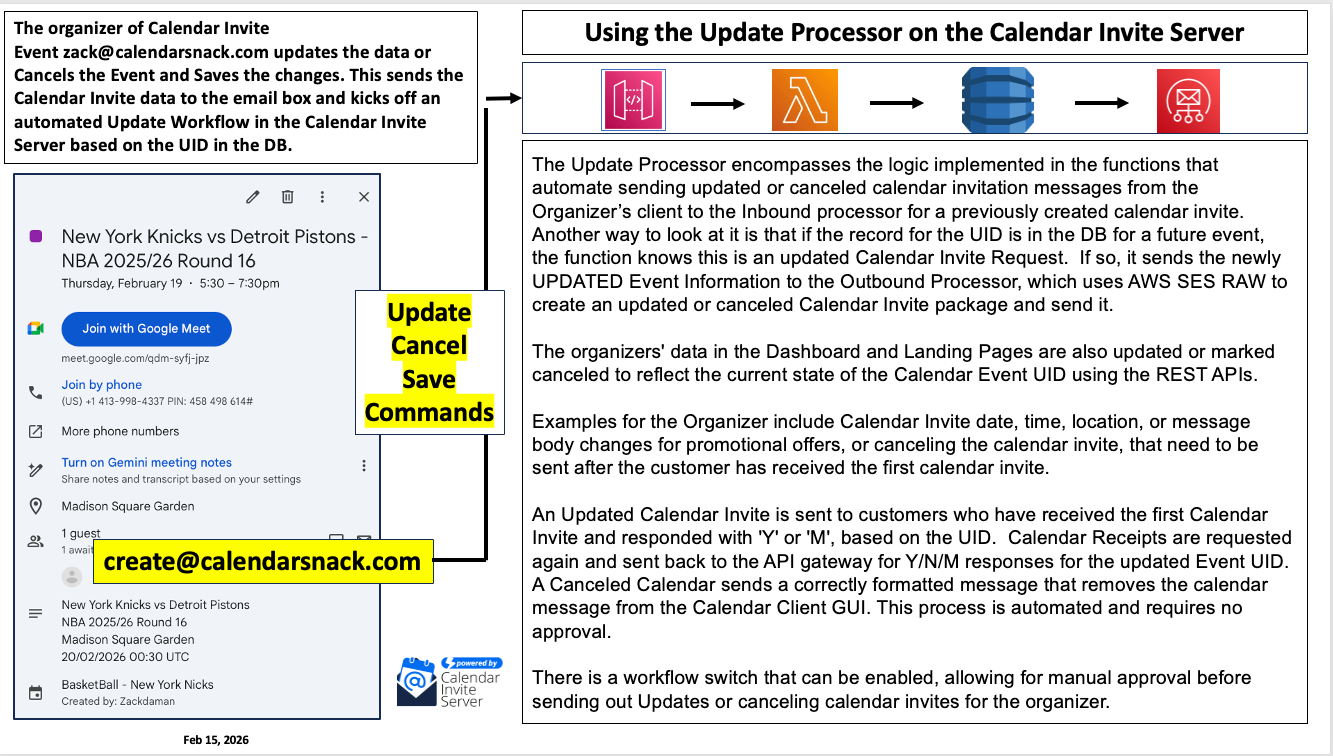
The Update Processor Logic
The Update Processor encompasses the logic implemented in the functions that automate sending updated or canceled calendar invitation messages from the Organizer’s client to the Inbound processor for a previously created calendar invite. Another way to look at it is that if the record for the UID is in the DB for a future event, the function knows this is an updated Calendar Invite Request. If so, it sends the newly UPDATED Event Information to the Outbound Processor, which uses AWS SES RAW to create an updated or canceled Calendar Invite package and send it.
The organizers’ data in the Dashboard and Landing Pages are also updated or marked canceled to reflect the current state of the Calendar Event UID using the REST APIs. Examples for the Organizer include Calendar Invite date, time, location, or message body changes for promotional offers, or canceling the calendar invite, that need to be sent after the customer has received the first calendar invite.
An Updated Calendar Invite is sent to customers who have received the first Calendar Invite and responded with ‘Y’ or ‘M’, based on the UID. Calendar Receipts are requested again and sent back to the API gateway for Y/N/M responses for the updated Event UID. A Canceled Calendar sends a correctly formatted message that removes the calendar message from the Calendar Client GUI. This process is automated and requires no approval.
A workflow switch can be enabled to require manual approval before sending Updates or canceling calendar invites for the organizer.
Details on how the Calendar Invites keep the status of the customer prior to the event
The Calendar Invite sent by the Calendar Invite Server API#1 requests a calendar receipt from the customer. Calendar Invite receipts are collected by the Calendar Invite Server API Gateway, and the data is summarized for Y, N, and M statuses for each event UID.
If a status is updated by a customer in the calendar client, the new calendar receipt is sent back to the API gateway and collected and updated in the Database for API consumption.
Specific Technical details for each Calendar Invite include the following parameters generated for all Calendar Invites sent by API #1 per the RFC.
ATTENDEE; PARTSTAT=NEEDS-ACTION; ROLE=REQ_PARTICIPANT; RSVP=TRUE; SCHEDULE STATUS=1.1:mailto:zack@techvader.comORGANIZER; CN=greghanchin[at]31events.com; SENT-BY=” mail to:rsvp@calendarsnack.com”:mailto:rsvp@calendarsnack.com
Detailed Organizer Event Reporting
Event reporting for each UID includes the UID# generated and Calendar Client type used to create the event, Date, Time it was created, Event Details such as Title of Event, Date Start, Date End, Message Body, Location, and Google or Outlook Meeting URLs, and how many times the Event has been updated or canceled.
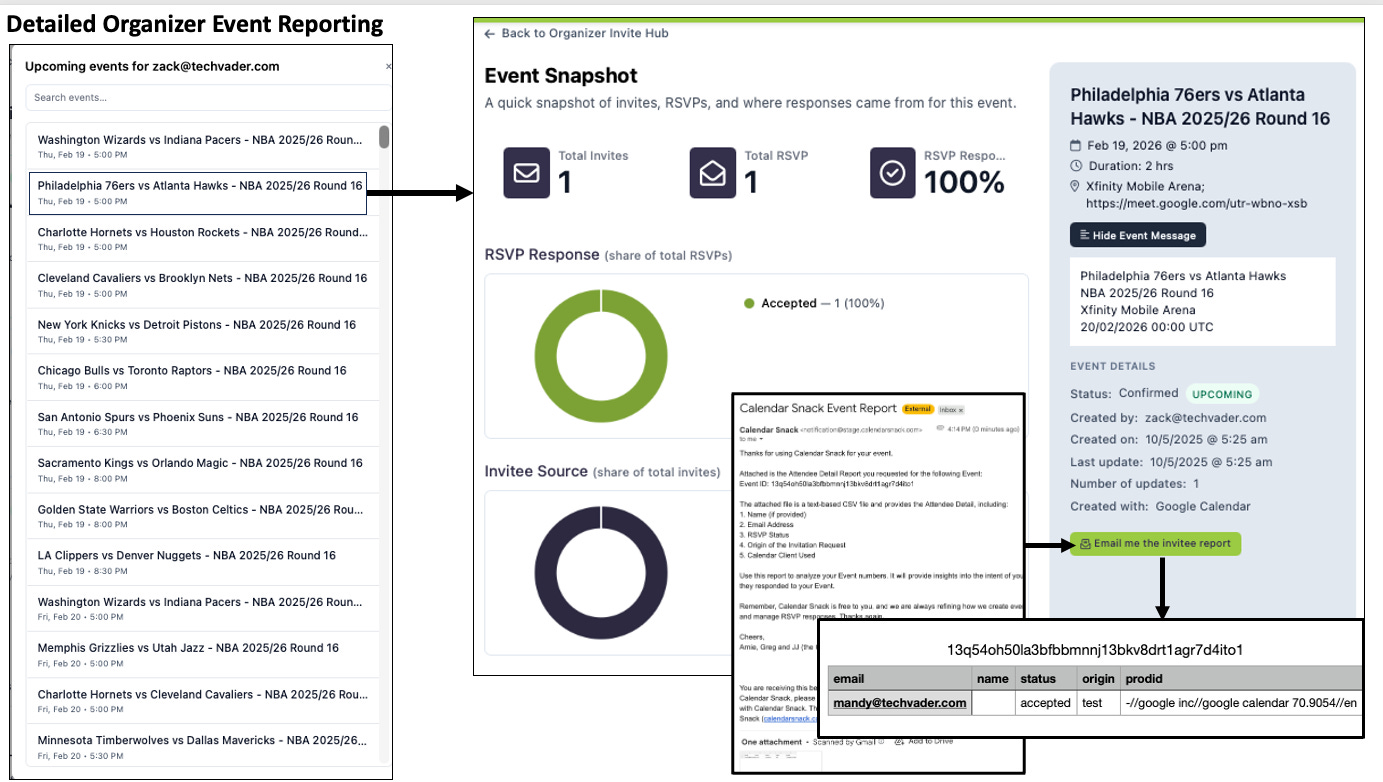
Then we collect which source channel API#1 was used, such as Web Embeds like Schedule Event pages or Email Marketing uses like MailChimp, SendGrid, or HubSpot.
The Events are selected from a picker of all events using API #2 and #3, with #5 used for the Report Button, which emails RSVP details to the Organizer for that event.

Wrap up on NBA 2026 Demo for the Calendar Invite Server
Data is ingested from the Organizer’s Client.
The Data is displayed in the NBA demo Scheduling Page using the API’s.
The APIs used are the 7 Core Organizer APIs to develop Stock or Custom Sports Scheduling Pages.
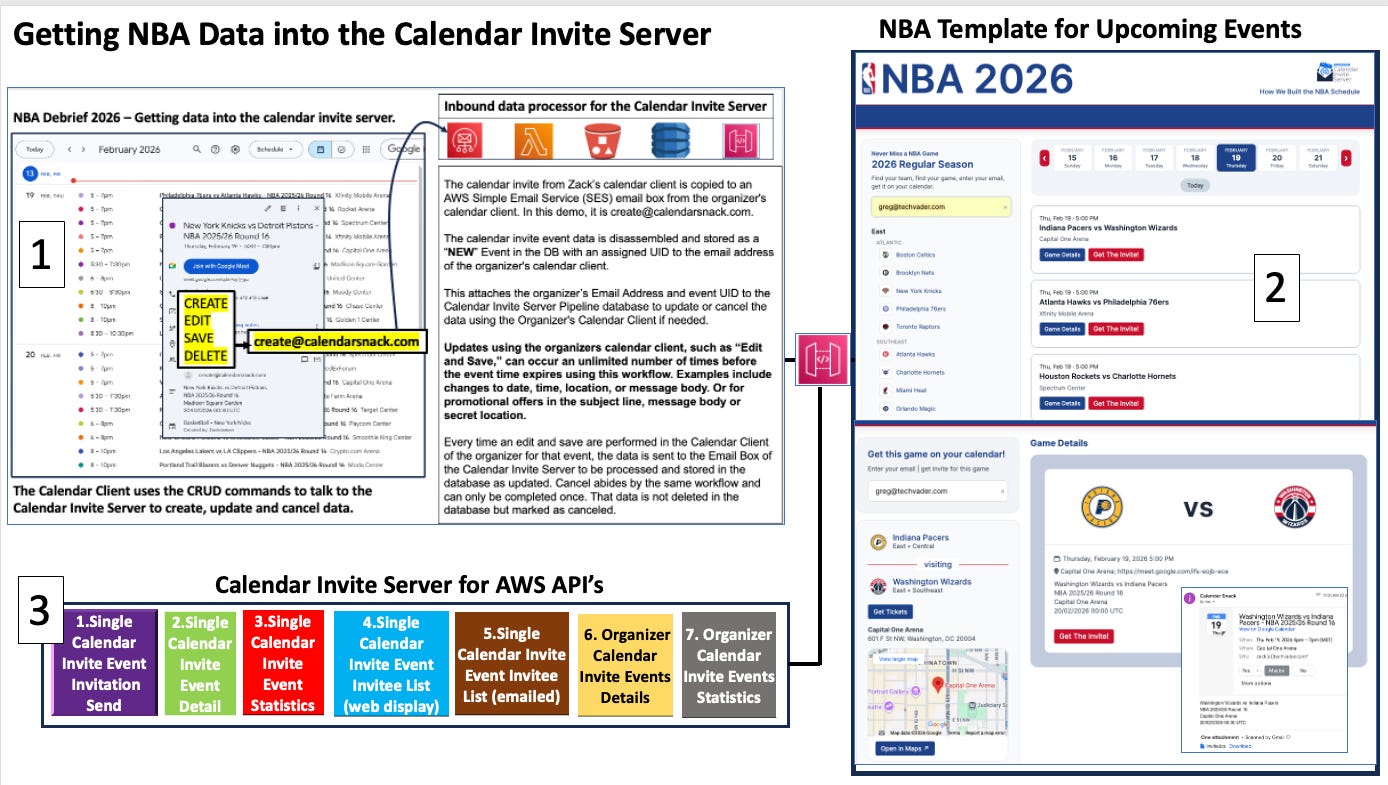
How to access the software
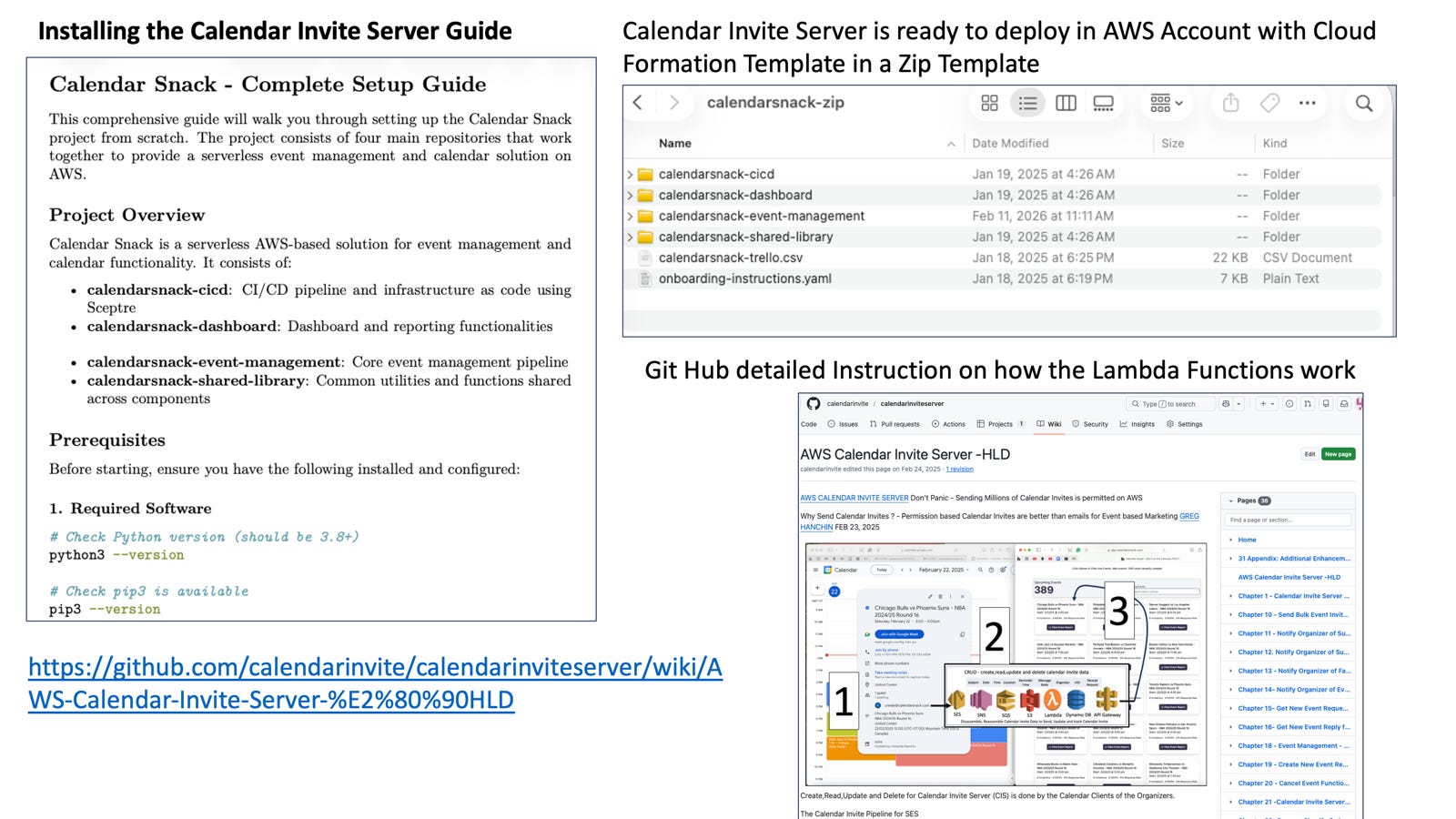
Install and Setup Guide
We have completed a detailed install guide. Step by step.

Calendar Invite Server AWS Serverless Template
The CloudFormation template is available as a ZIP file with an installer. Contact me, and I will send it to you. greg@techvader.com
GitHub Wiki detailed instructions are here.
https://github.com/calendarinvite/calendarinviteserver/wiki
Calendar Invite Lamba Functions
Calendar Invite Server Pitch Docs here:


