


The Challenge - Easy Landing Page Generation for RSVP
Event organizers today face significant logistical hurdles in promoting their schedules and securing attendee commitment through calendar invites.
The process is often a patchwork of manual tasks, disconnected workflows, and unreliable tracking mechanisms. From individually sharing event details to hoping attendees manually add them to their calendars, the entire lifecycle is fraught with friction, leading to lost engagement and a lack of clear performance data.
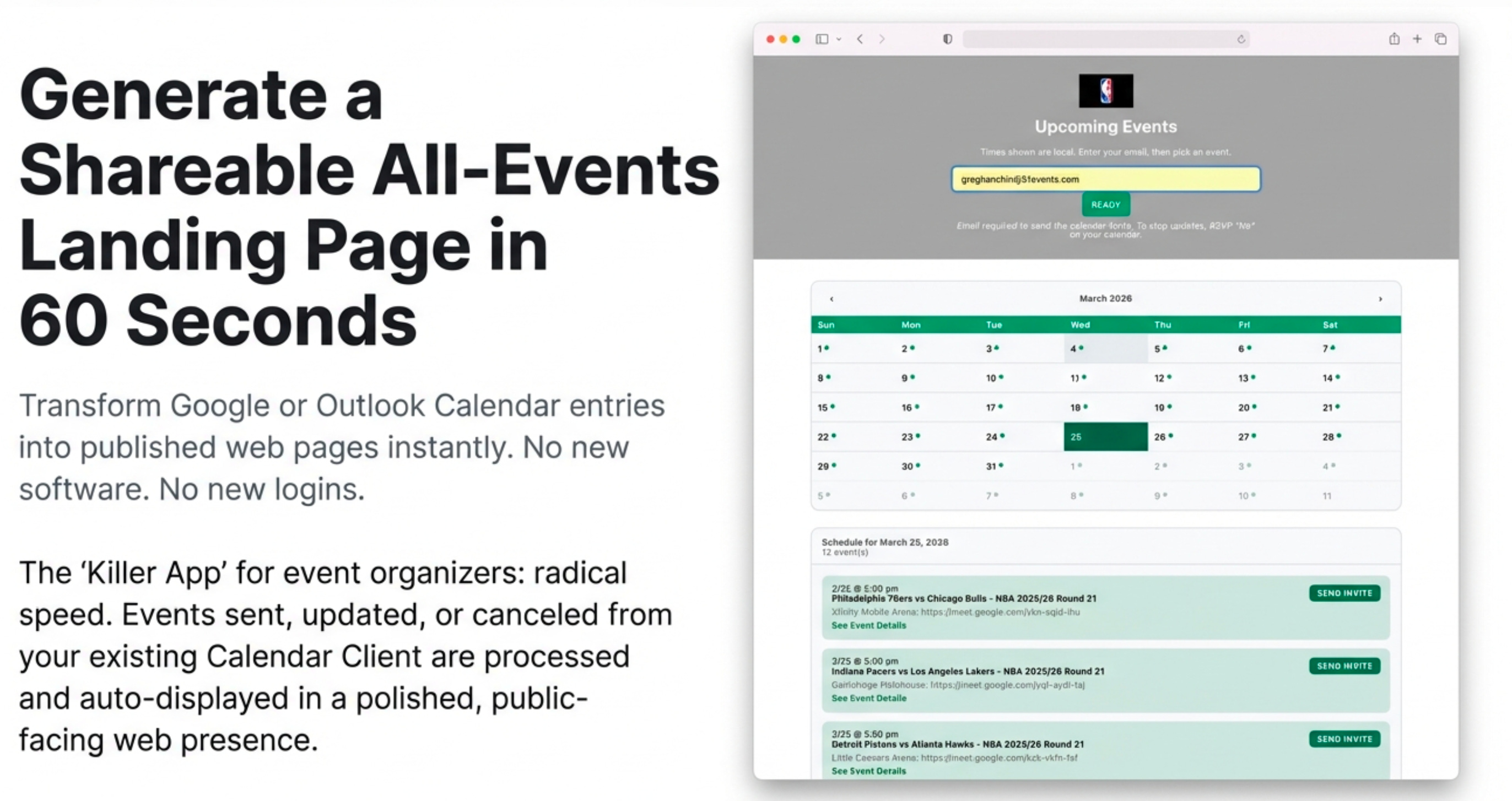
CalendarSnack directly addresses the core operational pain points for both event organizers and their customers:
Inefficient Promotion: Manually sharing details for a large volume of events is time-consuming and difficult to scale, leading to inconsistent messaging and presentation.
Customer Conversion Gap: There is no guarantee that a customer who sees an event promotion will successfully add it to their personal calendar, creating friction and leading to lost interest and easily forgotten events.
Complex Updates & Cancellations: Communicating changes to dates, times, or locations to every interested individual is a complex, error-prone manual process for the organizer.
Poor Customer Experience with Changes: For customers, missed updates lead to confusion and frustration. With traditional methods, if an event is canceled, it often remains on their calendar as a dead entry unless they manually remove it.
How can organizations overcome these challenges by transforming a simple calendar entry into a powerful, automated marketing and analytics engine?
The Solution: An Automated “All-Events” Hub in 60 Seconds
CalendarSnack’s core innovation is its ability to generate a shareable, professional “All-Events” Landing Page in just 60 seconds, directly from an organizer’s existing Google or Outlook Calendar. This elegant solution automates the entire event promotion and communication workflow, turning a standard business tool into a dynamic marketing asset for millions of organizers in 60 seconds.
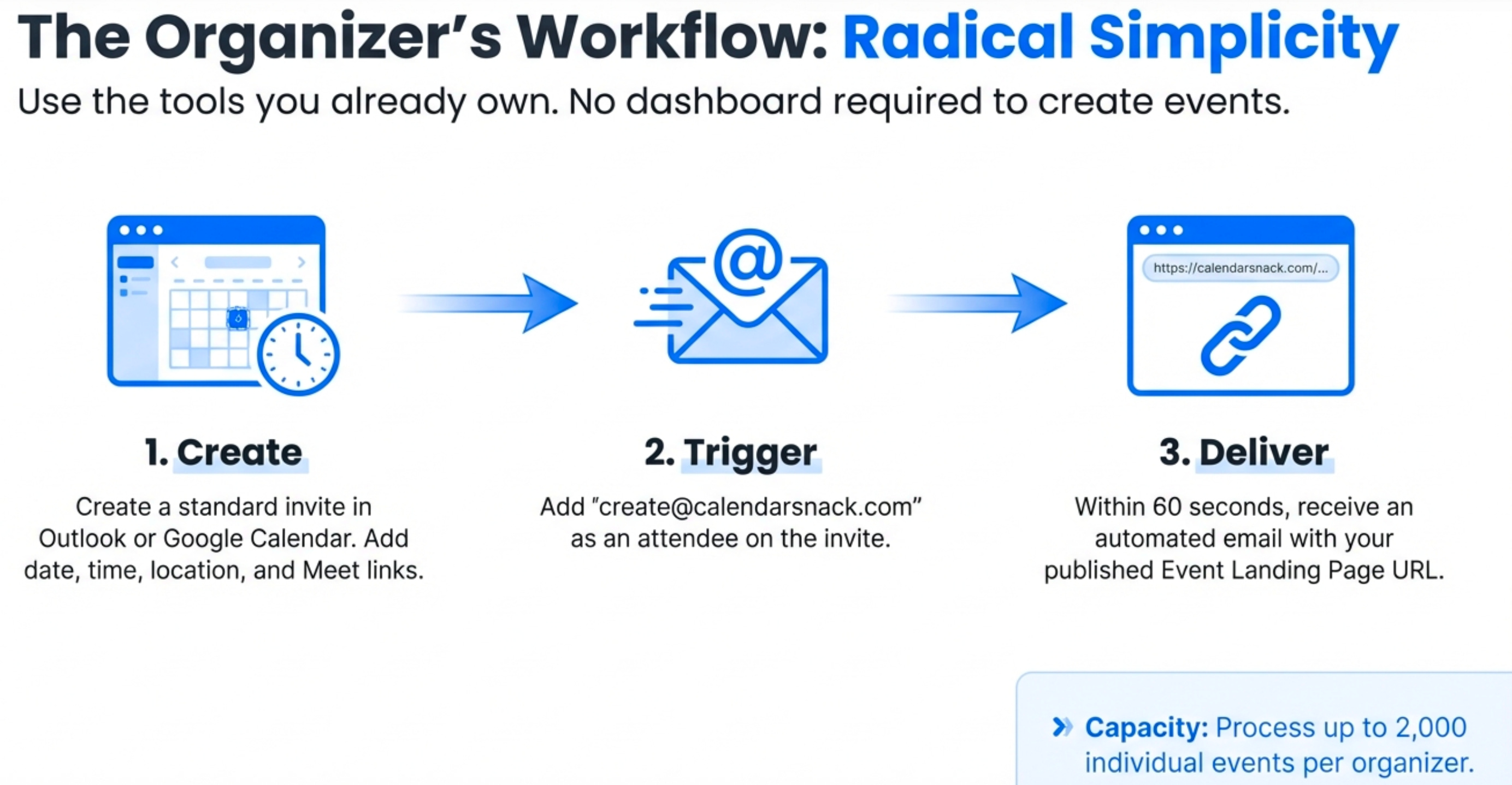
A Seamless Workflow
The process is designed for maximum efficiency and simplicity for both the organizer and their audience.
For the Event Organizer:
Create: The organizer creates or manages up to 2,000 events directly within their native Google or Outlook calendar client. The service processes all critical event data, including date, time, location, message body, and Google or Outlook Meet information.
Send: They send the calendar invitation to a dedicated processing address, such as
create@calendarsnack.com.Receive: Within 60 seconds, the organizer receives an automated email notification containing two critical links: one to their new, shareable “All-Events” landing page and another to their private analytics dashboard.
For the End-Customer:
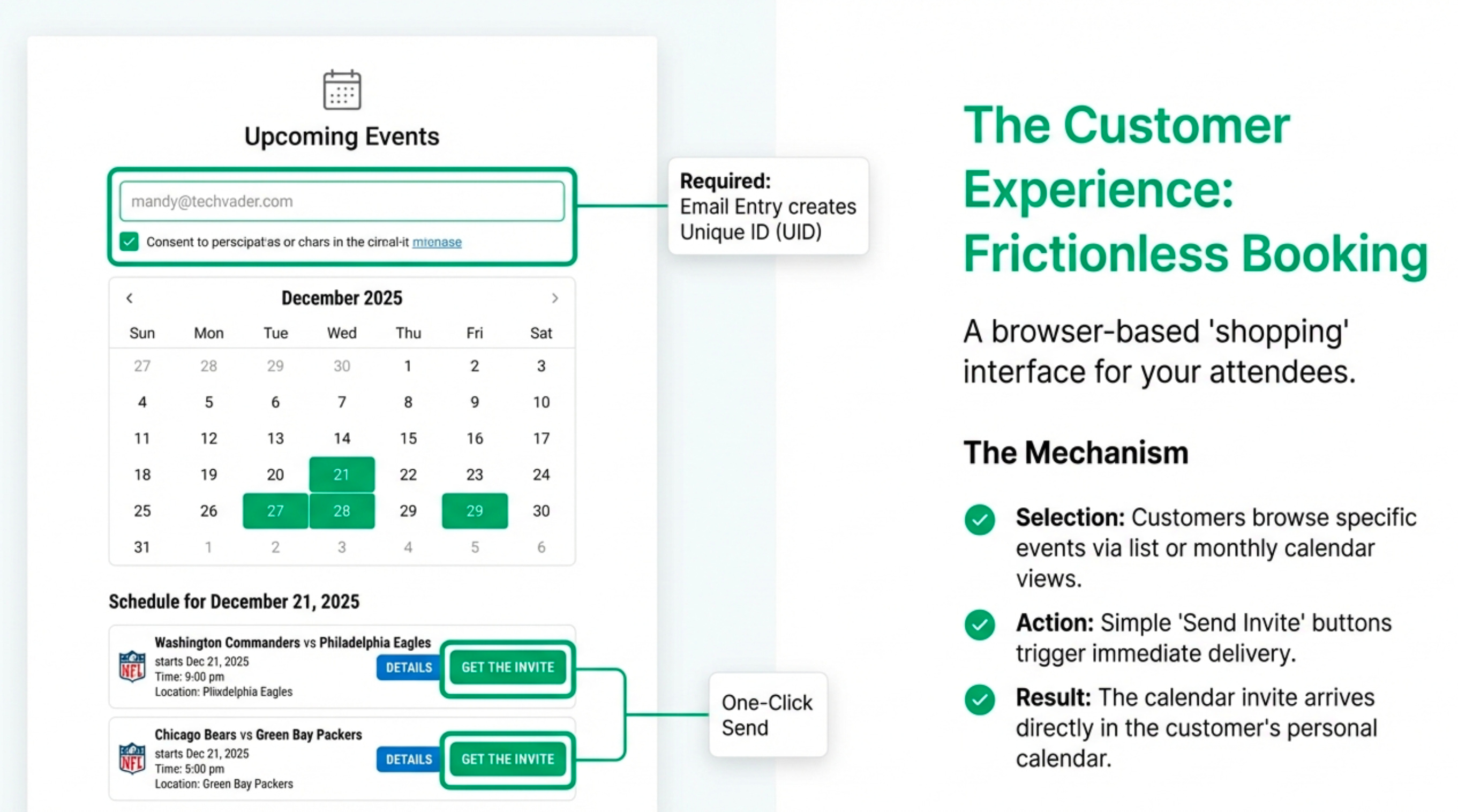
Visit: The customer accesses the clear, professionally designed landing page displaying all upcoming events.
Register: They enter their email address once at the top of the page.
Engage: The customer can select one or multiple events in a single session. With a single click, they instantly receive formal calendar invitations for all selected events directly in their inbox and calendar.
This automated workflow eliminates manual steps, ensures professional presentation, and creates a direct, trackable line of communication from the organizer’s calendar to the customer’s.
Strategic Value Proposition for Marketing & Sales
CalendarSnack transforms a simple calendar entry from a static piece of information into a dynamic, trackable marketing asset. Creating a direct and persistent connection to the end customer’s calendar provides a powerful channel for engagement and communication that goes far beyond traditional email campaigns.
This streamlined, data-rich process allows marketing and sales teams to standardize their approach and measure what truly matters.
Empowering Organizers and Teams
The platform delivers unique, tangible benefits that drive marketing efficiency and sales effectiveness.
Go-to-Market Standardization: CalendarSnack provides a standardized, out-of-the-box solution for a company’s “All Events” page. This creates a single source of truth for all event-related activities, ensuring brand consistency and simplifying promotion.
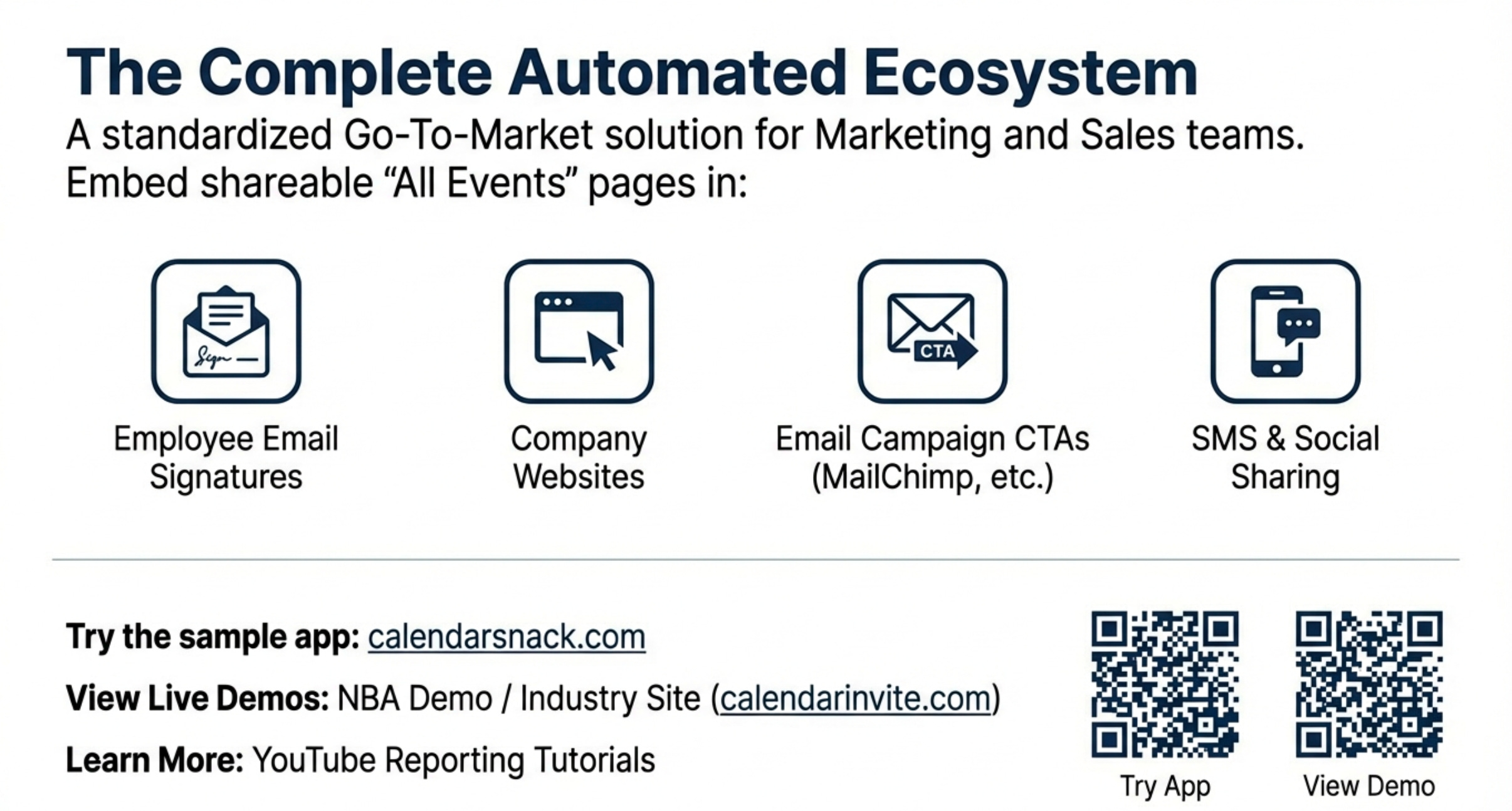
Amplified Reach: The shareable landing page URL becomes a powerful Call to Action (CTA). It can be embedded in employee email signatures, featured on company websites, used as the primary CTA in MailChimp campaigns, and easily forwarded by customers to their own networks via email and SMS.
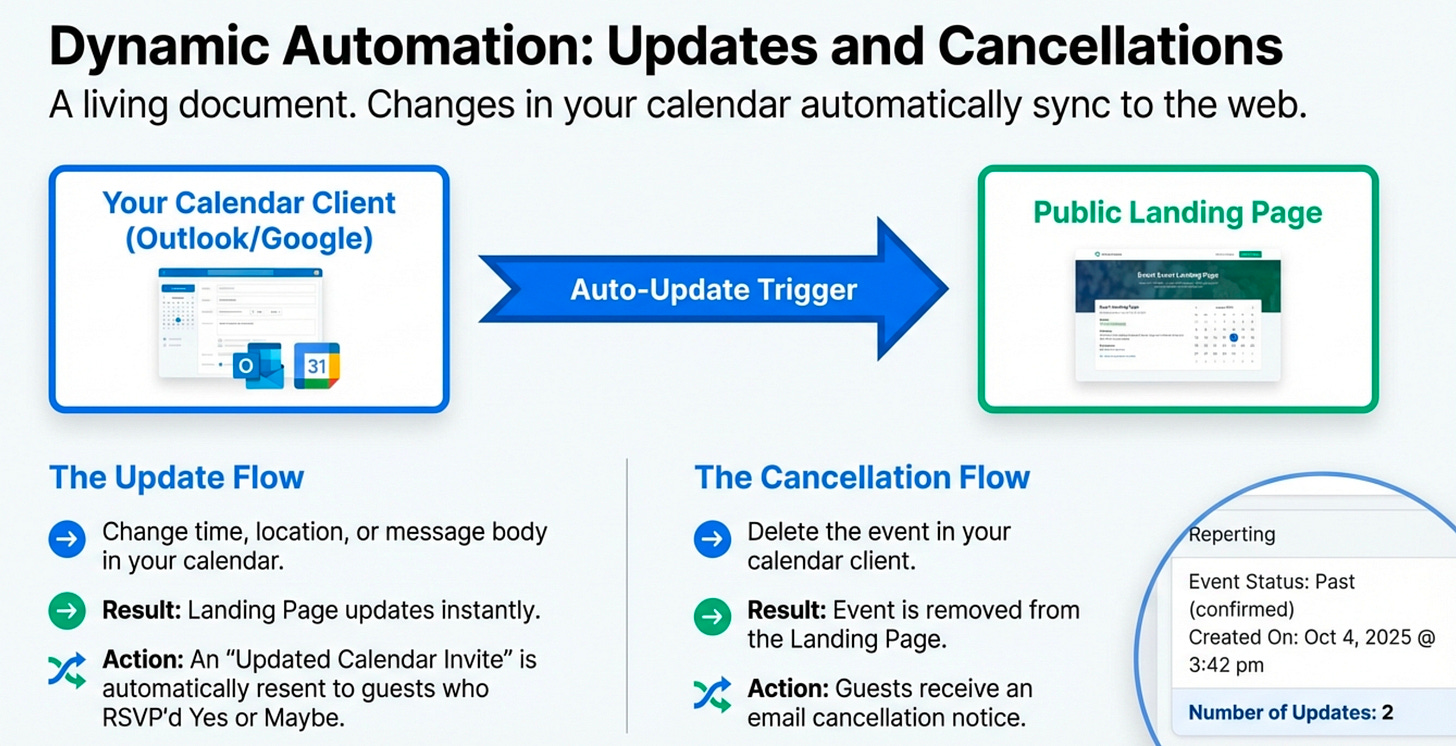
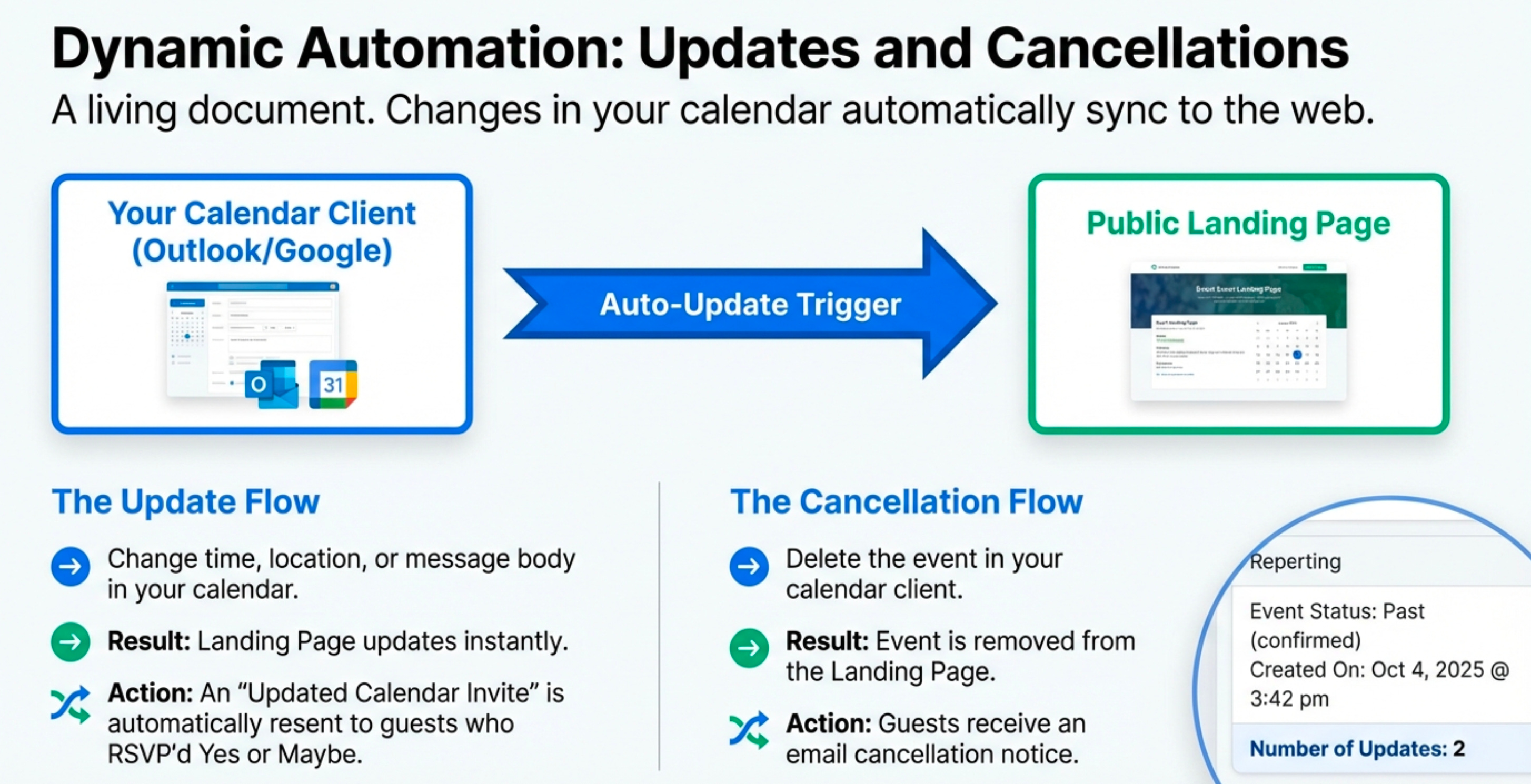
Guaranteed Delivery & Engagement: Organizers can be assured the calendar invitation was delivered directly to the customer’s calendar. Any updates made in the organizer’s calendar are automatically pushed to attendees who have responded “Y” (Yes) or “M” (Maybe), creating a valuable channel for ongoing engagement, such as sending promotional updates with special offers or QR codes.
These marketing advantages are underpinned by a robust analytics engine that provides critical data for measuring success and optimizing future events.
From Event Snapshot to Domain-Wide Insights
In modern marketing, data is paramount. CalendarSnack moves beyond simple promotion by providing deep, actionable insights at every level of the organization. The platform offers a multi-layered reporting structure that empowers individual event organizers while giving domain-level administrators a comprehensive view of all event marketing activities.
The Organizer’s Private Dashboard
Each organizer has access to a private dashboard to track the performance of their specific events.
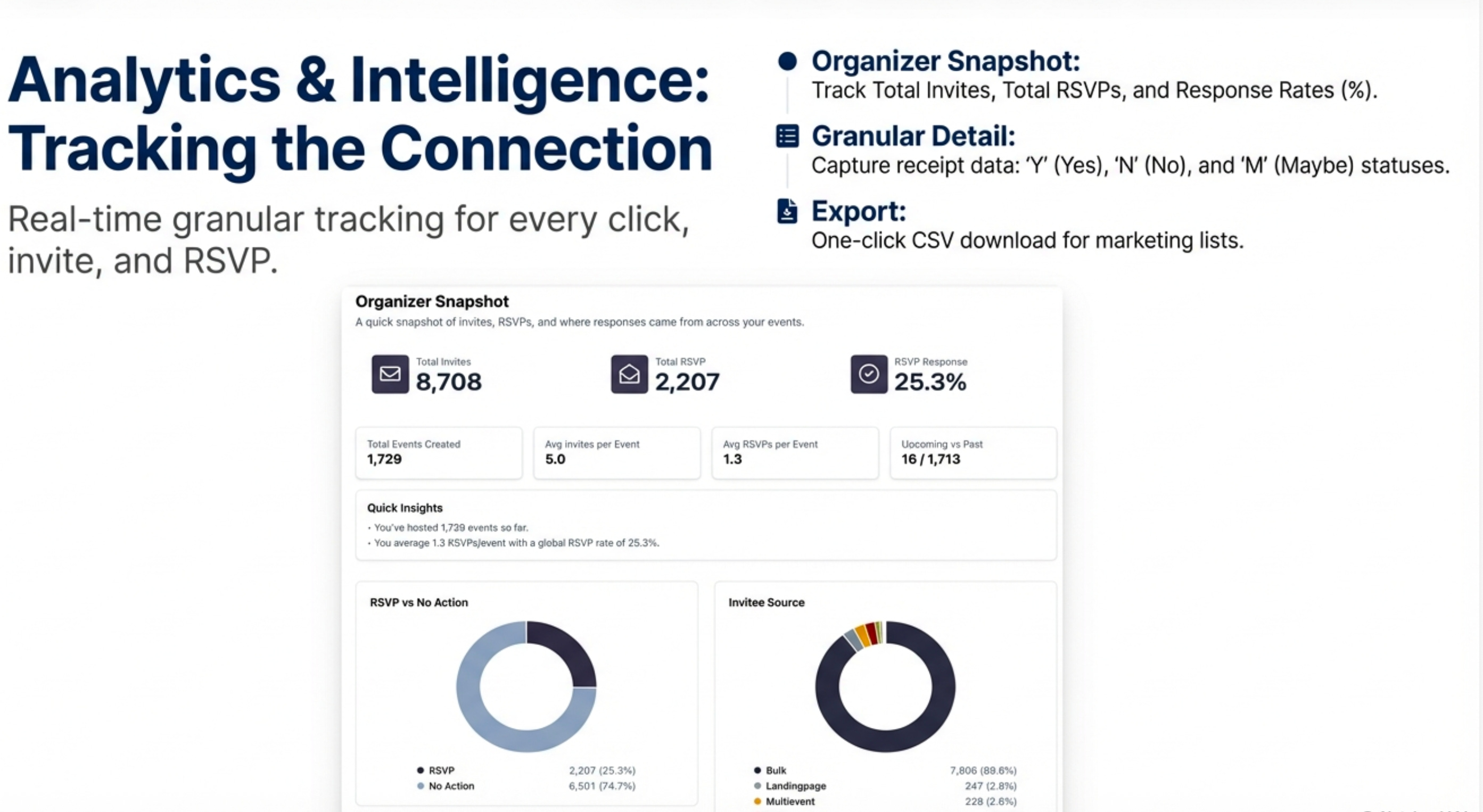
Organizer Snapshot: This high-level view provides key performance indicators across all of an organizer’s events. For example, a snapshot might show 8,708 Total Invites, 2,207 Total RSVPs, and a 25.3% RSVP Response Rate, giving an immediate sense of overall engagement.
Detailed Event Snapshot: Organizers can drill down into any individual event for granular insights. This view details specific RSVP responses and Invite Source, and provides key metadata such as who created the event, the last update time, and the total number of updates pushed to attendees.
Data Export: For integration with other marketing systems, the organizer can request an email report with a
.CSVfile containing the list of all customer email signups for a specific event.
The Domain Owner’s Reporting Console
For organizations with multiple event organizers, the Domain Owner holds the master account and has access to a powerful reporting console that aggregates data from all users.
Centralized Oversight: The Domain Owner console consolidates data from all organizers operating under the company’s domain. The system stats provide a macro view of performance, such as 296,607 Total Invites Sent and an aggregate RSVP Response Rate of 24.5%.
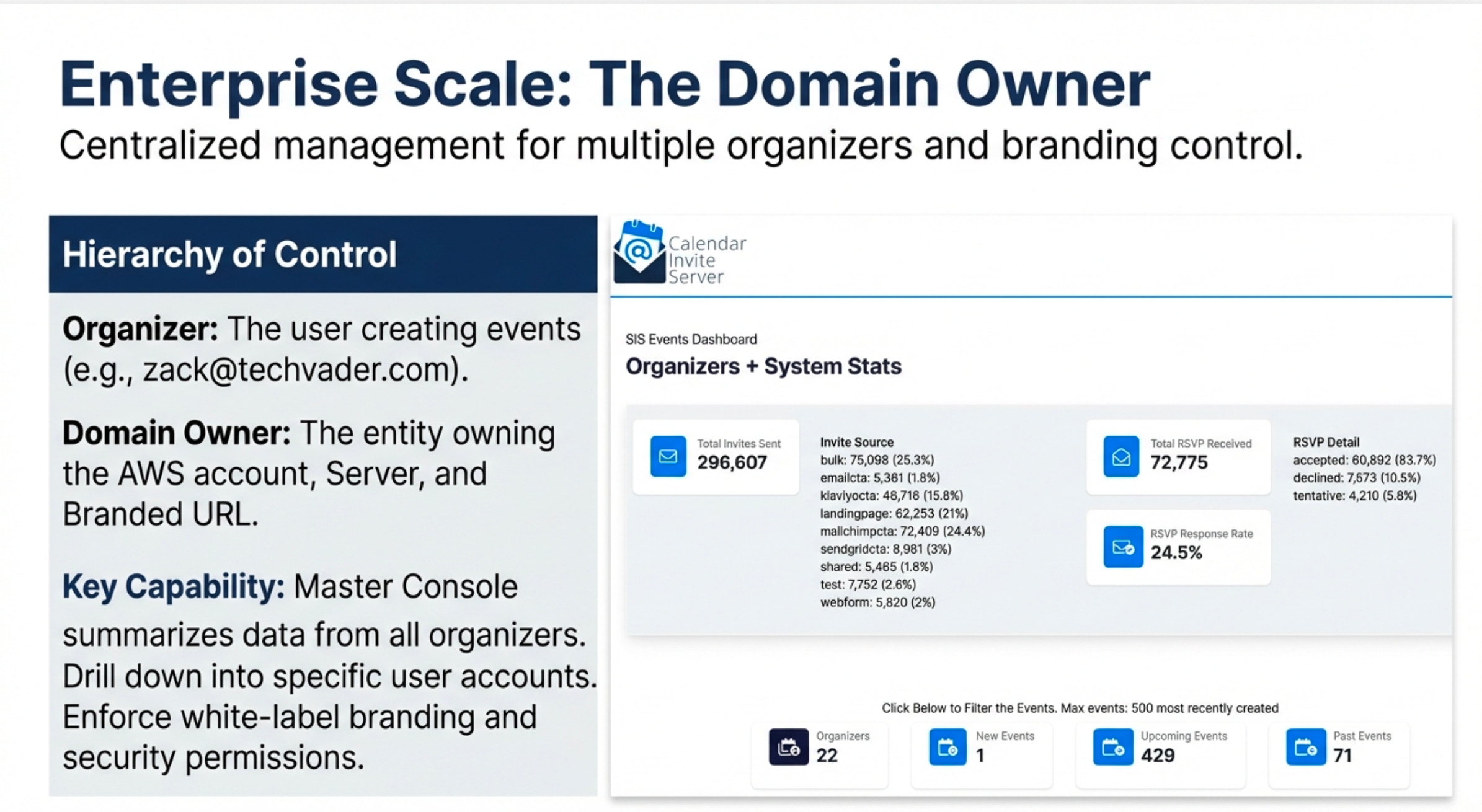
Comprehensive Reporting: This dashboard allows the Domain Owner to view, search, and report on all event data across the organization. They can filter by date created, event start time, or organizer email.
Granular Drill-Down: From the master console, an administrator can drill down into a specific organizer’s activity (e.g., viewing all 425 events created by
zack@techvader.com) and even inspect the update history of a single event, such as seeing that the “Detroit Pistons vs Indiana Pacers” game had 2 updates pushed to attendees.
This powerful backend reporting provides the business intelligence needed to understand audience engagement and measure the true ROI of event marketing efforts.
Flexible and Professional Event Displays
CalendarSnack ensures that the customer-facing experience is as polished and professional as the powerful backend. The platform offers a variety of user-friendly layouts to suit different event schedules, from a handful of webinars to a full season of sporting events, ensuring a premium brand experience for end users.
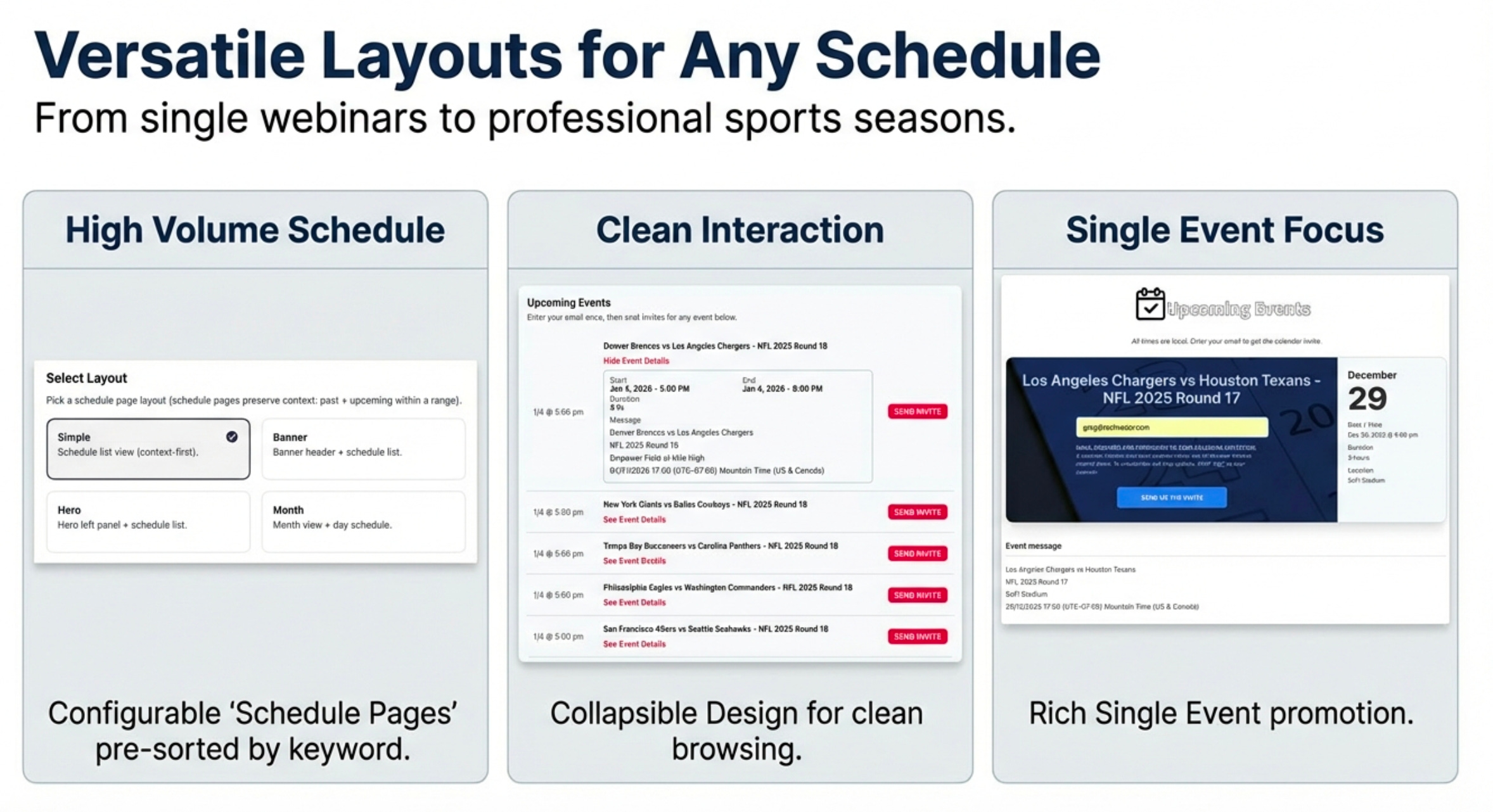
The following display options can be configured to meet specific promotional needs:
Multi-Event Landing Pages: The standard view presents a clean, chronological list of upcoming events. A “load more” button allows for easy navigation through extensive schedules without overwhelming the user.
Monthly Calendar View: Ideal for high-volume schedules, such as the NBA demo featuring over 1,200 games. This layout allows users to navigate by month, then click a specific day to view the scheduled events, providing a familiar, intuitive browsing experience.
Collapsible Details: To maintain a clean interface, event details can be collapsed by default. A user can simply click to expand the view and see the full message body, location, and time information.
Filtered Schedule Pages: Using a simple configurator, organizers can generate targeted landing pages for specific campaigns. By setting a date range and adding keywords (e.g., all games in “Denver”), they can create highly specific, shareable pages for different audience segments.
By seamlessly connecting an organizer’s native calendar to their audience, CalendarSnack transforms the logistical friction of event promotion into a streamlined, intelligent, and measurable strategic advantage.


