


A bit of project history on how we arrived at the Calendar Invite Sender pattern for Claude NLP and on-demand Sports Schedules.
Current Pattern: Embedding Calendar Invite API in Web, Email, Apps.
The Calendar Invite Server (CIS) uses a CRUD pattern, working with Outlook or Google Calendar Clients to ingest data into the calendar invite server using an email inbox.
Think of it as a “Dropbox for Calendar Event Data”.
The data is ingested and stored for calendar invite API embedding in web, email, apps, and agents.
That pipeline displays event data from the API and builds calendar invites on the fly using the UID and AWS Serverless when a customer’s email address is received.
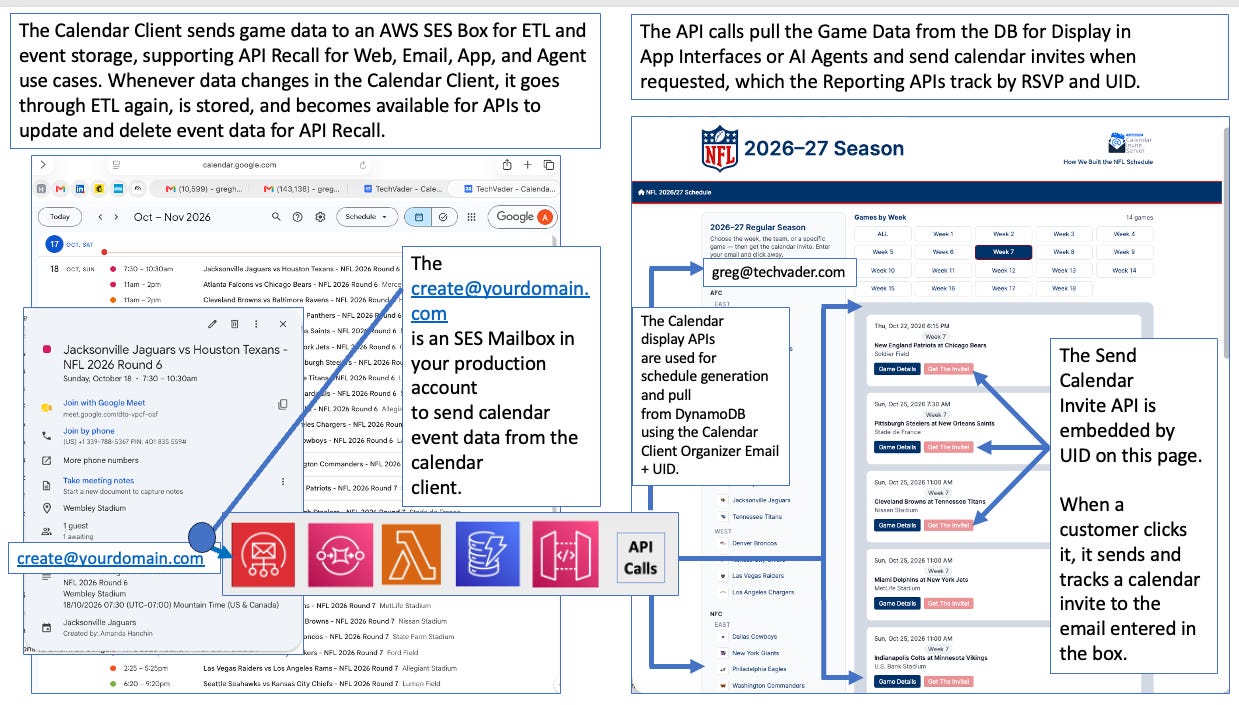
By establishing a dedicated email ingest point (create@yourdomain.com), CIS intercepts incoming event communications directly from standard calendar clients.
When an organizer creates, edits, or deletes an event in the CIS by inviting the system email, that native calendar client action fires off the underlying payload to the calendar invite pipeline on AWS.
The Calendar Client for the Organizers serves as the CREATE, READ, UPDATE, and DELETE Engine for Headless Operations.
We enhanced this Calendar Invite Server pattern for Claude generative dialogs, enabling Claude to auto-generate ESPN API data using a harness to create on-demand sports schedules and send calendar invites to track RSVPs.
CIS Automation Pattern: Embedding the Calendar Invite API into Auto-Generated Sports Schedules for using API’s
Step 1- We developed an on-demand pattern to pull data from a sports API like ESPN, transform it for multi-game display, let the user select a game in the auto-generated picker, and collect an email address to send a calendar invite to.
The workflow saves the JSON event details to a file and sends them to the CIS inbound ETL processor at CREATE@YOURDOMAIN.COM, which stores game data in the Calendar Invite Server INGEST. This automation uses ESPN EVENT data to build, send, update, and track a Calendar Invite using the FAN’s email that was collected in the email box in Claude GUI.
This pattern is the basis for building out an Agentic pattern with Claude using NLP search.
That is, no Event Data is loaded before asking for a calendar invite.
CIS Agentic Pattern: Embedding the Calendar Invite API into Auto-Generated Sports Schedules for using MCP with Claude NLP and generative UI
Step 2- We modified the workflow to let Claude do it using NLP search against a sports API like ESPN to display Game Data, and add the JSON event details to a file that can be sent to the CIS inbound ETL processor to store Game Data for sending and tracking calendar invites for the game UID on demand.
Automation for On-Demand creation of Sports Events
If the event isn't in the Calendar Invite Server (CIS) database for API Calendar Invite Sending, we create the file from ESPN API event data and send it to the Ingest CIS SES Mailbox using the proven messaging pipeline built for CIS CRUD.
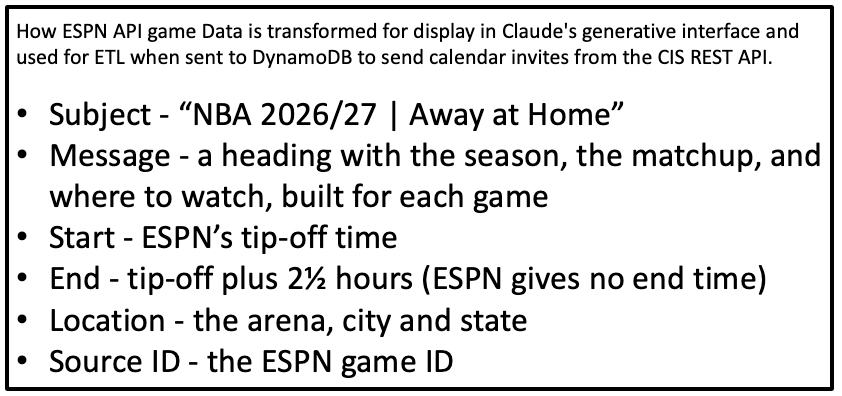
No calendar client or Calendar Invite Organizer intervention is needed to generate data for the Claude Schedule display GUI or to insert event data into the calendar invite server for an event that is not registered in the Calendar Invite Server Database.
This is what this on-demand pattern does in the background to set up the infrastructure for the CLAUDE dialog.
THE AUTOMATION and AGENTIC CONCEPTS
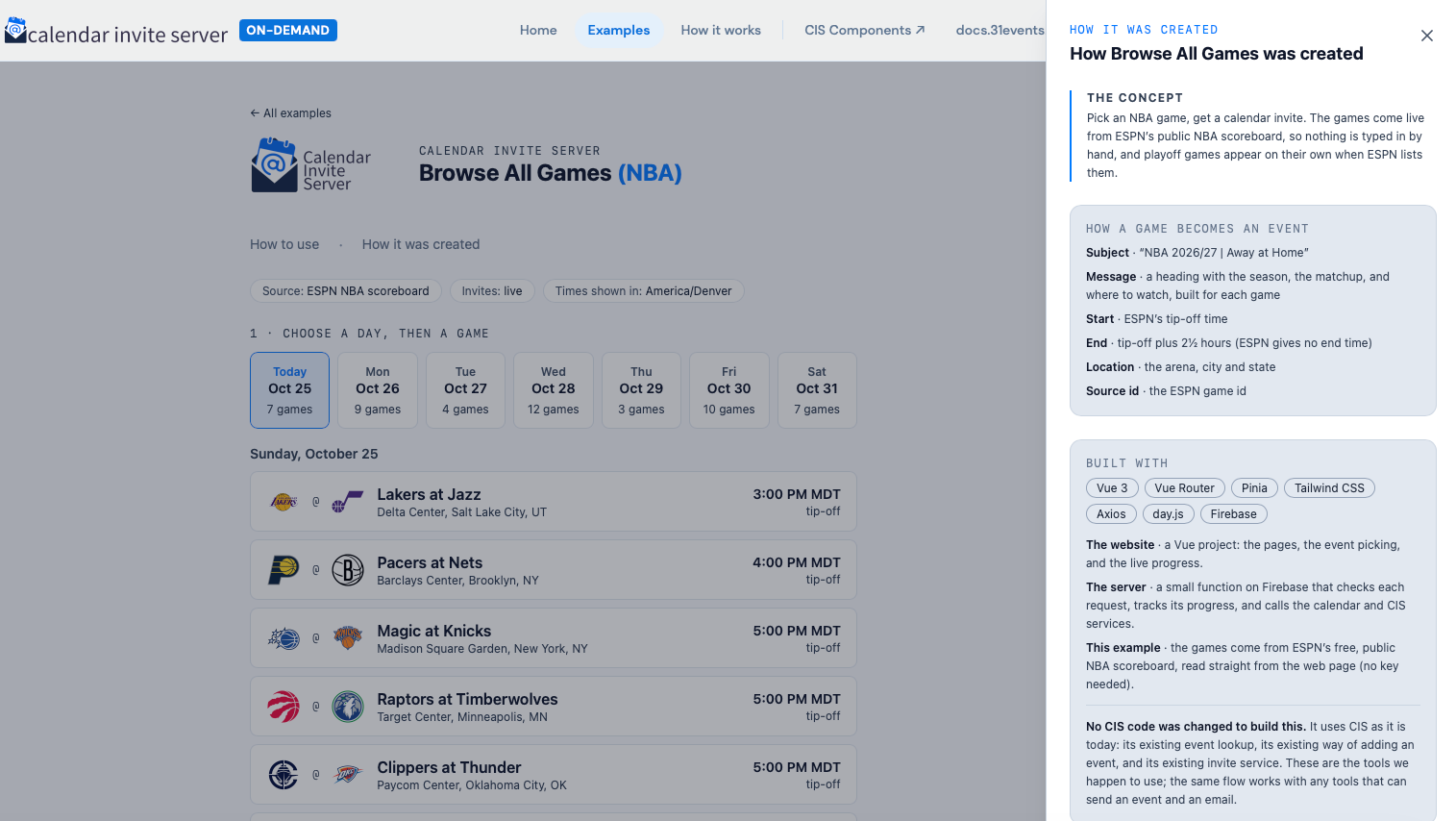
Pick an NBA game, get a calendar invite.
Games come live from ESPN’s public NBA scoreboard API, so nothing is typed by hand; playoff games appear pulled from the ESPN API in 7-day segments to list as a test in the auto-generated GUI.
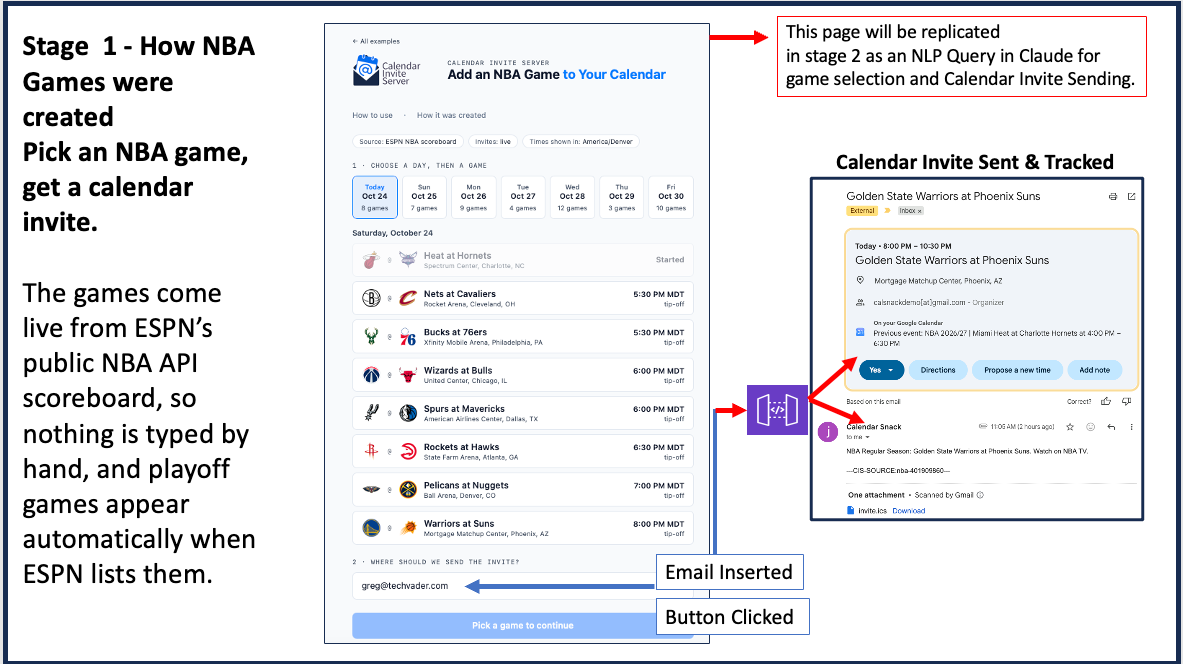
Pattern Details - Browse All Games (NBA)
Four stages. The last three are identical for every example.
1 · Discovery (the only part that differs)
The page asks ESPN’s public NBA scoreboard (no key needed) for the next seven days and turns each game into an event using the fields above. The days follow the NBA’s schedule (US Eastern), and you can't pick games that have already started.
2 · Invite Request
Your click sends the event and your email address to the one-on-demand function, which responds while the invite is on its way and the page shows each step.
3 · Invite Creation
The function checks whether the event is already in CIS. If not, it creates it on the organizer’s Google Calendar, adds create@calendarsnack.com as an invitee, and waits for it to appear in CIS (the 15 to 40 seconds a brand-new event takes).
4 · Invite Send
CIS’s invite API sends the invitation to your email address using the event’s unique ID.
Summary of Browse All Games (NBA)
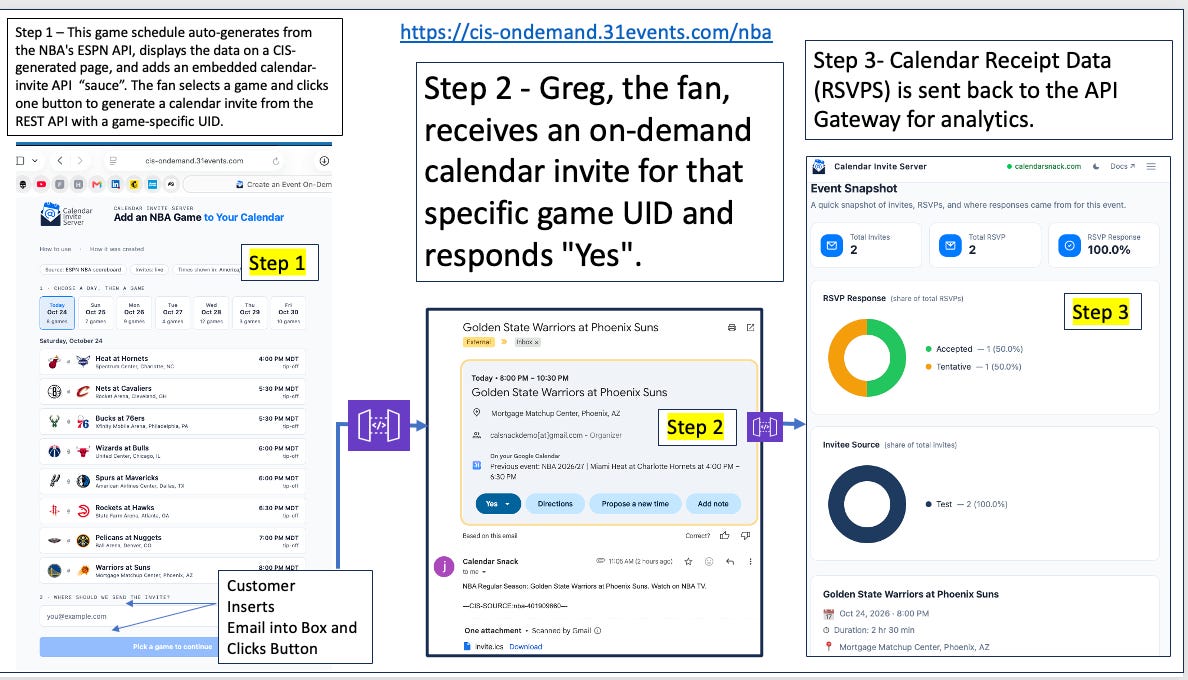
Claude MCP NLP pattern with demand event creation for UI and one-click Calendar Invite Sending
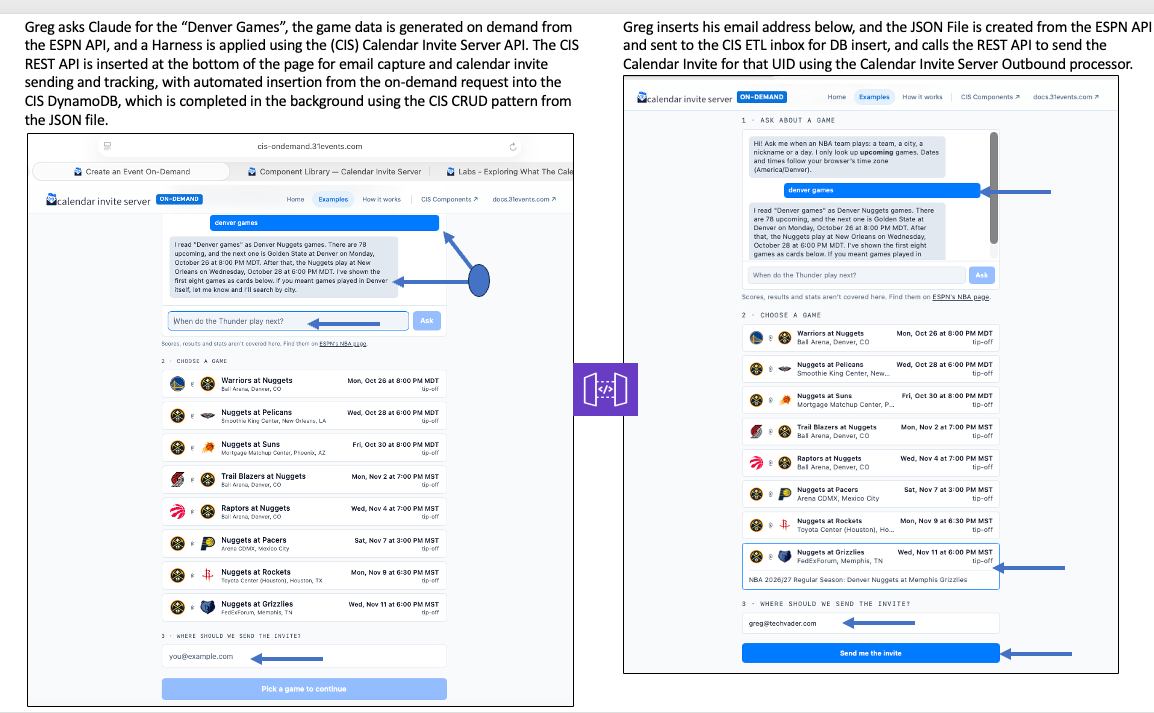
Final Steps of the Claude Inference Pattern
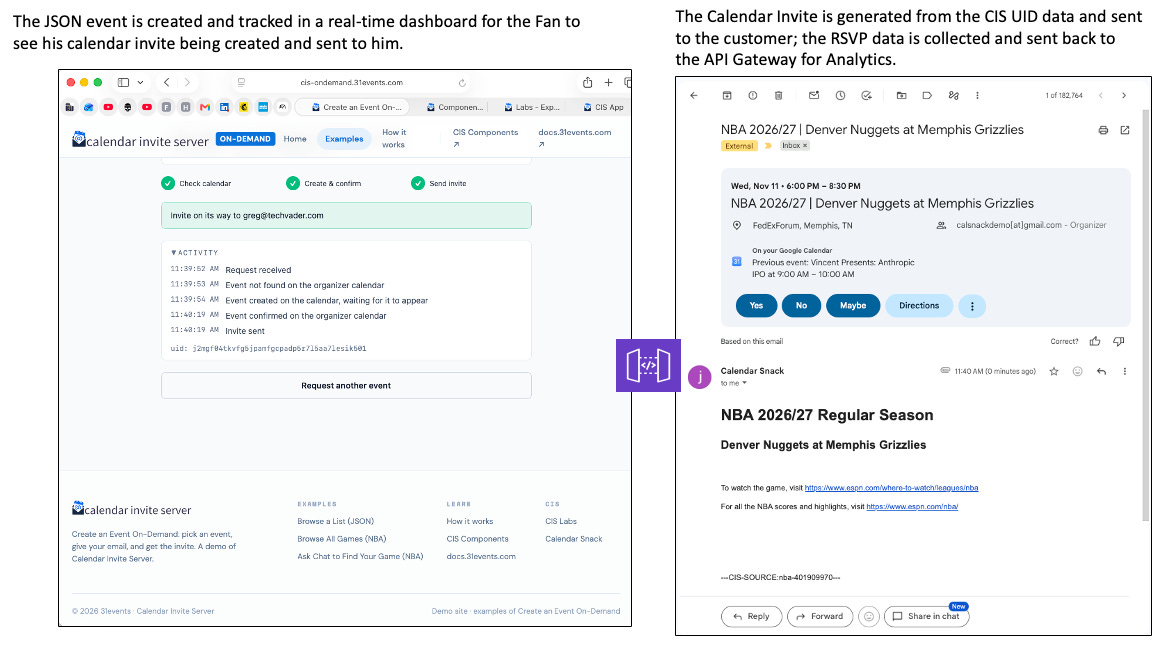
How to Ask Claude to Find Your Game that was created
THE CONCEPT
Nothing is listed; you ask. Claude turns the question into a search of ESPN’s NBA schedule, and the matching games come back as the same cards and the same calendar events as the Browse All Games page.
The Harness - HOW THE CHAT STAYS ON TOPIC
One job · when and where a team plays, who plays on a day, what is on in a city
Future only · a game that has started, or any day already past, is never returned
No scores · the lookup never sees them, so the chat can’t answer them; it links to ESPN instead
Code finds the games · Claude understands the question and words the answer; the schedule lookup decides which games exist and which cards show
Your time zone · the page sends your browser’s time zone with every question, so “today” and “this weekend” are your own days
Cities and trips · a city search returns only games played there. If none are, the lookup reports the home team’s away games and the chat offers them, so you choose
Same event · built by the same code as the Browse All Games page, so a game created there is found here
Kind to ESPN · schedules are cached for hours and fetched a few at a time, and each visitor is limited to 20 questions per 10 minutes
Details of how its built with the Calendar Invite Server
The website · a Vue project: the pages, the event picking, and the live progress.
The server · a small function on Firebase that checks each request, tracks its progress, and calls the calendar and CIS services.
This example · Claude (Anthropic’s AI) understands the questions, and ESPN’s free, public NBA schedules supply the games. The chat runs as its own small function on Firebase.
Requires · an API key to use the AI, kept on the server and never in the web page.
No CIS code was changed to build this. It uses CIS as it is today: its existing event lookup, its existing way of adding an event, and its existing invite service. These are the tools we happen to use; the same flow works with any tools that can send an event and an email.
1 · Discovery (the only part that differs than from above examples)
You ask in plain words. A small chat service (its own function, separate from the on-demand one, because it holds the Claude key) has Claude read the question and look up upcoming games in ESPN’s public NBA team schedules. The page turns each game into a standard event, exactly as the Browse All Games page does, and the on-demand function takes it from there.
A Full-Stack Serverless Pipeline Deployed via a Single CloudFormation Template
Under the hood, CIS provisions an entire end-to-end asynchronous processing pipeline within a user’s AWS account using a single AWS CloudFormation template. Rather than requiring developers to manually stitch together cloud services, the automated installer spins up a battle-tested serverless architecture:
Ingestion & Messaging Pipeline: Incoming emails to
create@yourdomain.comland in Amazon SES, which triggers a storage and queuing chain across Amazon S3, Amazon SNS, and Amazon SQS to guarantee decoupled, fault-tolerant message handling.ETL & Persistence Layer: Custom Python Lambdas pull payloads from SQS, perform data transformations, extract event state, and persist structured record sets into Amazon DynamoDB.
API Recall & Security: An Amazon API Gateway instance exposes the underlying event data stored in DynamoDB, complete with automatically generated API Keys so front-end applications can securely fetch real-time event details.
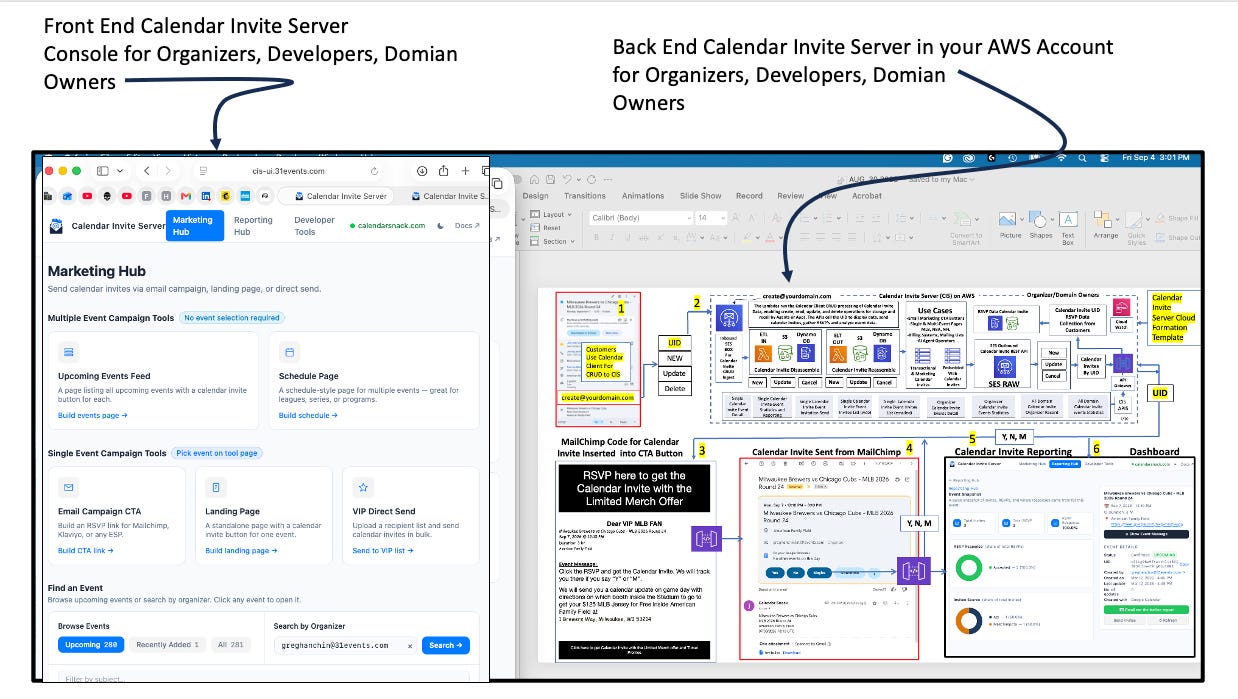
Packaging a full asynchronous ETL, persistent storage layer, and API distribution mechanism into a single infrastructure-as-code template eliminates manual configuration overhead. Developers get an enterprise-grade ingestion engine ready to handle spikey event traffic with zero server management.
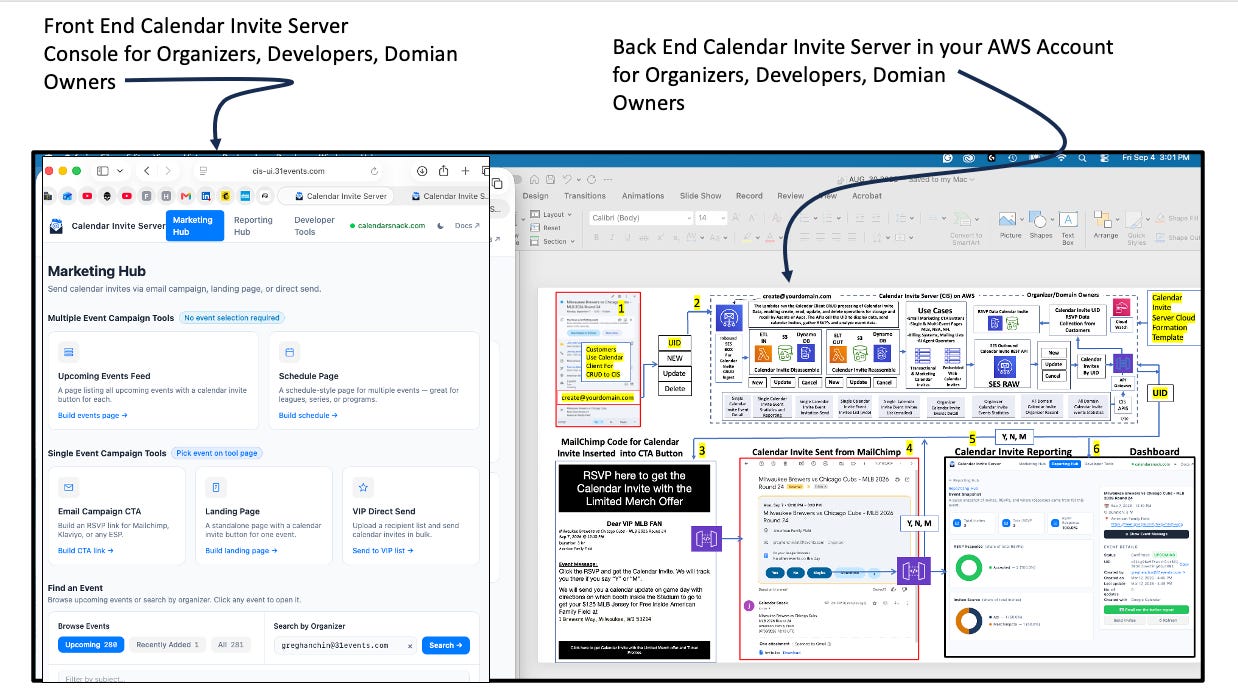
The Manual Authentication Exception: Why SES Isn’t Auto-Created
While CloudFormation automates almost the entirety of the backend pipeline, CIS highlights an important boundary in cloud automation: AWS Simple Email Service (SES) requires manual identity verification.
The CIS installer automatically provisions a dedicated mailbox (create@yourdomain.com) inside an existing AWS SES environment—supporting both SES sandbox and production accounts.
However, the template cannot automatically spin up a brand-new SES account from scratch.
This architectural separation exists for crucial security and compliance reasons. CloudFormation can automate resource provisioning, but it cannot bypass domain trust boundaries.
Verifying domain ownership requires manual administrative tasks, such as configuring DNS records (DKIM, SPF, and MX records) and completing trust verification to exit the AWS SES sandbox. By enforcing this manual checkpoint, AWS ensures that administrative domain ownership is explicitly verified before the serverless pipeline begins handling live inbound traffic.
Dual-Purpose Frontend: Merging Marketing Analytics with Developer Tooling
Once event data flows through the pipeline, the CIS Operator User Interface provides operational visibility by neatly dividing functional responsibility into two distinct hubs:
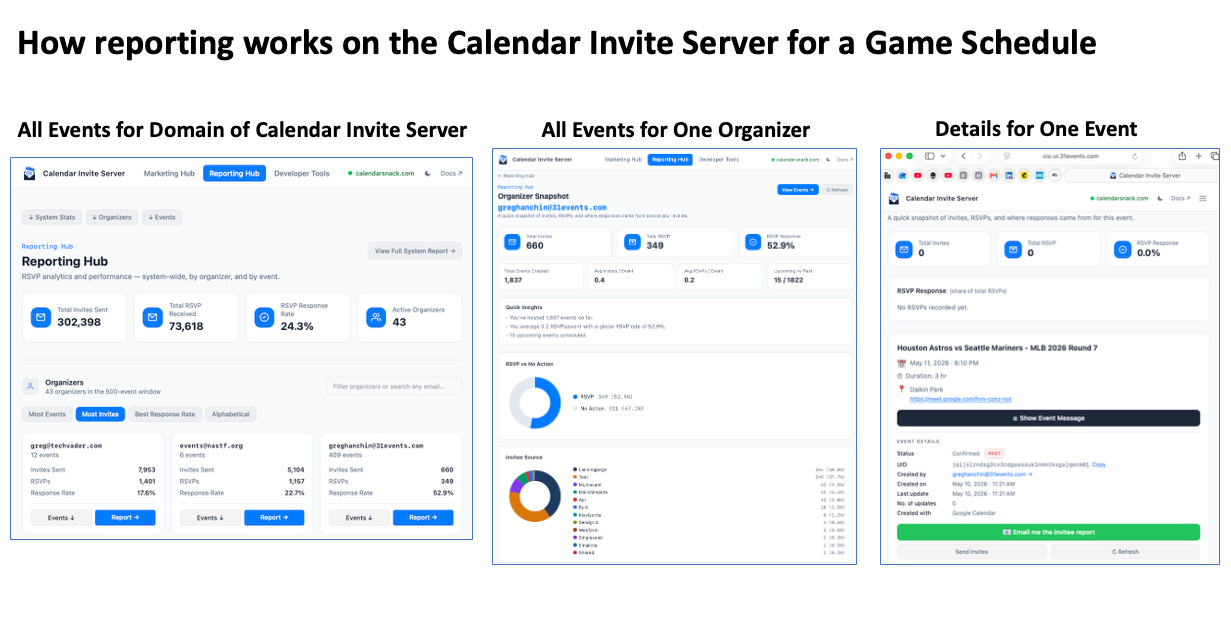
Marketing & Reporting Hub: Designed for domain users and event organizers to monitor engagement across all event data. It aggregates system-wide, organizer-level, and event-level performance metrics, tracking real-time data points such as 302,418 Total Invites Sent, 73,627 Total RSVPs Received, a 24.3% Response Rate, and 45 Active Organizers. Furthermore, it gives marketers instant access to Single Event Campaign Tools (
Email Campaign CTA,Landing Page,1-Click Event Card) and Multiple Event Campaign Tools (Upcoming Events Feed,Schedule Page).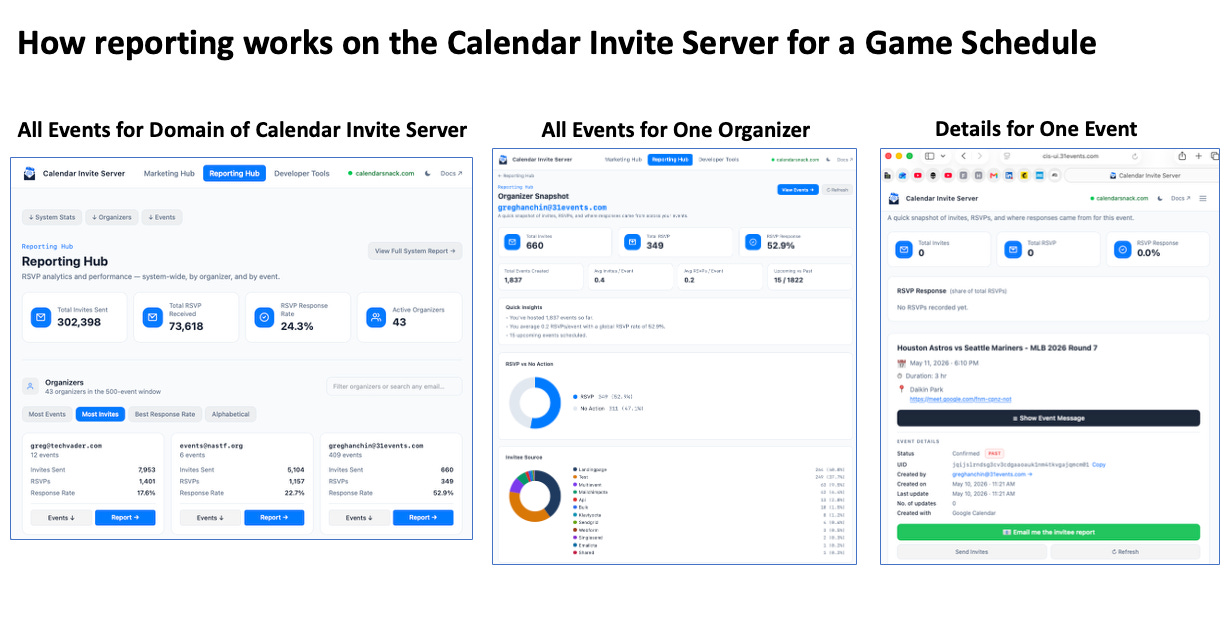
Developer Hub: A dedicated workbench equipping engineers with specialized diagnostics for setup and testing. It features the CIS Verifier (for running end-to-end pipeline validation across ingest, invite, RSVP, update, and cancel flows), an API Explorer (to inspect live endpoints against the API Gateway instance), full CIS Documentation (architecture specs and SNS setup guides), and CIS Labs (for experimental integrations).
Merging business analytics and developer diagnostic tools into a single operator console bridges the gap between technical maintenance and operational utility, ensuring both engineers and event hosts work from a single source of truth.
Conclusion
The Calendar Invite Server demonstrates how modern serverless pipelines on AWS can transform everyday consumer software into an automated, headless data processing engine. By combining email-driven CRUD workflows with a single-template CloudFormation deployment and a dual-hub dashboard, CIS provides a practical blueprint for low-friction cloud architecture.
How might you leverage headless, email-driven ingestion pipelines to simplify workflows and eliminate UI overhead in your own Claude Applications?


