


CIS Notification Infrastructure
Introduction to the Email Notification Playbook
The Calendar Invite Server (CIS) Email Template system is a platform for communicating with Organizers and Agents.
By decoupling technical delivery from design, teams can ensure the underlying infrastructure is sound before any customization is implemented into the email templates.
The notification infrastructure uses the core 9 CIS APIs with the custom workflow stack we built to route messaging notifications via SNS and SQS, and the CIS Lambdas to manage the Calendar Invite Server “Operations” for message creation, reading, updating, and deleting events.
The byproduct of this is the ability to send notification messages to Human Organizers and Agents using AWS SES RAW API, customizing the messages based on data needed from the Calendar Invite Server Database via the REST APIs.
In addition, the messaging logic built into the Lambdas can be modified if you want to do other “things”.
No Initial Configuration Required
One of the most strategic aspects of a phased deployment is the ability to leverage “out-of-the-box” functionality.
In the CIS model, notification templates are ready to use the moment they are installed. This “Verification First, Customization Later” philosophy significantly reduces deployment friction by removing the need for upfront design work.
By utilizing pre-configured templates, teams can immediately validate the system’s “plumbing”—the triggers and routing—ensuring that the technical foundation is robust before any creative resources are committed.
The templates are designed to work correctly out of the box — no configuration is required before running a verification test.
Why Your Team Shouldn’t Cross Paths (Yet)
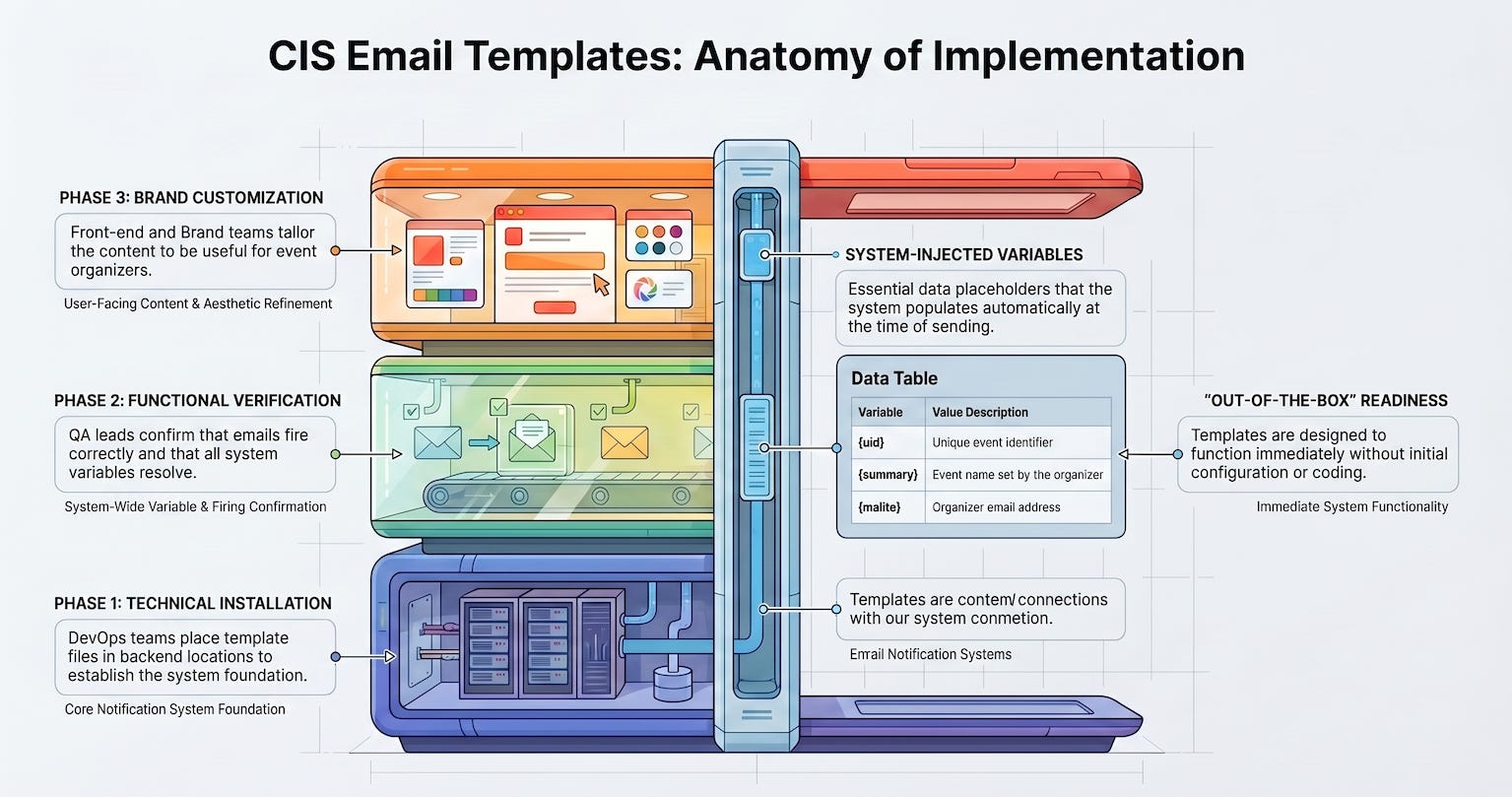
The CIS approach utilizes three distinct phases, each targeted at a specific audience with isolated instructions, ensuring that teams do not need deep knowledge of the other phases to succeed.
Phase 1: The Foundation (DevOps/Backend) Guided by
PHASE1_INSTALL.md, the goal is installation. This phase focuses on placing template files in the correct system location to ensure the backend can access them.Phase 2: The Proof (QA/Project Lead) Guided by
PHASE2_VERIFY.md, the goal is verification. This phase confirms that each of the system’s notification emails fires correctly and that all system variables resolve as intended.Phase 3: The Brand (Front-end/Product/Brand) Guided by
PHASE3_CUSTOMIZE.md, the goal is customization. Once the system is confirmed as operational, the creative team can modify the templates to make them useful and brand-compliant for organizers.

Phase 3: Email Template Customization Files
Navigating Inactive and Conditional Templates
The CIS system encompasses a set of six notification emails, but not every template behaves the same way:
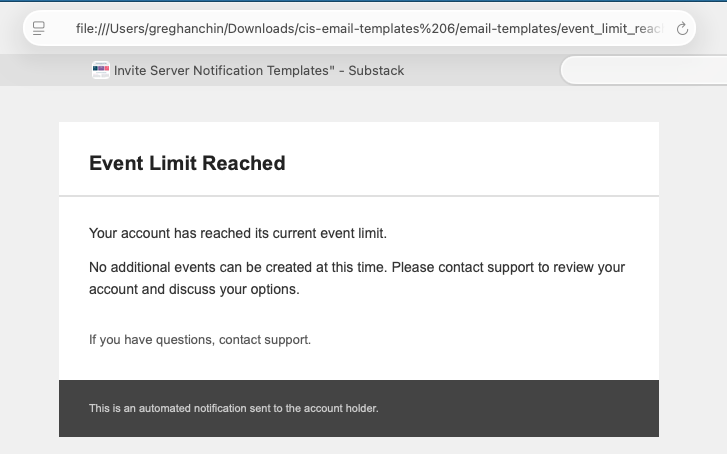
The Event Limit Template: The “Event limit” template is included in the package, but the feature is currently disabled in the codebase. In the codebase there is a “switch” that can be modified to by changed at the system or per user level. It can be turned on if needed if your are setting send limit parameters in the adminstrative setting for users and want a notification email to go out to a Human or Agent that the set limit has been reached.
The Conditional Template: The “Payment Enrollment” template is not a universal requirement. It applies only to deployments that include subscription or payment enrollment processing.
The Active Baseline: Standard notifications Templates such as the “Verification of Event” and “RSVP Report” email with the attached .CSV file, form the core of the operational system.
The Variables and the Values
While the visual style of a notification is flexible, the underlying data structure is immutable. System-injected variables are the critical hooks that pull real-time data into the email at “send time.”
To maintain system stability, these variables must never be renamed or removed. This rigidity ensures that regardless of how the template is customized, the system can always inject the necessary event and contact data.
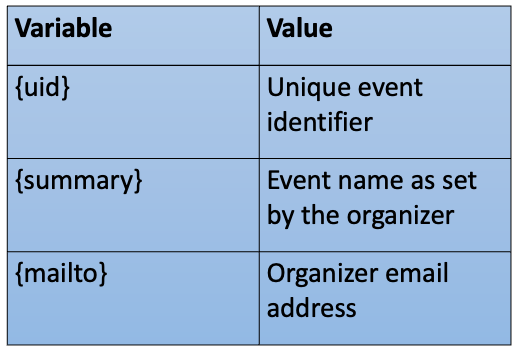
Important: Treat these variables as protected system assets. Their removal will break the data link between the backend and the recipient being a Human or an Agent.
Summary of Notification CIS Playbook PDF
CIS Email Infrastructure: Phase 1
Executive Summary
Phase 1: The Foundation (DevOps/Backend) Guided by PHASE1_INSTALL.md, the goal is installation. This phase focuses on placing template files in the correct system location to ensure the backend can access them.
This document outlines the technical requirements and procedural steps for Phase 1 of the CIS Email Template installation process.
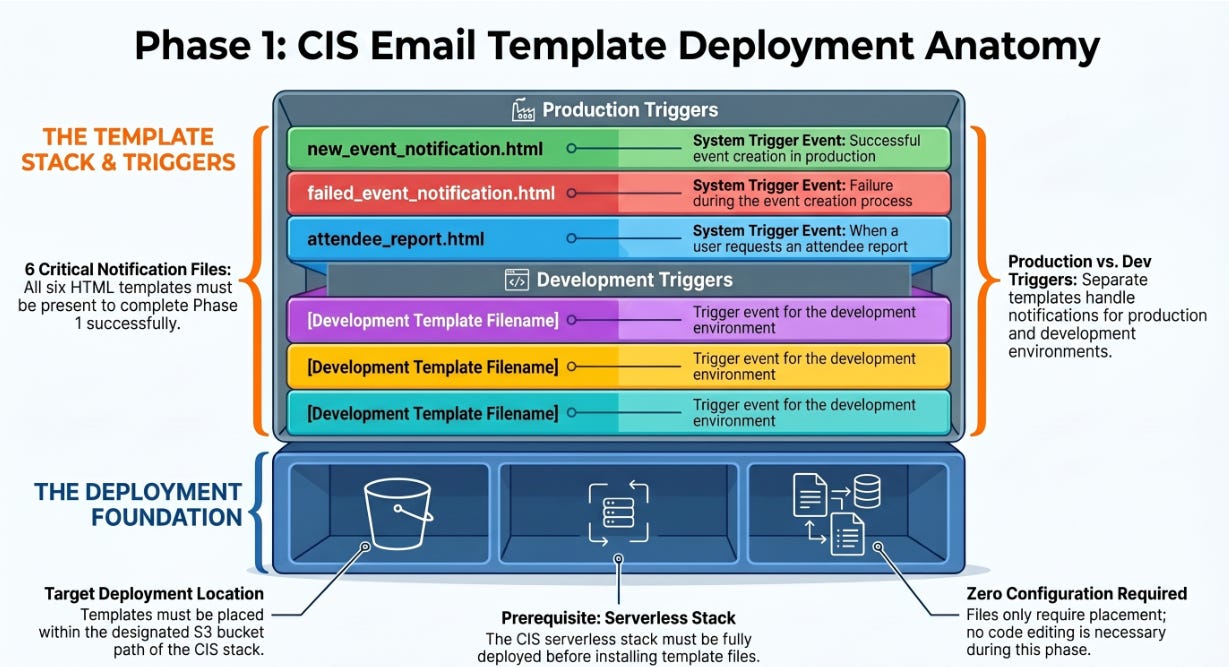
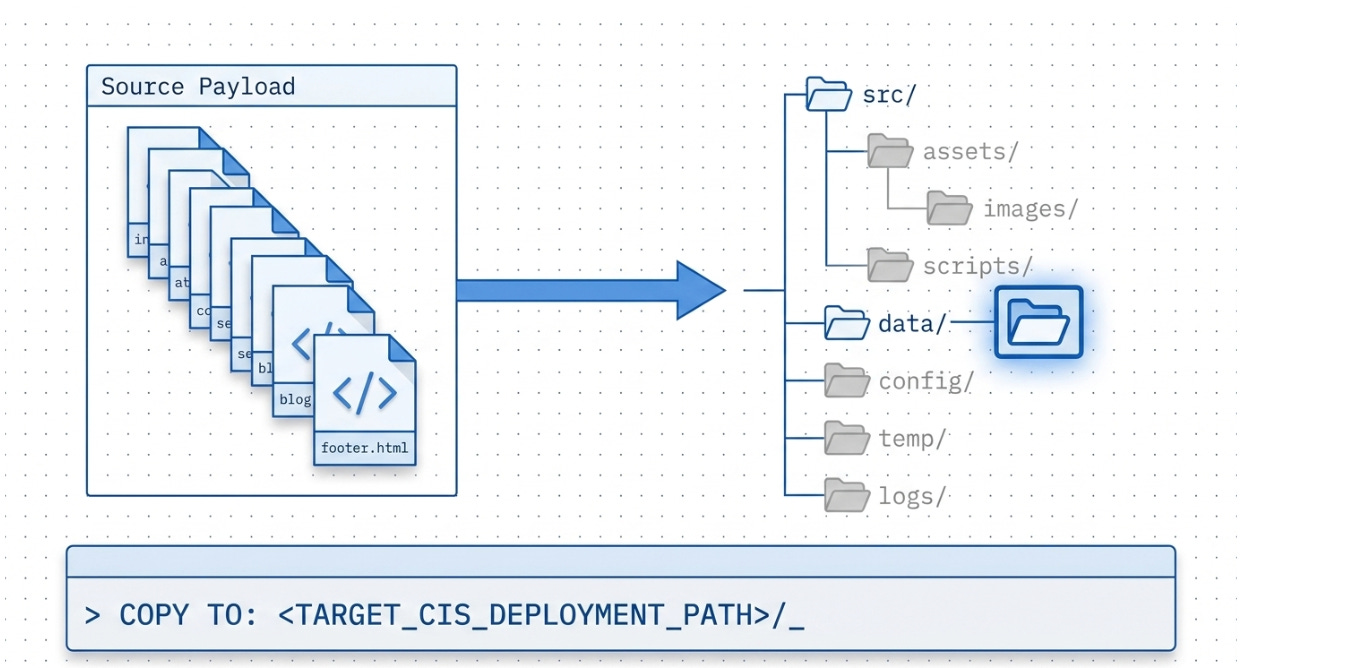
The primary objective of this phase is to place six specific HTML template files within a pre-existing CIS serverless stack deployment.
The process is designed for DevOps and Backend engineers and focuses strictly on file positioning rather than content modification.
While six files are required for completion, internal logic dictates that some templates are currently disabled or conditionally enabled based on specific deployment features, such as payment processing.
Successful completion of this phase is a prerequisite for the verification stage (PHASE2_VERIFY.md).
Technical Overview and Prerequisites
The installation of CIS Email Templates is a technical task that requires specific administrative access to the deployment environment.
Primary Audience: The procedure is designated for DevOps and Backend engineers.
System Requirements: A CIS serverless stack must be fully deployed before template installation can commence.
Scope of Work: Phase 1 is limited to the physical location of files. No editing or customization of the HTML templates is required during this stage.
Template Inventory and Trigger Logic
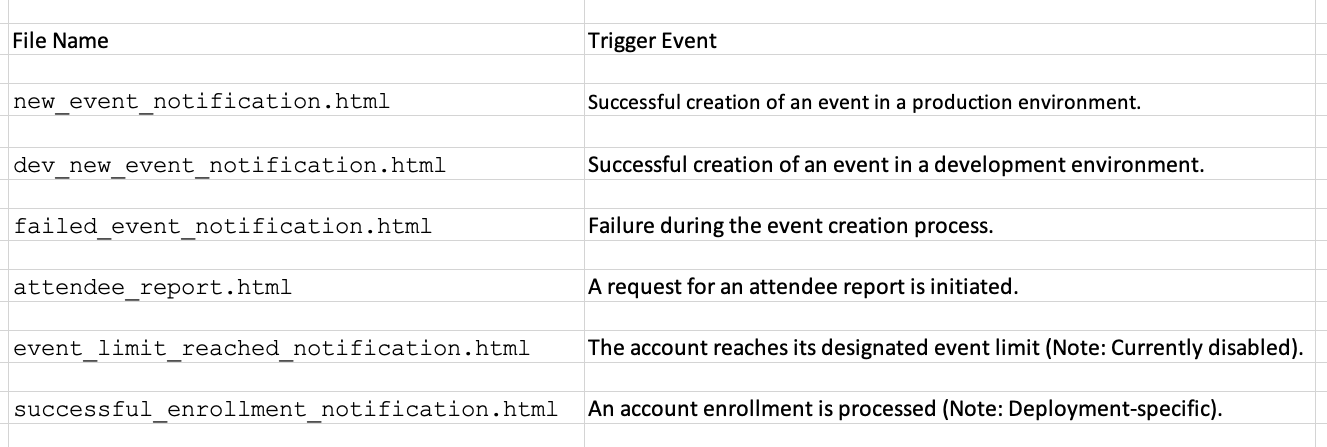
The deployment involves six distinct HTML files, each mapped to specific system events or environmental contexts. The following table details the files and their respective triggers:
Operational Constraints and Release Notes
The source material identifies specific functional limitations for two of the template files in the current release:
Event Limit Notifications: The
event_limit_reached_notification.htmltemplate is currently disabled within the codebase. Consequently, this notification will not trigger in the current release, despite the file being required for installation.Enrollment Notifications: The
successful_enrollment_notification.htmltrigger is conditional. It is only functional if the specific deployment includes subscription or payment enrollment modules.
Completion Criteria
Phase 1 is considered complete only when all six template files have been correctly positioned at the specified path within the CIS deployment.
No additional configuration or action is required within this phase. Upon successful placement, the workflow transitions to the verification phase as outlined in PHASE2_VERIFY.md.
Correct File placement in the Target Path for S3
<Target_CIS_Deployment_Deployment_Path>/_
CIS Email Infrastructure: Phase 2
Executive Summary -Smoke Testing Templates
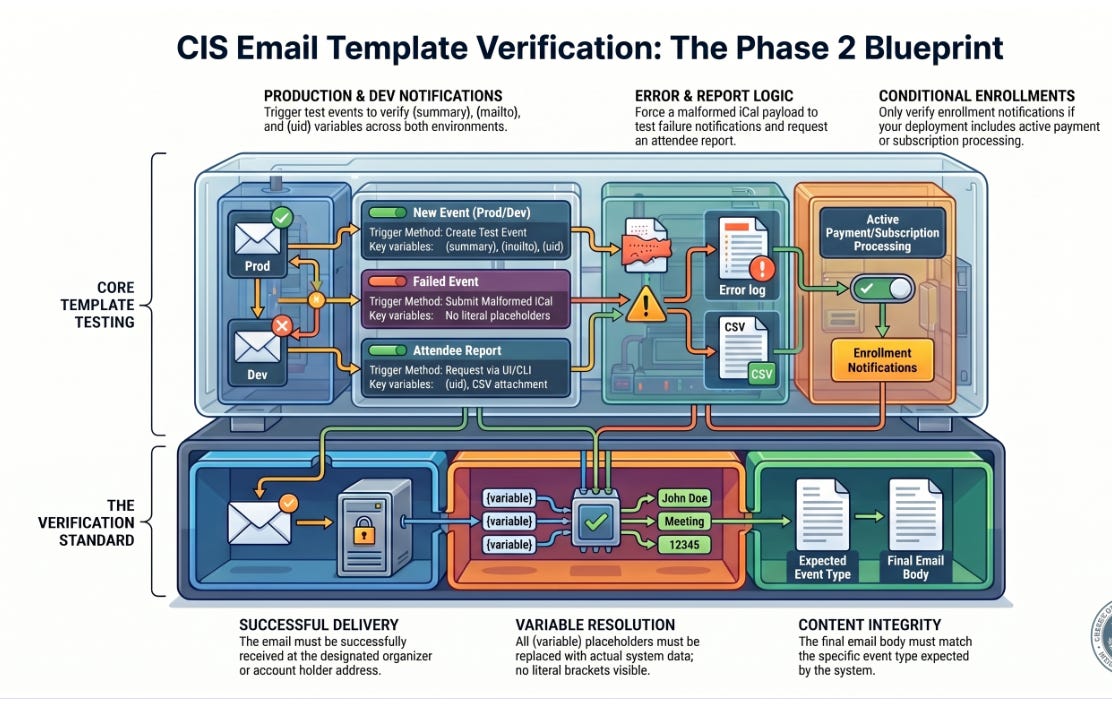
The verification phase for CIS email templates (Phase 2) serves as a critical smoke test to ensure system operationality before any customization occurs.
The primary objective is to confirm that six pre-configured email templates fire correctly and that system variables are successfully injected into the content. Verification is considered successful only when an email is received, all variable placeholders (e.g., {variable}) are replaced with actual data, and the content aligns with the specific event type.
This process is method-agnostic, allowing for triggers via CLI, Postman, or web applications. Once these generic templates are verified, the project proceeds to the customization stage.
Verification Fundamentals
The verification process is designed as a simple pass/fail check. It requires that Phase 1 (template file placement) is complete and serves as the prerequisite for Phase 3 (customization).
Core Principles
Functional State: The templates are intentionally generic and pre-configured to function on a fresh install without prior editing.
Variable Resolution: A successful test must show no literal placeholders; every bracketed variable must resolve to a system value.
Trigger Flexibility: Verification does not mandate a specific tool. Outcomes are validated regardless of whether the event was triggered via a Command Line Interface (CLI), direct endpoint calls, Postman, or a web application UI.
Scope: This phase specifically covers email templates; a broader CIS smoke test procedure is maintained as a separate, maturing process.
Template Verification Catalog
The system utilizes six distinct templates, each with specific trigger requirements and validation checkpoints.
Production and Development Notifications
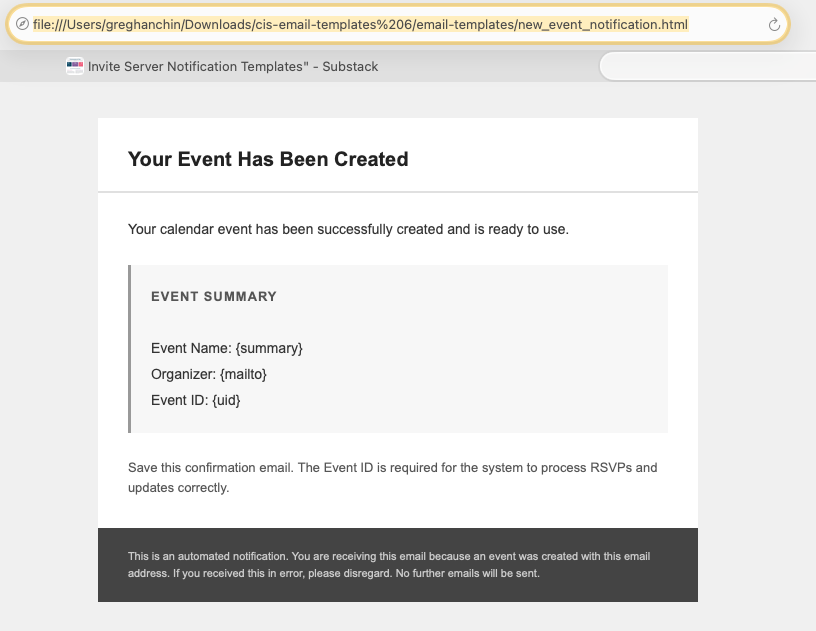
Template -new_event_notification.html
Environment -Production
Specific Requirements -Trigger via Gmail/Outlook to the production endpoint. A trigger occurs when an Organizer or Agent sends a calendar invite from a calendar client to the AWS SES mailbox (via Gmail or Outlook) at the production AWS SES endpoint. That mailbox is configured in stock configuration as create@yourdomain.com. It could be configured as any email box name as needed in the AWS SES admin dashboard using the create@yourdomain.com Syntax.
Techincally it could be changed in the LAMBDA to accommodate whatever “AWS SES MAILBOX NAME” you configure in the AWS SES adminstrative dashboard if your development team wants to. Just so they match.
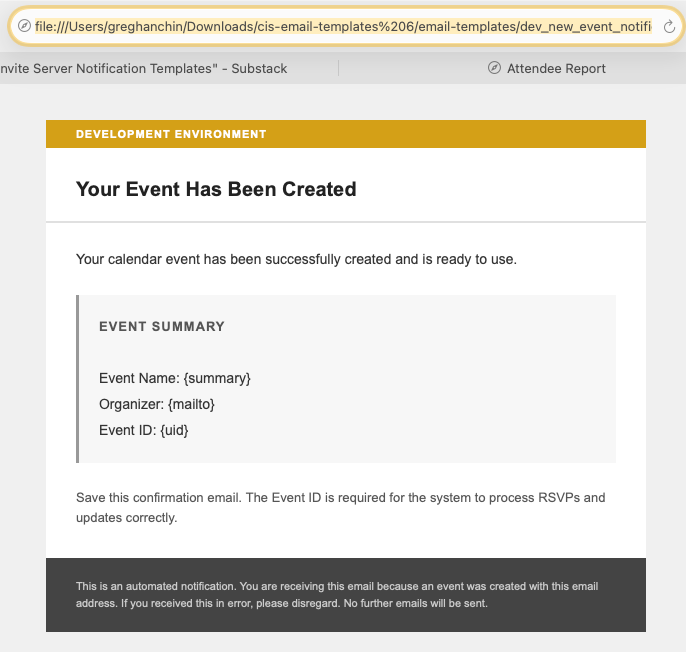
Template- dev_new_event_notification.html
Environment-Development
Specific Requirements -Must display a “Development Environment” banner at the top.
Validation Points for both:
Email received at the organizer address.
{summary}replaced with the event name.{mailto}replaced with the organizer email address.{uid}replaced with the event ID.
System and Administrative Templates
These templates handle error states and reporting functions.
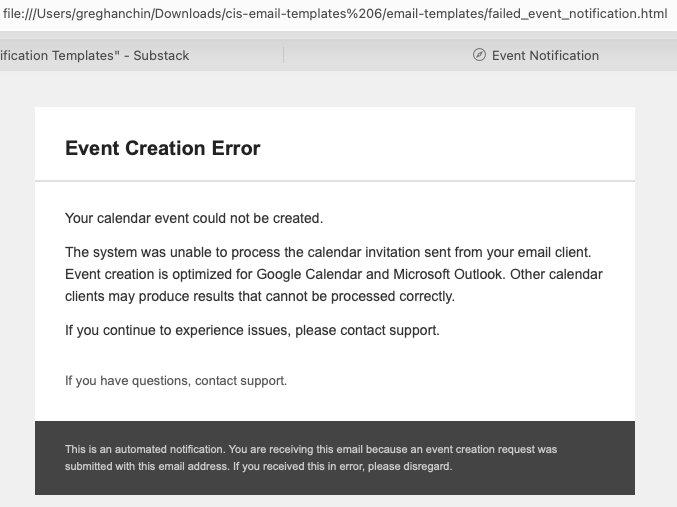
failed_event_notification.html
Trigger: Submit a calendar invitation from an unsupported client or a malformed iCal payload.
Check: Ensure no literal placeholders are visible. The body must explicitly reference Google Calendar and Outlook as the only supported clients.
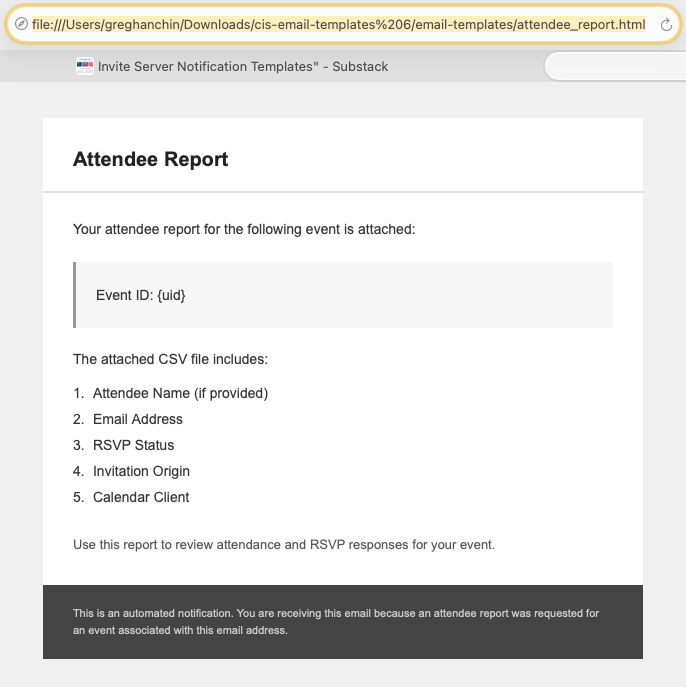
attendee_report.html
Trigger: Request a report for a test event that contains at least one recorded RSVP.
Check: Ensure
{uid}is replaced with the event ID and verify that a CSV file is successfully attached to the email.
Conditional and Disabled Templates
Certain templates are subject to current feature status or specific deployment configurations.
event_limit_reached_notification.html
Status: Feature currently disabled.
Action: No verification is required in the current release as this template will not fire.
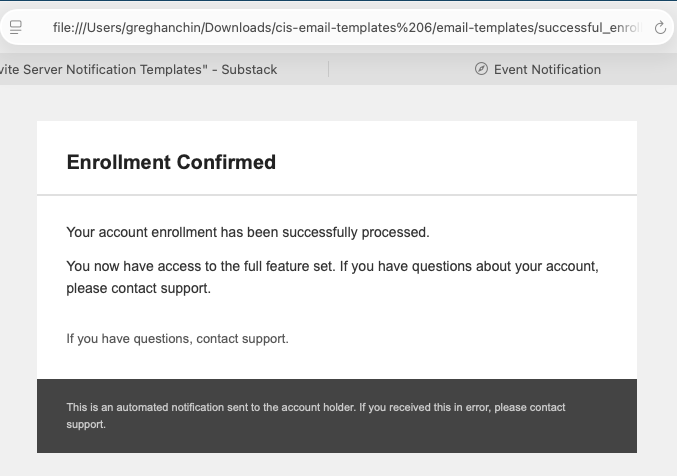
successful_enrollment_notification.html
Status: Conditional.
Action: Only verify if the deployment includes subscription or payment enrollment processing.
Trigger: Process a test enrollment through the payment/subscription system.
Check: Confirm receipt at the account holder address and ensure all variables are resolved.
Definition of Completion
The verification phase is concluded only when all applicable templates have passed the required checks. Any instance where a template fails to fire or displays unresolved {variable} placeholders requires immediate diagnosis.
System operators are instructed not to proceed to customization (documented in PHASE3_CUSTOMIZE.md) until the underlying system is confirmed fully operational through these passing tests.
CIS Email Template Customization: Phase 3
Executive Summary
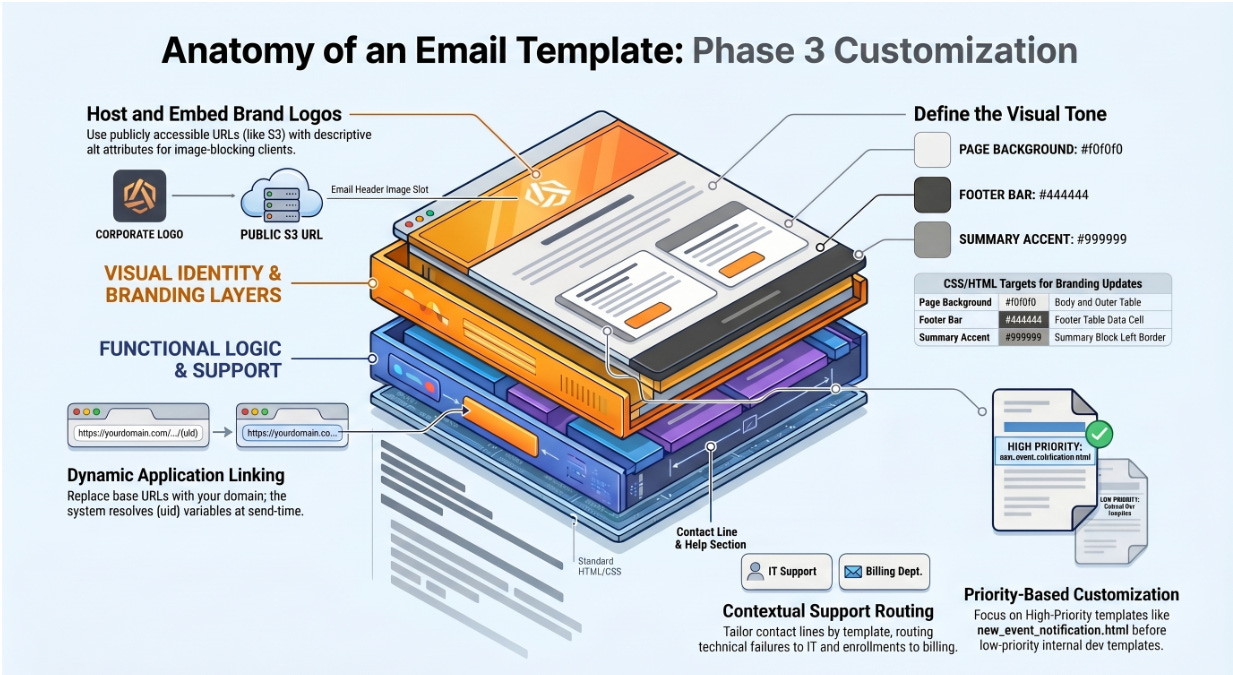
Phase 3 of the CIS implementation focuses on the customization of email templates to provide context, branding, and functional navigation for end-users. While the base templates are fully operational and verified following Phase 2, they are intentionally generic and text-only to ensure universal rendering and functional stability.
The primary objectives of this phase are:
Functional Integration: Incorporating application-specific URL structures and links using system-resolved variables.
Support Optimization: Replacing generic support placeholders with specific contact methods tailored to the nature of the notification (technical vs. administrative).
Brand Alignment: Applying visual branding through logo integration and color palette adjustments while maintaining cross-client compatibility.
Customization in this phase is entirely additive; the system remains functional even if these modifications are not implemented.
However, high-priority templates, specifically the primary organizer-facing notifications, require customization to be considered “meaningful” for the target audience.
Phase Overview and Prerequisites
The customization phase is designed for front-end developers, product owners, and brand teams. Before initiating these changes, it is mandatory that Phase 2 (System Verification) is complete and the email system is confirmed as operational.
Detailed instructions for implementation are maintained in the reference document EMAIL_TEMPLATE_CUSTOMIZATION.md.
Functional Customization: Application Connectivity
Base templates do not ship with pre-defined dashboard or event links because application URL structures are unique to each deployment.
Implementing Event Links
Once the application is deployed and the URL structure is finalized, links should be integrated into the event summary blocks of the primary notification templates.
Variable Usage: The system utilizes the
{uid}variable, which is automatically resolved at the time of sending to point to specific event records.Target Templates: Links should be added primarily to
new_event_notification.htmlanddev_new_event_notification.html.Structure: Organizations must replace placeholder domains (e.g.,
app.yourdomain.com) with actual base URLs and paths used by their specific application.
Support Infrastructure and Communication
The base templates utilize a generic “If you have questions, contact support” line. To improve user experience, this must be updated to reflect organizational support workflows.
Support Routing Strategies
The document identifies four primary patterns for handling support inquiries:
Direct Email: A clickable mailto link.
Support Portal: Redirection to an existing ticketing system.
Internal Helpdesk: Directing users to phone numbers or internal resources.
Removal: Deleting the support line for users who have established alternative channels.
Template-Specific Routing
It is recommended that organizations review each template individually rather than applying a universal support contact. Different issues require different expertise:
Technical Issues: Failed event creations may require routing to a technical helpdesk.
Administrative/Billing: Enrollment confirmations may be better served by account management or billing departments.
Logo Integration
To incorporate branding without compromising deliverability:
Hosting: Images must be hosted at a publicly accessible URL, preferably on a platform like S3. Using third-party domains or CDNs not controlled by the organization is prohibited.
Implementation: An
<img>tag should be placed above the heading row.Accessibility: A descriptive
altattribute is required for clients that block images.Verification: Rendering must be tested specifically in both Gmail and Outlook before a full deployment.
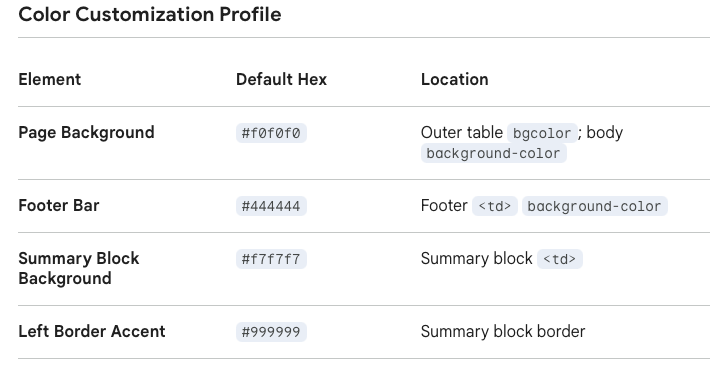
Color Customization
The visual tone of the templates is controlled by several key hexadecimal values:
Template Prioritization and Notes
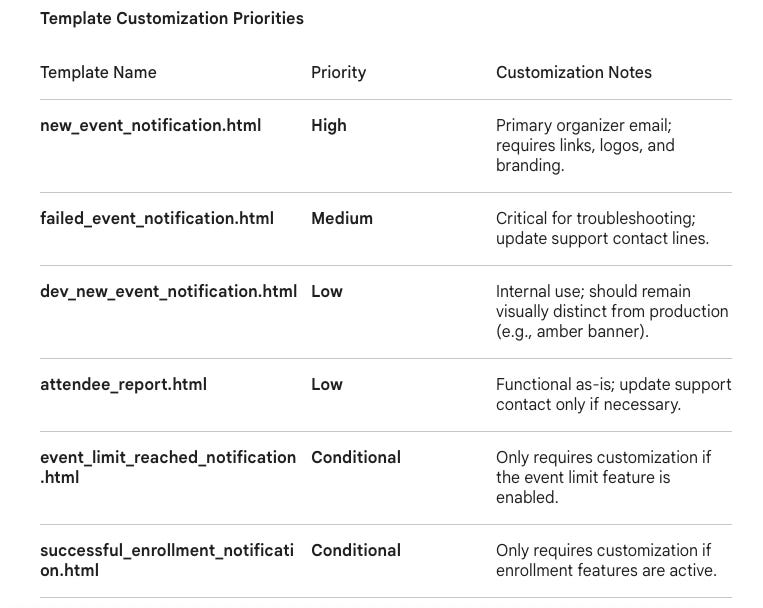
Not all templates require the same level of attention. Implementation teams should prioritize based on the following urgency levels:
CIS HTML Email Template Examples

Production - email-templates/attendee_report.html
Development - email-templates/dev_new_event_notification
Production (not used) - email-templates/event_limit_reached_notification.html
Production (not used) - email-templates/failed_event_notification.html
Production - email-templates/new_event_notification.html
Production (not used) -email-templates/successful_enrollment_notification.html
Thats a wrap. Thanks Arnie and Milan of the Calendar Invite Server Team.
April 26, 2026


