


How the Calendar Invite Server Just Turned Your Calendar into a Live Data Stream
For decades, the calendar invitation has been a “lost reminder,” unable to be updated or collect RSVPs from the ICS files generated by “Add to Calendar.”
Q- Do the Email and Storage vendors love this?
A- You betcha, imagine how many REMINDER emails you get and how many ICS files you have downloaded in a lifetime. >:)
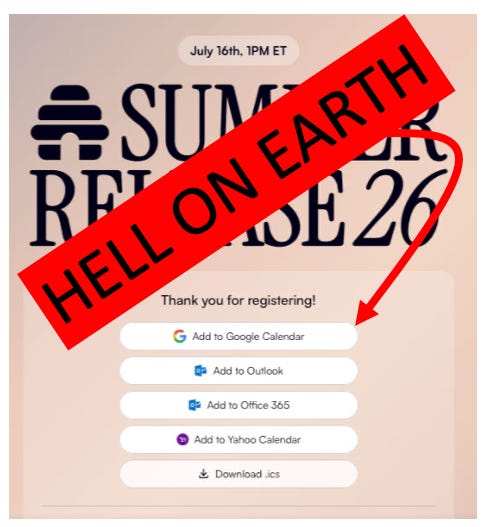
Events in 2026 might appear in your Google or Outlook Inbox and look official, but the organizer does not receive your calendar receipt.
If the event time shifts, the venue changes, or a promotional update occurs, the organizer is forced to spam your inbox with “Updated” emails, hoping you’ll bother to download a new file. It is a fragmented, manual, and remarkably “quiet” process for an era defined by real-time data.
The Calendar Invite Server for AWS has moved the industry from isolated attachments to what is now a “fully lit up” data pipeline.
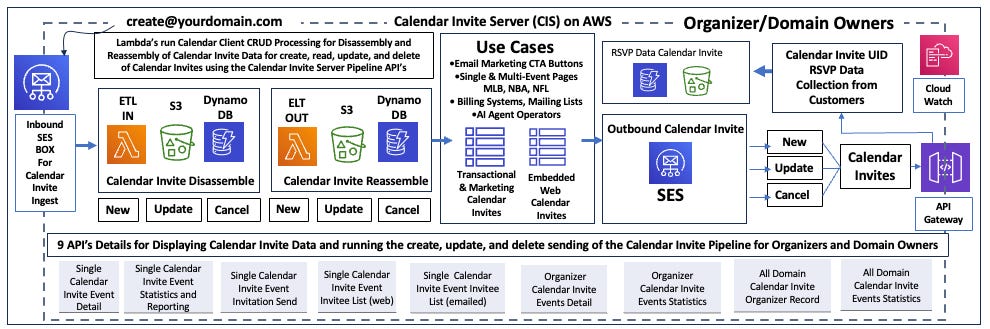
This isn’t just a simple app; it is a sophisticated AWS Marketplace stack—with APIs and Lambda functions—designed to bridge the gap between organizer and the end-user’s daily schedule using the embedded calendar invite API.
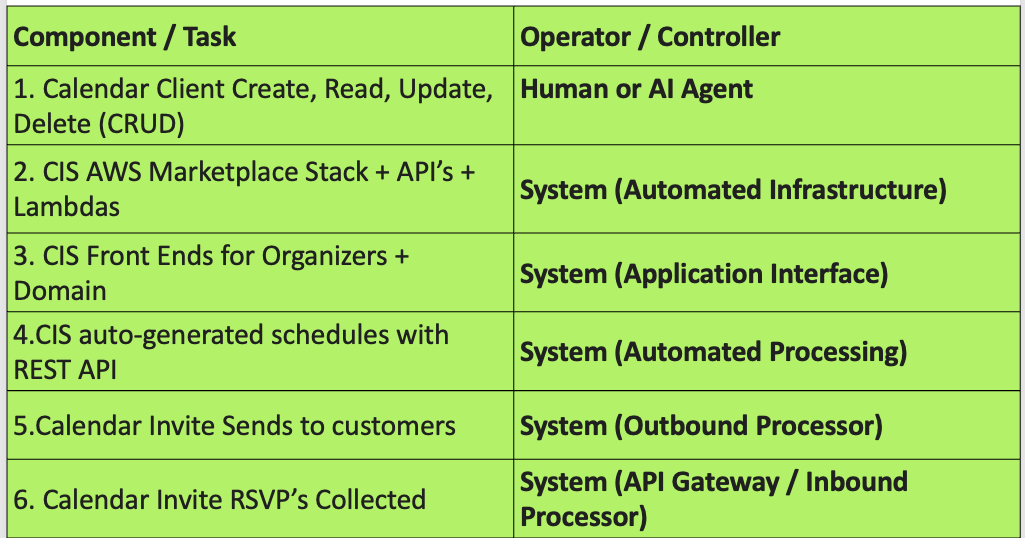
This shift represents more than just a convenience; it is a fundamental transformation of the calendar into a dynamic, two-way communication channel that serves human operators and autonomous agents alike using a embedded REST API that serves as the calendar invite pipeline logic.
Calendars Are No Longer Just for Humans
In this new architecture, the system is indifferent to whether the operator is a person or a machine.
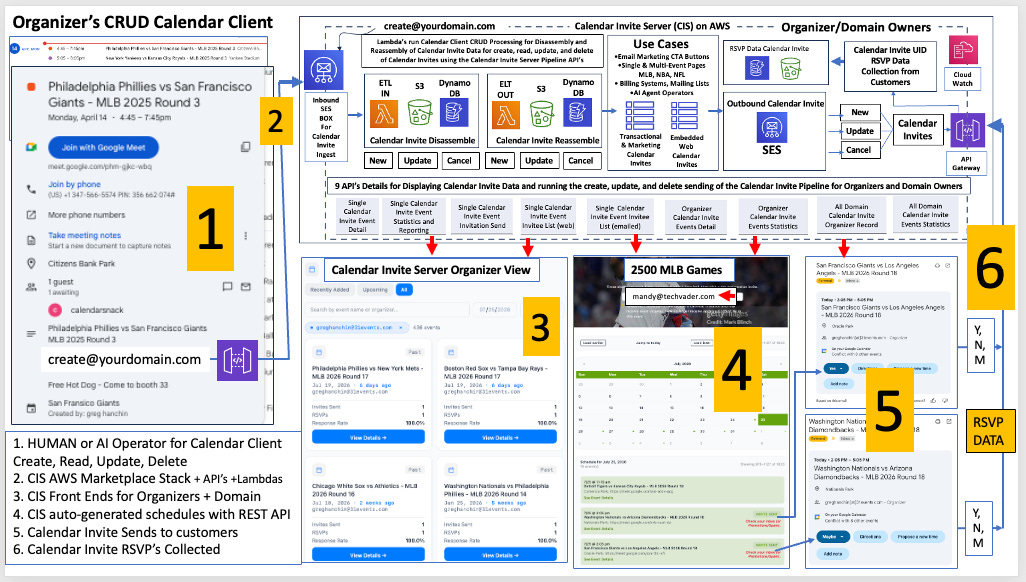
The Calendar clients—whether a human marketer or an AI-browser-operated agent—now have the power to perform full CRUD (Create, Read, Update, and Delete) operations directly within the invite server.
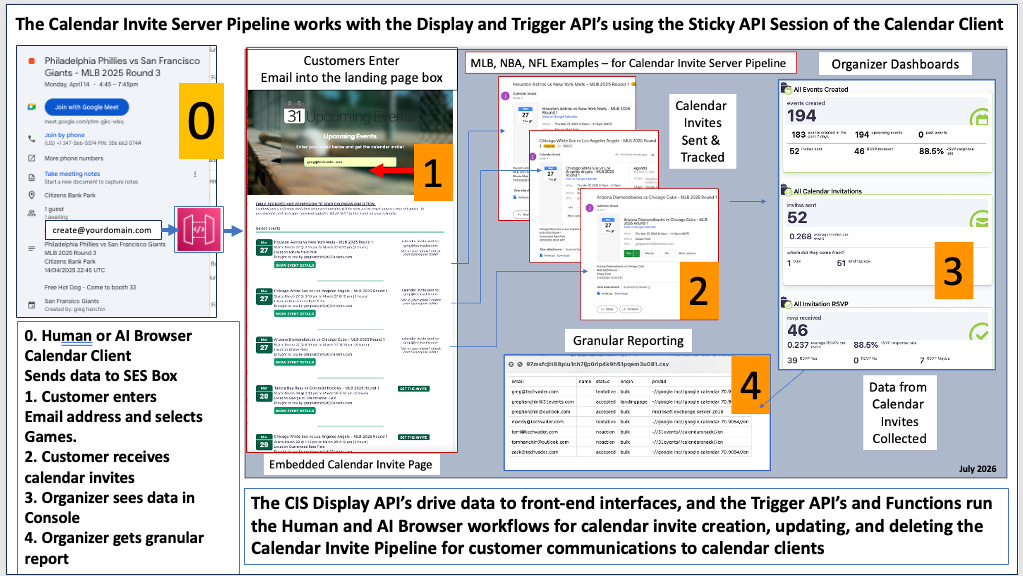
The ingress for this Calendar Event data is an AWS Dropbox for data collection creation, updating and deleting.
This allows thousands of Calendar Clients to hit the processing queue without overloading the ETL inbound Processor.
By utilizing AWS SES (Simple Email Service) as the drop box , the stack establishes a specific command point: create@yourdomain.com that any AI Operator can use.
This address serves as the gateway where data enters the pipeline to be disassembled and reassembled on the fly using AWS SES RAW. As Greg from the 31events crew notes:
“The pipeline is used by calendar clients; those could be human, or AI browser-operated calendar clients... the calendar clients themselves create, read, update, and delete data inside the calendar invite server.”
By allowing AI operators to manage these operations autonomously, organizations can now scale their event orchestration without a corresponding increase in human overhead.
The “Sticky Session” and the Power of Downstream Updates
At the heart of this evolution is a technical concept Greg refers to as the “sticky session.” In traditional scheduling, the link between the organizer and the attendee dies the moment the email is sent.
In this AWS-driven pipeline, the sticky session maintains a persistent, stateful connection between the original organizer and the invitations residing in the attendees’ calendars.
This creates a “living” channel for attribution and engagement.
If a game is rained out or a marketing promotion is added last-minute, the organizer (or an AI agent) simply updates the data on the original calendar client.
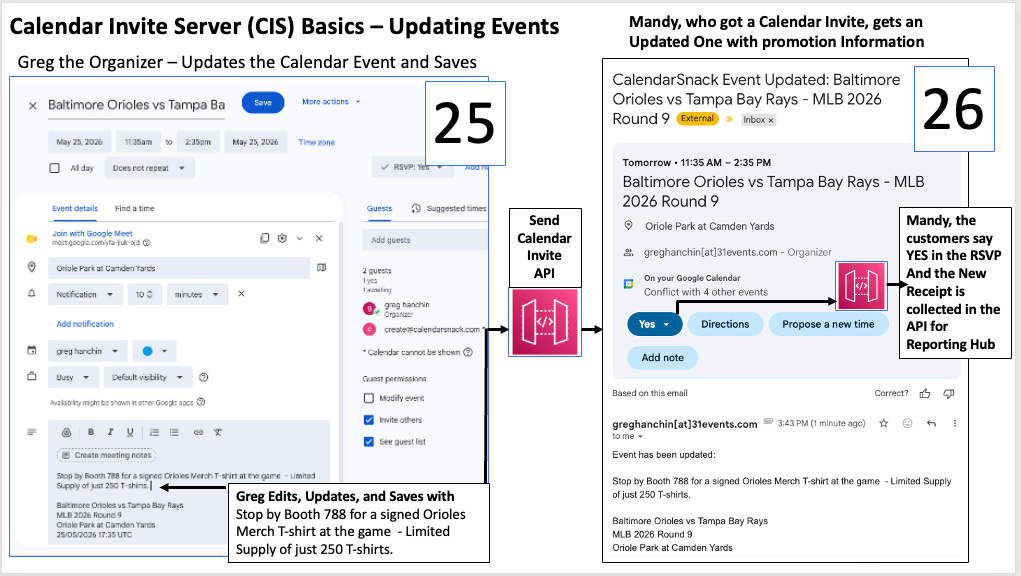
Those changes flow through the display APIs and trigger automatic updates to the invites already sitting in the users’ calendars. This transforms the invitation from a mere notification into a powerful tool for marketing attribution, ensuring the organizer remains “sticky” to the consumer long after the initial invite was sent.
Automated Page Generation for “Hard” Schedules
The heavy lifting of the pipeline is performed by nine specialized REST APIs that drive the demand-based generation of event pages. To stress-test this infrastructure, the developers focused on the “hardest” possible use cases: the massive, high-frequency schedules of the NBA, MLB, and NFL.
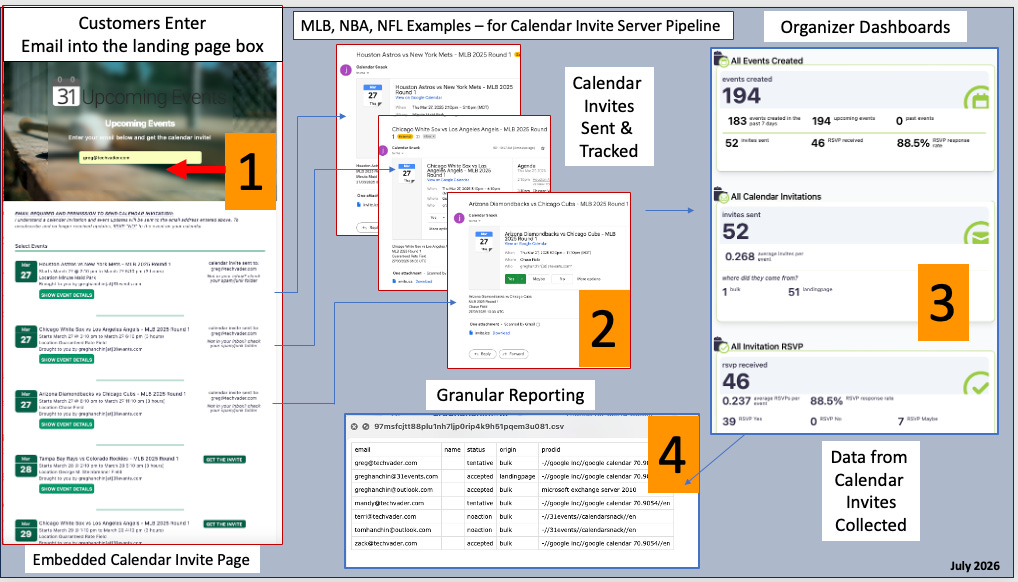
These professional sports leagues represent the ultimate test because of their volatility—game times change, rosters shift, and the sheer volume of data is immense.
The pipeline handles this by generating automated pages where users can interact with these complex schedules in real-time. For example, a user like “Mandy” can visit a generated MLB schedule page, enter her email address, and immediately receive granular, relevant calendar invites.
This data flow—from the display page through the API gateway and back to the organizer’s dashboard—creates a seamless loop that was previously impossible with static files.
Seamless Integration of the Calendar Invite Pipeline REST API to send, update, and gather RSVP data
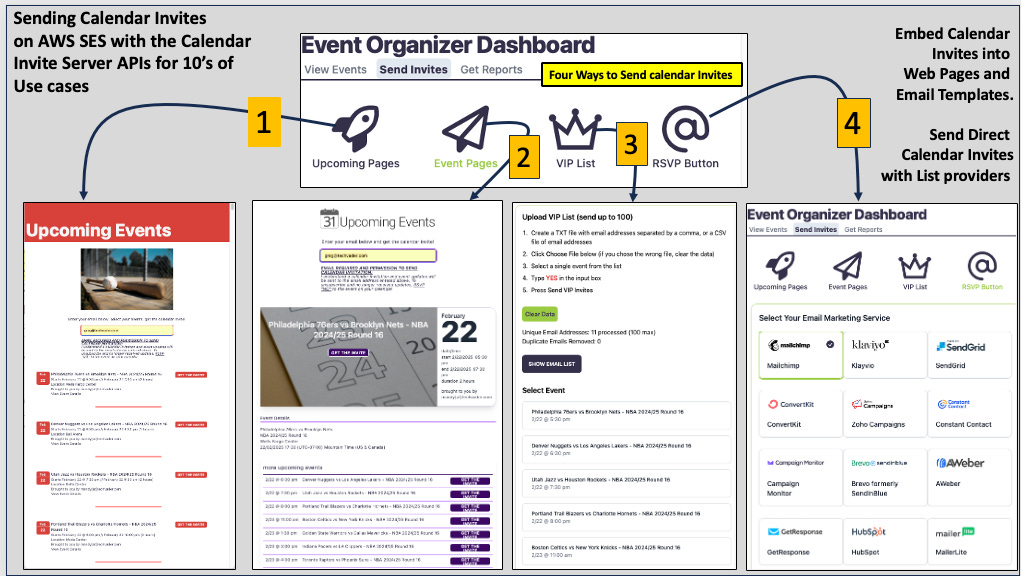
For modern digital marketers, the Calendar Invite Server for AWS is native to their existing workflows for insertions into Email Service providers, web pages and apps.
The system is built for distinct paths beyond complex game schedules as reviewed above.
The other two are built into the Calendar Invite Server API Kit.
VIP List Batching: For targeted outreach, the browser-driven interface allows organizers to upload email batches of 500 to 1,000 at a time, allowing for rapid dispatch to high-value segments.
The “Big Three” Integration: The stack integrates with 50 different email providers, including the industry leaders: Mailchimp, Klaviyo, and SendGrid.
The “killer feature” here is eliminating the .ics attachment in any use case and inserting the calendar invite pipeline as a REST API.
Instead, the calendar invite server pipeline provides embedded codes for specific EVENT UIDs as a direct Call to Action (CTA) within email templates, apps, and webpages, and summons the calendar receipts back to the API gateway for analytics.
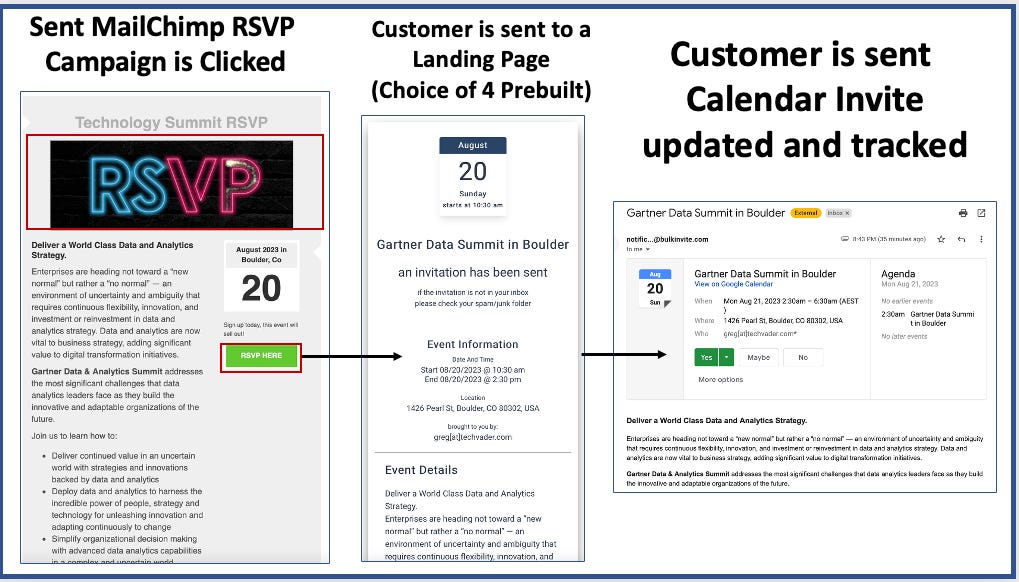
When a user clicks “Yes” or “Maybe,” the system automatically sends the invite to their address. This removes the friction of downloading files and ensures a much higher conversion rate for event organizers.
Conclusion: From Invitations to Infrastructure for AI Operators
The July 2026 review confirms that we have moved past the era of the “calendar app” and into the era of calendar pipeline infrastructure that can be emebeded on a per UID into email, web and apps.
By deploying this as a specialized AWS Marketplace stack, organizations are no longer just sending invites; they are managing a dynamic data pipeline.
With the ability to automate CRUD operations via AI, maintain “sticky” attribution through downstream updates, and handle the world’s most complex sports schedules through REST APIs, the calendar has finally caught up to the rest of the cloud-native world.
As you evaluate your organization’s digital touchpoints, ask yourself: Is your scheduling still a static administrative task, or is it a fully lit up, data-driven asset?


