

Baseball Chatbots or Refrigerator Magnets?
Customer Use Case for the Sports Fan Schedule
In this example, we explore a CIS Organizer named Greg.
Greg aims to promote his company’s brand by building a sports fan calendar aligned with the MLB season’s 2400-game schedule.
Customers review the MLB Game Calendar, select a game, enter their email address, and click a button to receive a calendar invite that includes the event details and a call to action for a product or service in the message body.
The Outbound Processor uses the Calendar Invite REST API to generate a calendar invite for the event's UID, match it to the Sports fan email, and send it when the button on the page is clicked.
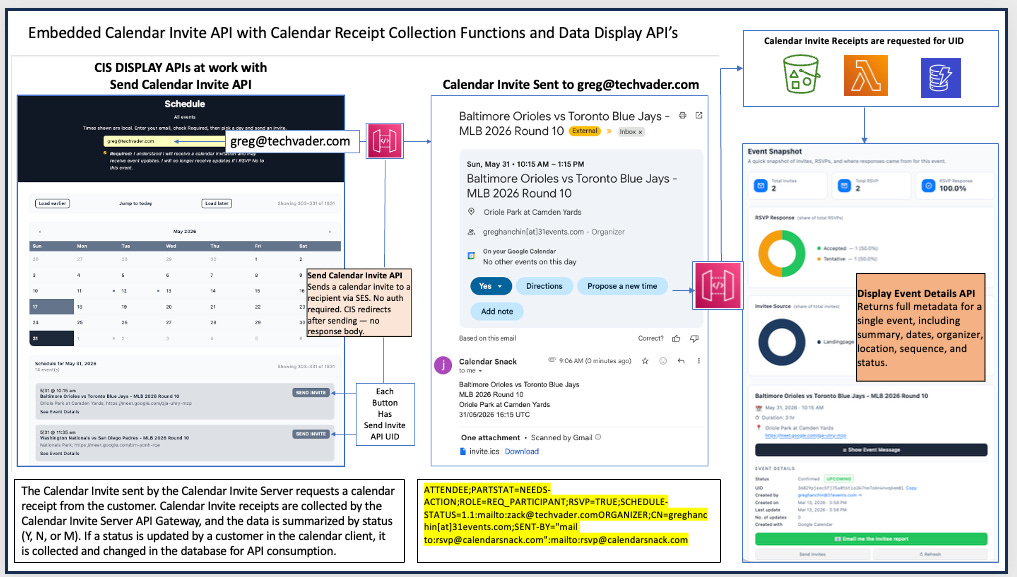
The CIS server tracks sports fan email addresses and RSVP responses (Y, N, or M) on a per-customer and per-event basis by requesting participation in each calendar invite and collecting the response via the REST API for RSVP analytics.
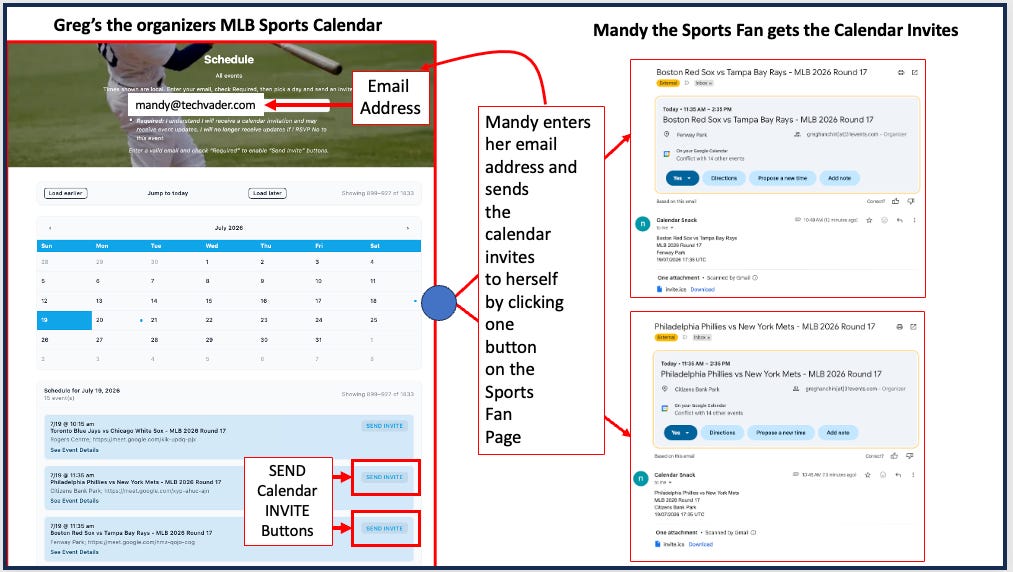
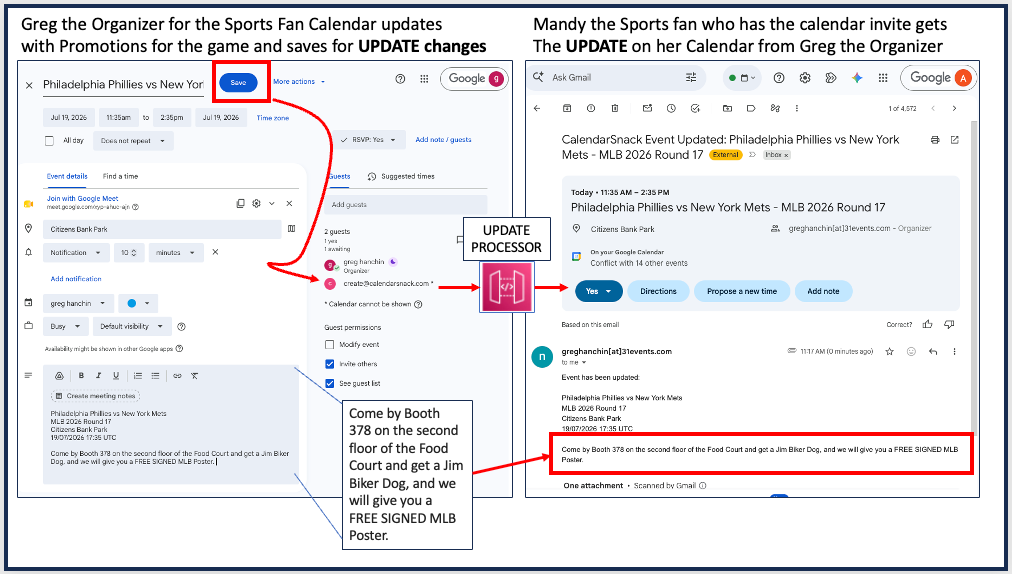
Greg will offer promotions throughout the season by updating the calendar invite for each game with company offers for that event.
Anyone who has selected and received a calendar invite from the fan site will receive the updated calendar invite with the promotion and the call to action.
Data loading of the games into CIS
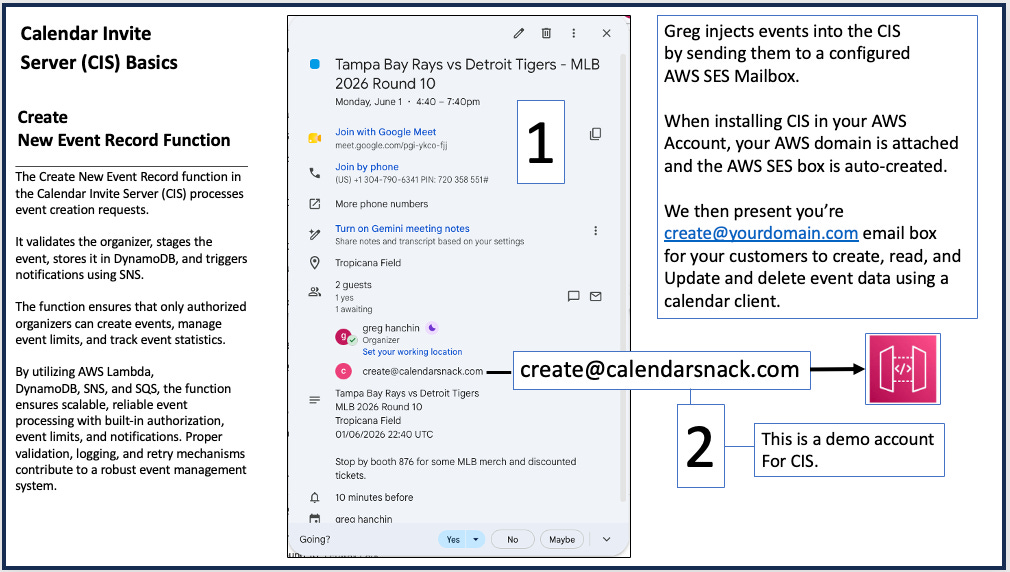
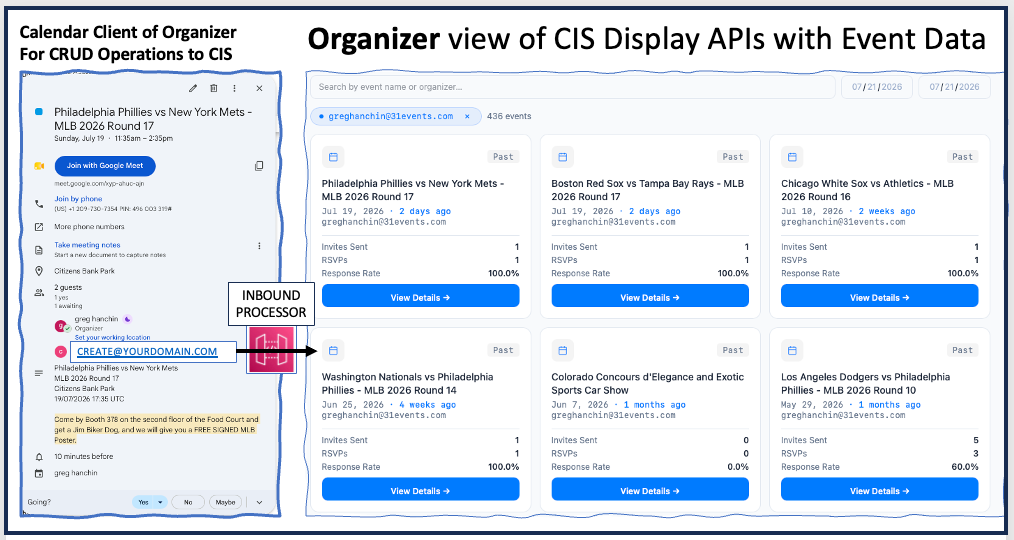
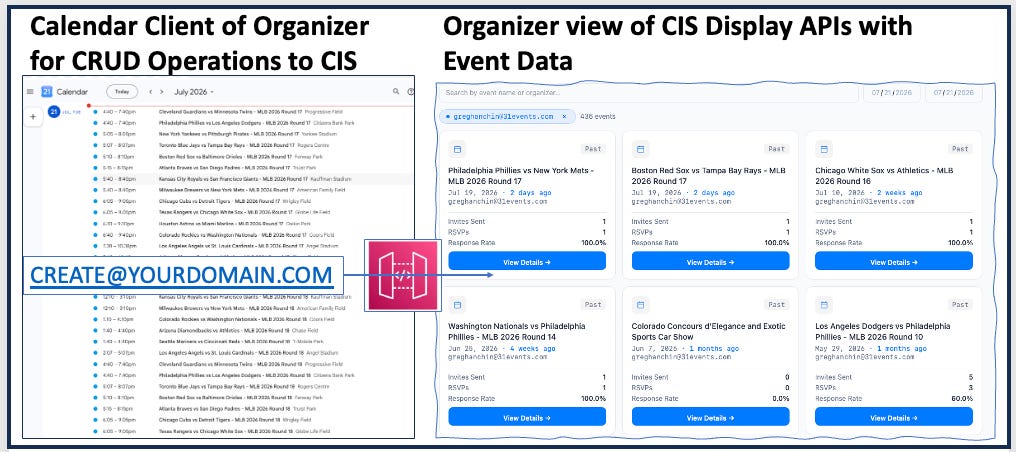
Greg uses his company’s Google or Outlook Calendar Client to create, read, update, and delete the Sports fan data in the Calendar Invite Server using the Create New Event Function, which we call the Inbound Processor.
This function is set up when you install CIS in your AWS environment. Organizers send CREATE new events and UPDATE AND DELETE with the Inbound Processor using an email address set up by the AWS administrator in an AWS SES mailbox.
In the demo, we use create@calendarsnack.com for the organizers to communicate with the Calendar Invite Server.
Inbound Processor
The Create New Event Record function in the Calendar Invite Server (CIS) processes event creation requests from Organizer Calendar Client Events sent to the configured email box for ETL and storage.
It validates the organizer, stages the event, stores it in DynamoDB, and triggers notifications using SNS to email the organizer that the event is ready to use, with instructions.
The function ensures that only authorized organizers can create events, manage event limits, and track event statistics.
By utilizing AWS Lambda, DynamoDB, SNS, and SQS, the function ensures scalable, reliable event processing with built-in authorization, event limits, and notifications. Proper validation, logging, and retry mechanisms contribute to a robust event management system.
Event data by organizer is stored in the CIS pipeline for display data or to trigger REST APIs, such as sending, updating, and deleting calendar invites.
The email address used in the Calendar Client becomes the user’s ID, and the event is assigned a UID.
Update and Delete Processor
This same INBOUND workflow is used by the Event Organizer when UPDATING or DELETING the event in the Calendar Invite Server.
An organizer simply uses the Calendar Client with the original event information and edits, then saves the event, thereby pushing the new information back to CREATE@YOURDOMAIN.COM and updating the DISPLAY APIs and REST APIs.
The Outbound Processor logic kicks in and routes the messaging to the Update/Delete function to process and send the Calendar Invites.
Display APIS
Data is generated and manipulated using the Organizer’s Calendar Client. All data is pulled by the Display APIS for the dashboards to be rendered.
The 2500 Events
Breaking it down into the steps for loading the 2500 MLB games into a Google or Outlook Calendar Client.
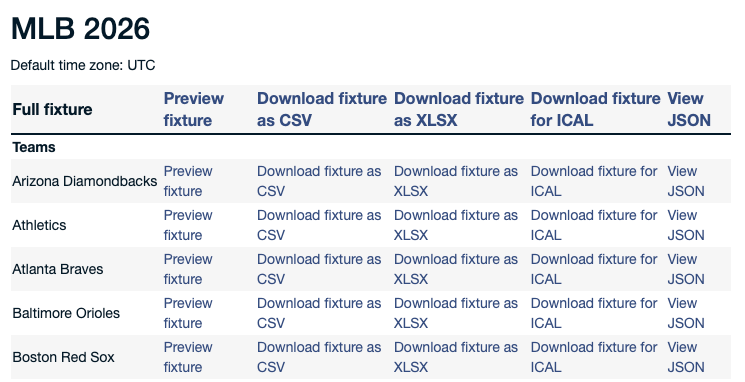
Greg downloaded the ICAL files from the fixture download, uploaded the games into his Google Calendar, and sent those games to the Calendar Invite Server Inbound Processor function using create@calendarsnack.com in his Calendar Client.
There are a number of techniques that make this easy, which I won’t get into here, but essentially involve an AI operator taking over your Google or Outlook Calendar Client to forward Calendar Events to a single common email address for the CIS Inbound Processor to accelerate automated data loading.
What might an Update or Delete look like from the Organizer?
Greg the Organizer EDIT’s and adds a NEW OFFER, then SAVES the original event on their Calendar Client: “Come by Booth 378 on the second floor of the Food Court and get a Jim Biker Dog, and we will give you a FREE SIGNED MLB Poster.”
That sends the new date back to the Inbound processor and triggers the Update or Delete functions in the background.
The new data is collected from Mandy the Sports fan with the RSVP information of Y, N, or M sent back to the API Gateway for Analytics.
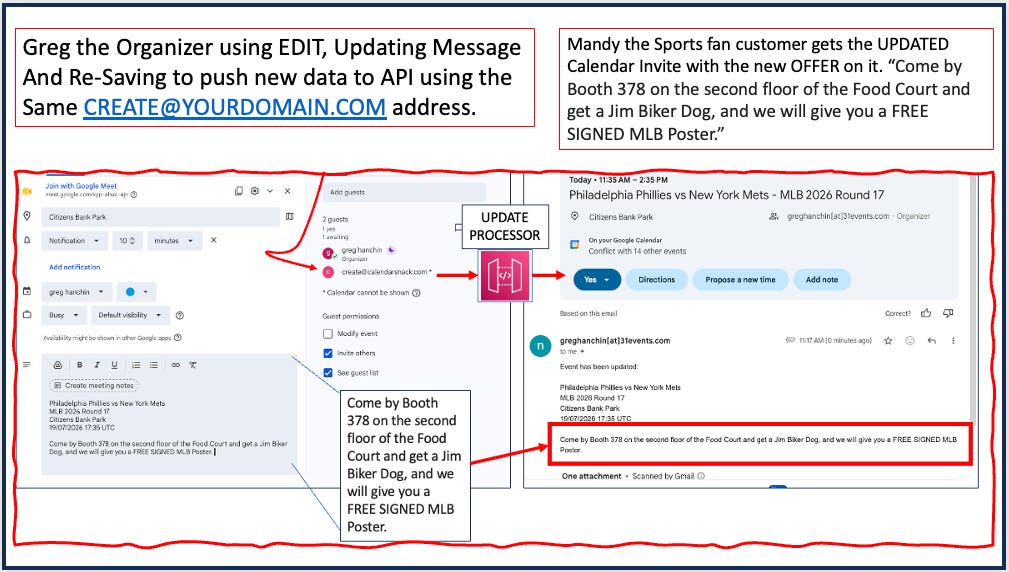
Anytime the event changes by the Organizer, the pipeline can repeat and follow the same logic.
Detailed Reporting for the Organizers
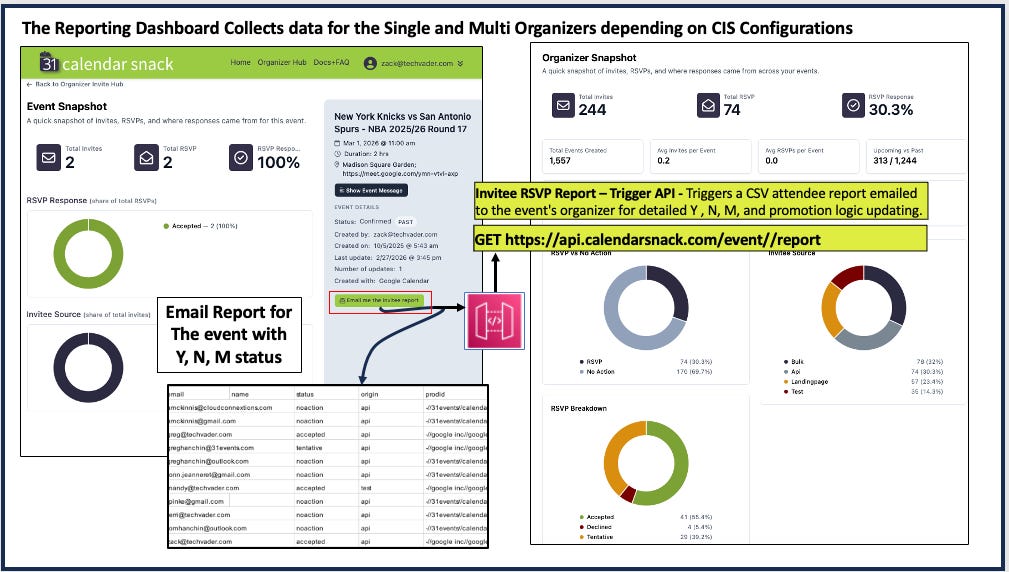
The Reporting APIs contain custom logic for summarizing dashboards, and a detailed Email attendee list with a collection of RSVPs for each event can be clicked to view. The email report is routed to the Organizer’s email address for PII compliance when the button is clicked.
Detailed Reporting for the Domain Owners
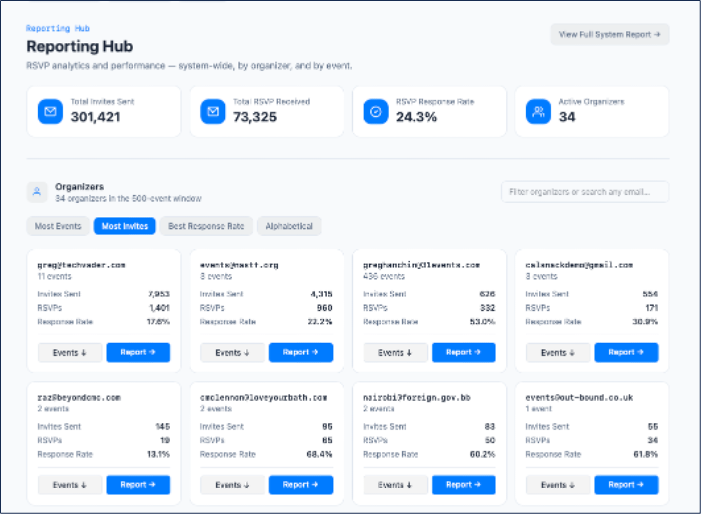
All Events by Domain Owner show 300K sends in the calendarsnack.com domain with about 3600 users, and you can drill into Organizer details for each event to see specifics, including gathered email lists.
Domain Wide by Category - Email, Web, App or Bulk Calendar Invites
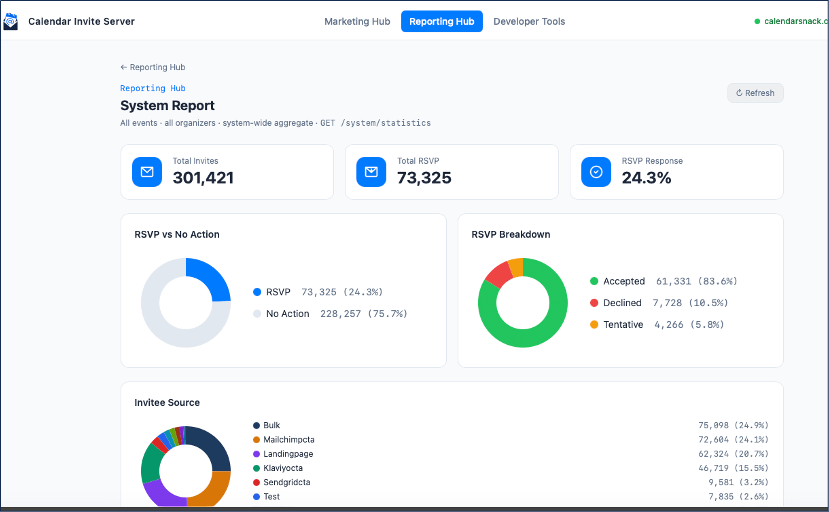
System-wide summary is above. It consolidates all Organizers under one domain, calendarsnack.com, in the Reporting Hub.
Calendar Invites can be Embedded in Email, Web, Apps and AI
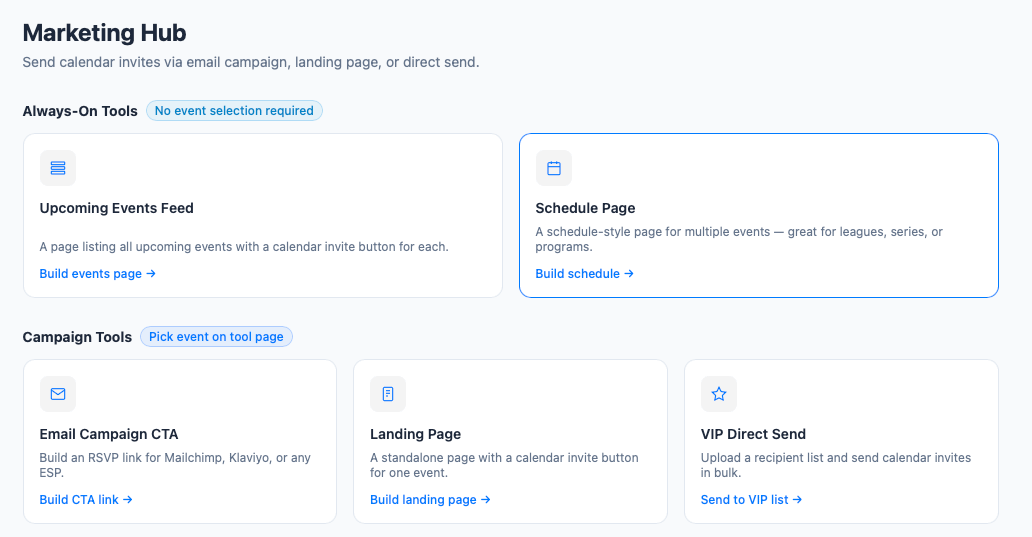
The Calendar Invite Server supports embedding Calendar Invite API codes into Email Templates like MailChimp, Sporting Pages like the example above, GUI’s for Bulk Calendar Invite sending, and for use in API to NLP chats where an Agent could show a game schedule with a customer selecting a game like below and getting a calendar invite for any future game they want.
Talking to your Sports Calendar with Claude?
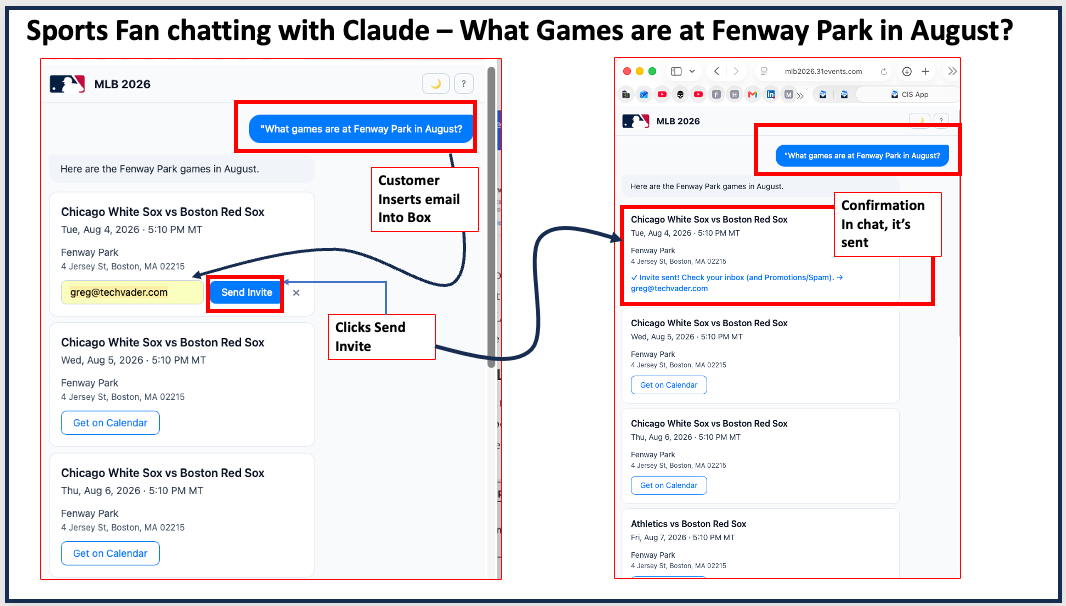
This app is a Phase 1 R&D experiment by 31Events demonstrating how the Calendar Invite Server infrastructure can power an AI-driven fan experience — built in an afternoon, running on pennies per session.
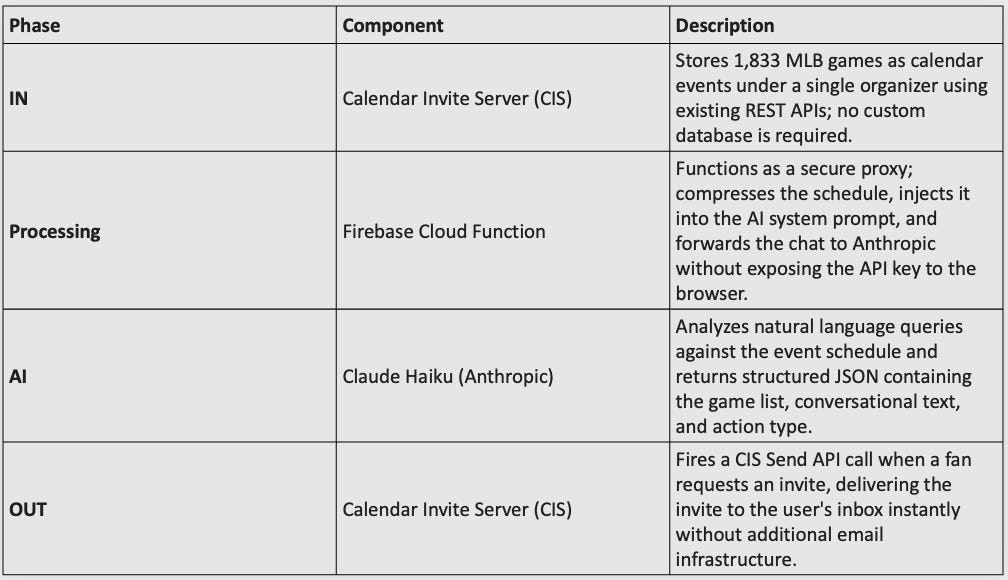
Integrating the Tech Stack for NLP Chatting with Calendar Invites
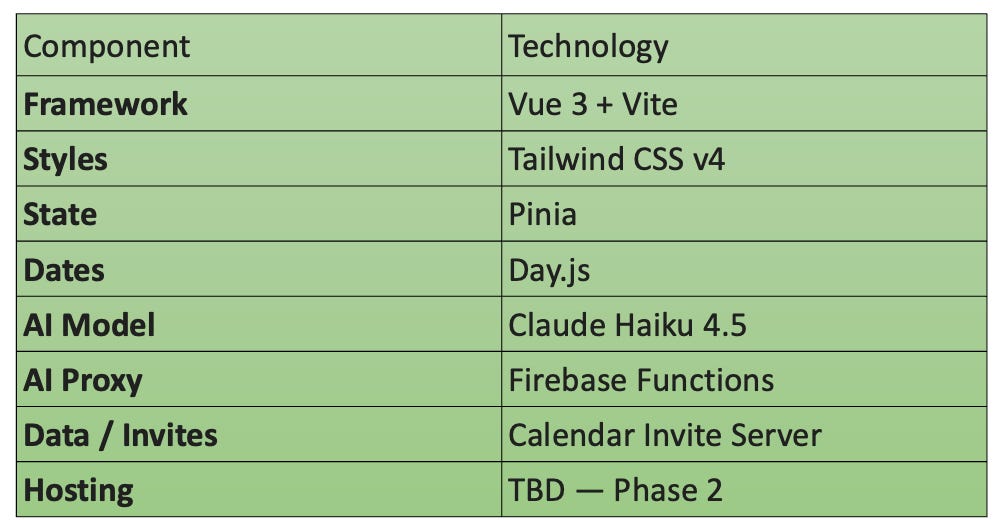
This is the first Calendar Invite interface we are aware of that uses Claude and NLP to select game events and send and track calendar invites for Sports Fans.
Cost Per Session
Less than $0.01 for a typical session of 10–15 questions, thanks to Claude Haiku and prompt caching. The entire Phase 1 build-and-test cost under $1.00 in API credits.
What’s Next — Phase 2
• Team & game pages — full schedule views, rosters, and standings powered by ESPN data.
• AI stays focused — chat remains on schedule + invites. Live scores and stats surface in the UI, not the AI context.
Check out the Claude Sports Calendar here with built in Calendar Invites.
Recap Doc here:


