


1. Embedding Calendar Invites into NLP-Generated Sporting Schedules with AWS, Claude, and Google Stacks
Finding an upcoming event online—such as checking when your favorite NBA team takes the court—and transferring that event into a personal schedule has traditionally been an exercise in technical friction.
Users locate an event on a website, click a static link, download a standalone .ics file, and manually import it into their calendar client. The moment that file downloads, the organizer loses the ability to talk with the fan about event changes, merchandise offers, or tickets.
If game times shift, venues change, or broadcast details update, attendees are left holding stale data inside an add-to-calendar entry.
Modern sports fans expect natural language search, real-time sync, and conversational discovery. Bridging the gap between discovering an event and maintaining a persistent, real-time reminder requires moving past static file downloads entirely.
Enter the Calendar Invite Server (CIS) architecture, live in production at https://cis-ondemand.31events.com/nba-chat.
By coupling Claude Haiku Natural Language Processing (NLP) with headless calendar transport workflows, this architecture converts standard calendar management into an interactive, programmable fan engagement pipeline.
2. Takeaway 1: “Add to Calendar” Buttons Are Dead — Long Live Real Calendar Invites
Traditional “Add to Calendar” buttons generate a one-way file export that cuts off event organizers the instant the download completes. Organizers cannot track who added the event, nor can they update ticket links, broadcast partners, or timing changes.
The CIS architecture replaces passive file exports with native calendar invites, establishing a dynamic two-way data pipeline between the fan’s calendar client and the organizer’s Calendar Client on the phone or desktop.
Functional Comparison: Static Buttons vs. CIS Programmable Invites
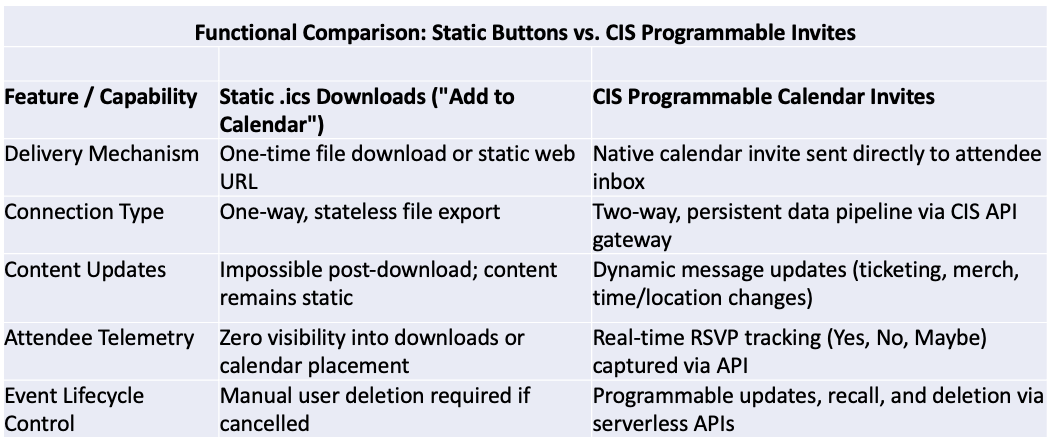
Transitioning from static downloads to live calendar invites fundamentally alters fan engagement economics. When an organizer can programmatically update a calendar item’s message body with fresh promotional offers, direct ticketing links, or stadium entry guidelines while concurrently gathering attendee RSVPs, the calendar item transforms from a forgotten reminder into a high-converting, owned engagement channel.
3. Takeaway 2: Claude Haiku Brings Natural Language Intelligence to Game Schedules
Instead of forcing users to navigate static drop-down menus or complex filtering systems to find game times, the CIS solution integrates a lightweight LLM directly into the schedule selection workflow.
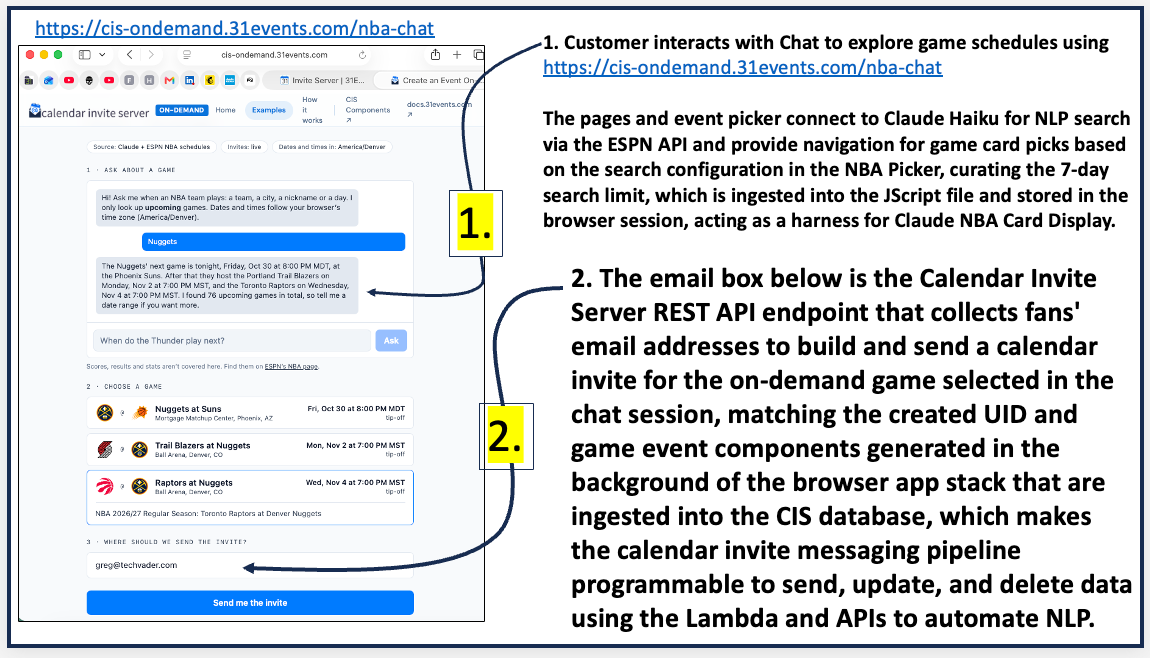
The Front-End & LLM Search Architecture
Front-End Application Stack: Built with Vue 3, Vue Router, Pinia, Tailwind CSS, Axios, and Day.js to create a responsive web app.
AI & Schedule Ingestion: Powered by Claude Haiku, which interfaces with ESPN’s free public NBA schedule API to query game information.
Session Harness & Caching: Up to 7 days of live NBA schedule data (including official team logos, tip-off times, and stadium locations) is retrieved under configured search rules, ingested directly into a JavaScript file, and cached in the browser session. This session harness provides instant context to Claude Haiku, eliminating redundant external API calls during conversational multi-turn searches.
Fans interact with the application via a simple chat interface at https://cis-ondemand.31events.com/nba-chat. Users can enter flexible natural language queries using team names, cities, team nicknames, or days of the week (e.g., searching “Nuggets” or asking “When do the Thunder play next?”). The browser harness evaluates the prompt against the cached schedule array, returning curated game cards with team logos and match telemetry.
Figure 1: Natural language interaction utilizing Claude Haiku and ESPN API schedule data within the browser session harness to display interactive game cards.
4. Takeaway 3: Google Calendar as a “Headless Transport” Pipeline
The true architectural innovation of the CIS framework lies in how it handles calendar object generation. Rather than building custom iCalendar objects from scratch on the server, the architecture utilizes a standard Google Calendar client as a headless transport layer.
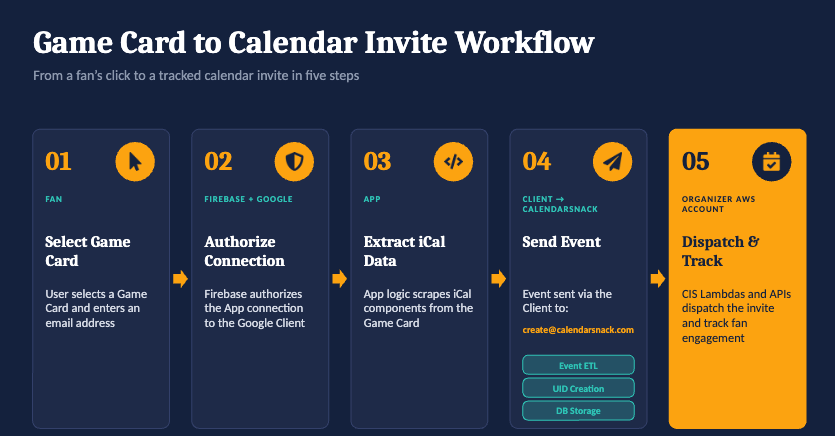
Under the Hood: The Browser-to-Headless-Client Pipeline
Selection & Email Capture: The fan selects a game card in the chat window and enters their email address in the REST API input field embedded in the browser UI.
Firebase Authorization: The browser application authenticates with a designated organizer Google Calendar client using Google Firebase authorization.
iCalendar Component Scraping: Front-end application logic scrapes the required
iCalendardata attributes directly from the selected game card (summary, start time, end time, location, description, logos).Automated Event ETL & Storage: The application dispatches the event payload to
create@calendarsnack.comthrough the authorized Google Calendar client. This action initiates an automated Event Extract, Transform, Load (ETL) pipeline: the system parses the raw iCal components, assigns a system-wide Unique Identifier (UID), and indexes the record into the CIS REST API database for future updates or recall.AWS Serverless Pipeline Execution: CIS Lambdas and REST APIs running directly within the organizer’s own AWS account take over the payload, dispatching the calendar invite to the fan’s inbox and registering the event for telemetry tracking by creating a UID for the On Demand event selected in the NLP Game CARD.
Using a standard calendar client in the background as an automated microservice bypasses the complex edge cases of building compliant .ics files manually. The calendar client acts as a reliable payload transport mechanism, allowing organizer-hosted AWS Lambda functions to manage large-scale calendar delivery securely within their own cloud boundary.
5. Takeaway 4: Two-Sided Visibility — Real-Time Dashboards for Fans and Organizers
The CIS architecture establishes end-to-end transparency, offering live operational telemetry to both the fan receiving the invite and the organizer managing the marketing pipeline.
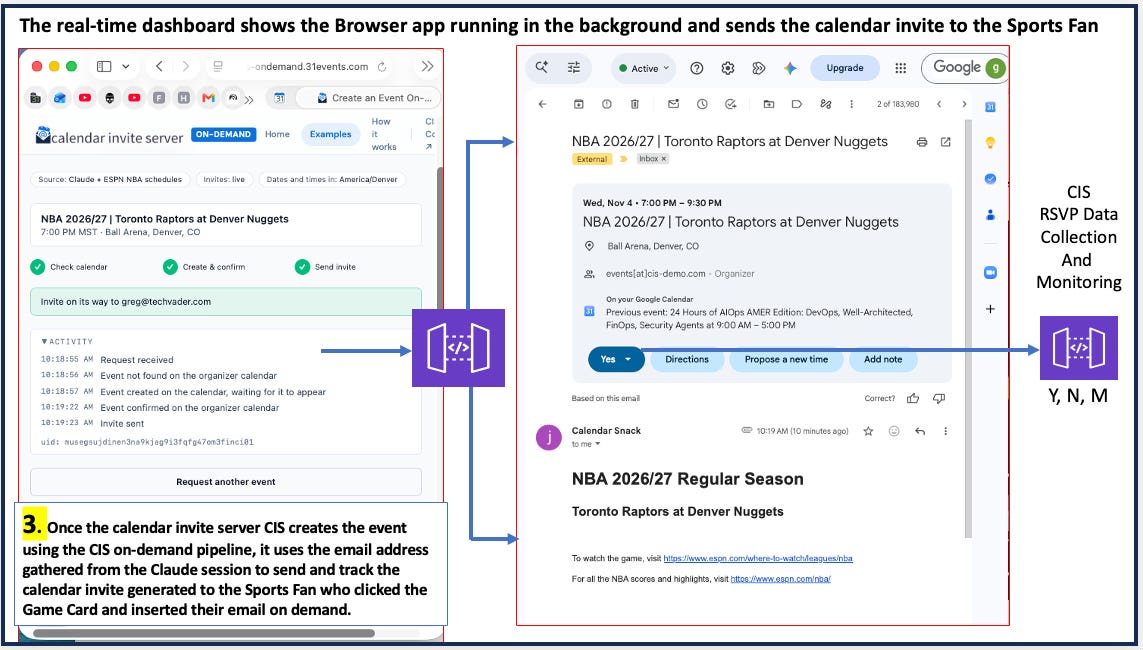
The Fan-Facing Execution Dashboard
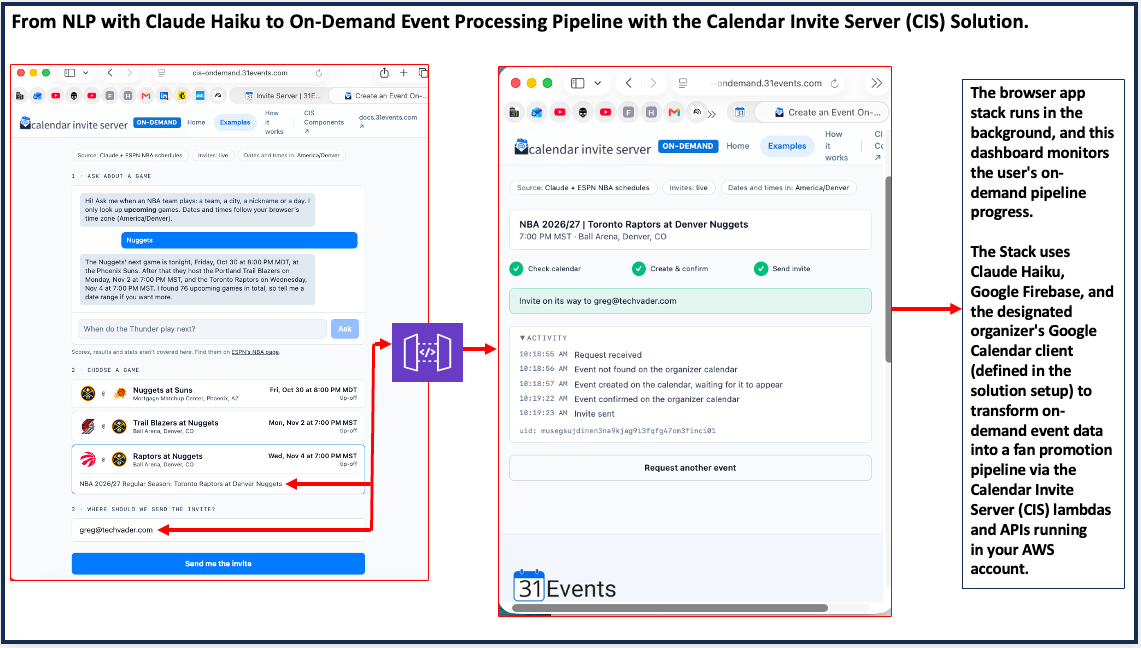
Upon submitting their email address, the fan’s UI transitions into an execution log monitoring the background pipeline step-by-step:
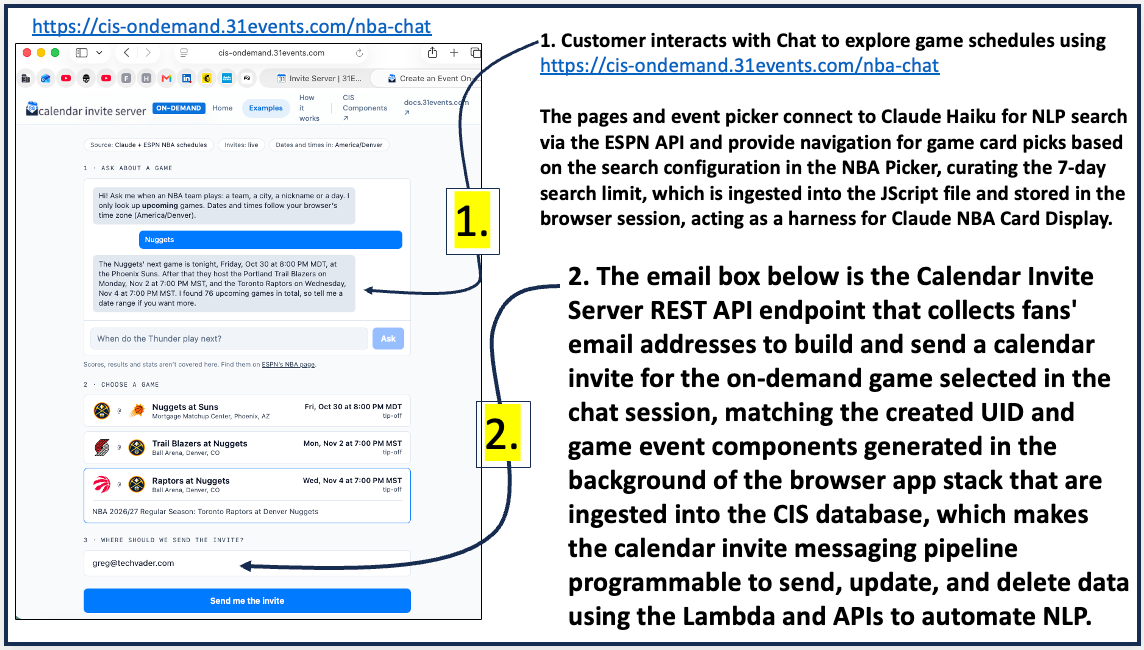
The Steps are highlighted here in the generated on demand Claude NLP dialog talking to the NBA API for Serach parmeter data and taking direction from the Calendar Invite Server mini app in the browser that connects all the pieces together.
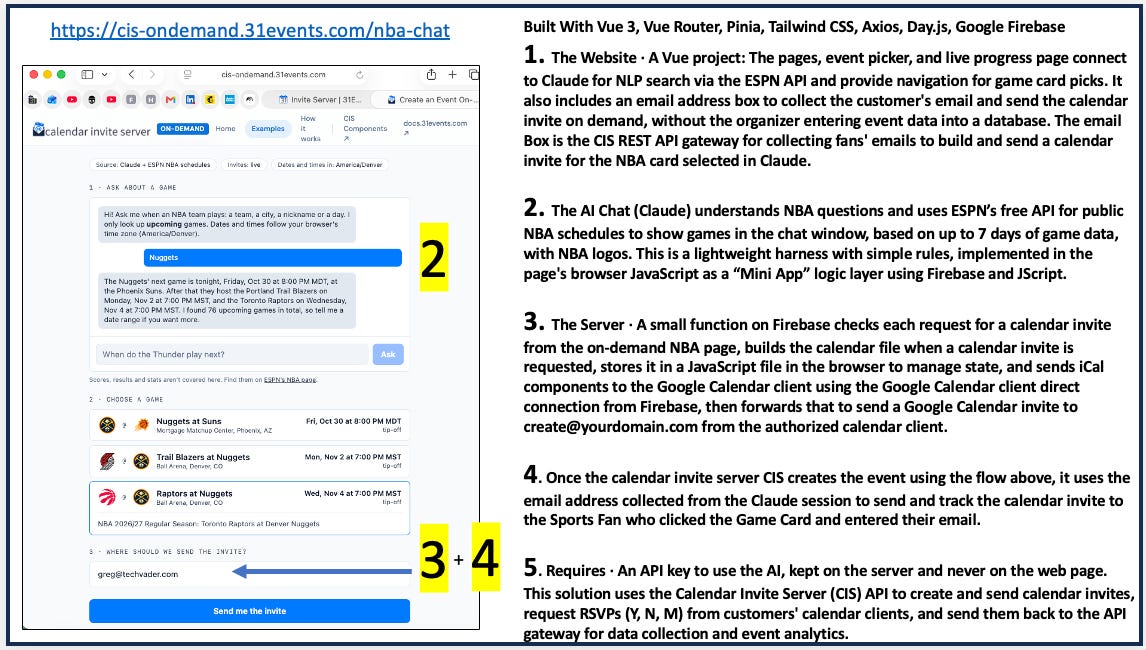
After the customer selects what game from the NLP Sports cards presented and inserts their email address into the box they get a screen generated with the telementary of the on demand Event being built.
The Sports fan will receive the customer generated Calendar Invite built for that event into their Email Box and onto their calendar client for RSVP data collection.
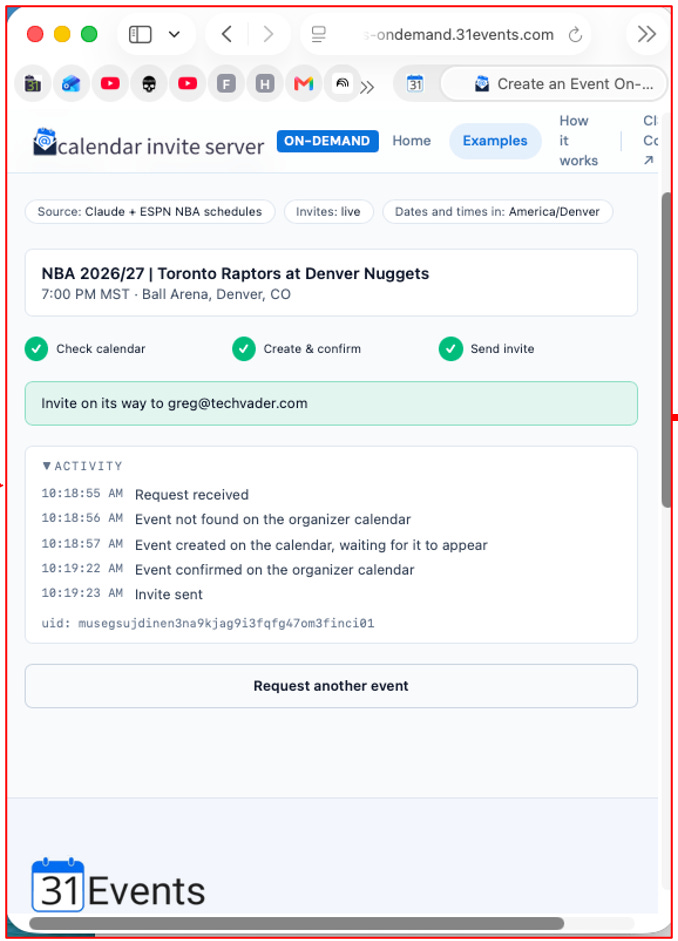
Figure 2: Real-time fan-facing telemetry log tracking calendar verification, invite generation, and exact UID assignment (musegsujdinen3na9kjag9i3fqfg47om3finci01).
The Organizer Dashboard (Reporting Hub)
Organizers access real-time metrics through the CIS Reporting Hub (cis-ui.31events.com). The interface provides total oversight of fan interactions and campaign performance:
Event Snapshot Metrics: Displays real-time counts for Total Invites (e.g.,
1), Total RSVPs (e.g.,0), and overall RSVP Response Percentage (0.0%).Granular Event Metadata: Displays event parameters including event title (
NBA 2026/27 | Minnesota Timberwolves at San Antonio Spurs), location (Frost Bank Center, San Antonio, TX), start time, duration (2 hr 30 min), and creation source (Created with Google Calendar).UID Indexing & Traceability: Displays unique system UIDs (such as
2pgnrt2bneiinqes72slalmk1blncvevr3om4n01) linking front-end requests to back-end database records.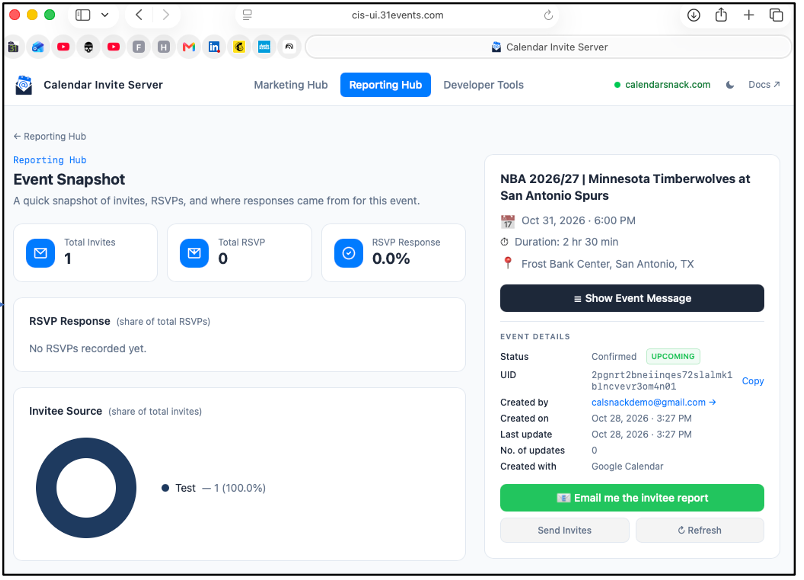
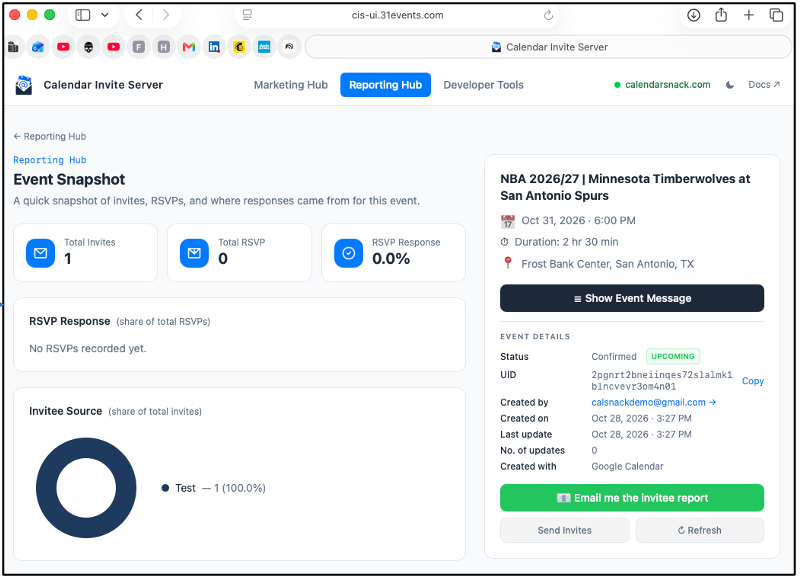
Figure 3: The CIS Reporting Hub (cis-ui.31events.com) illustrating Event Snapshot metrics, specific UID tracking (2pgnrt2bneiinqes72slalmk1blncvevr3om4n01), invitee source charts, and administrative report triggers.
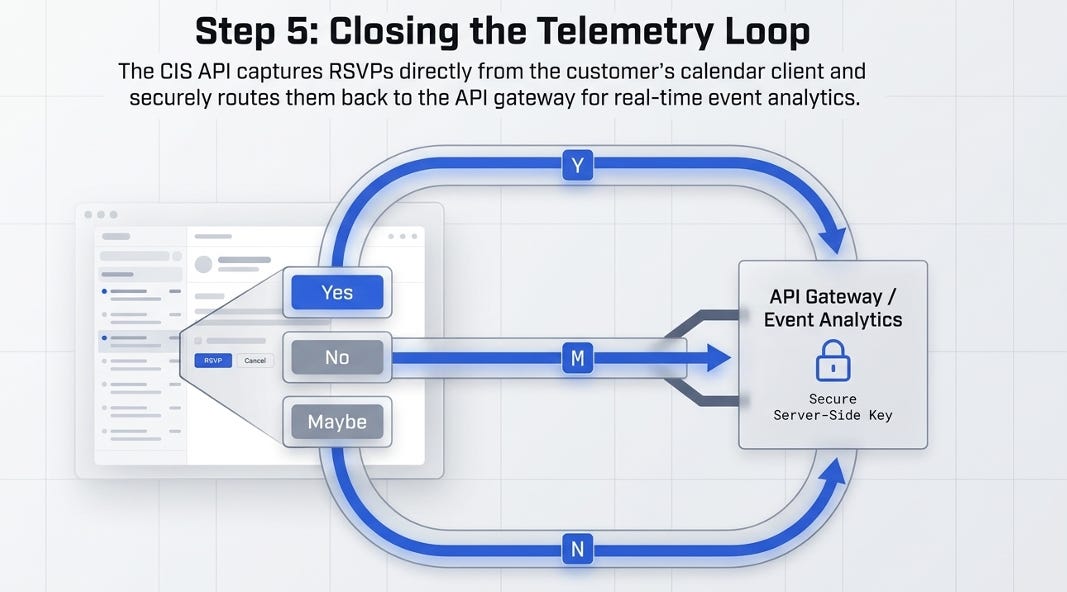
RSVP Response Telemetry: Captures incoming attendee status changes (Yes, No, Maybe / Y, N, M) routed automatically from fan calendar clients back to the CIS API gateway via standard iCalendar reply protocols.
Invitee Source Breakdown: Visualizes request origins via distribution charts (e.g.,
Test — 1 (100.0%)).
Administrative Controls: Provides operational action buttons including “Email me the invitee report”, “Send Invites”, and “Refresh” to trigger batch actions or update event payloads in real time.
By bridging consumer-side execution logs with administrative telemetry dashboards, the architecture ensures complete data integrity across the entire event delivery lifecycle.
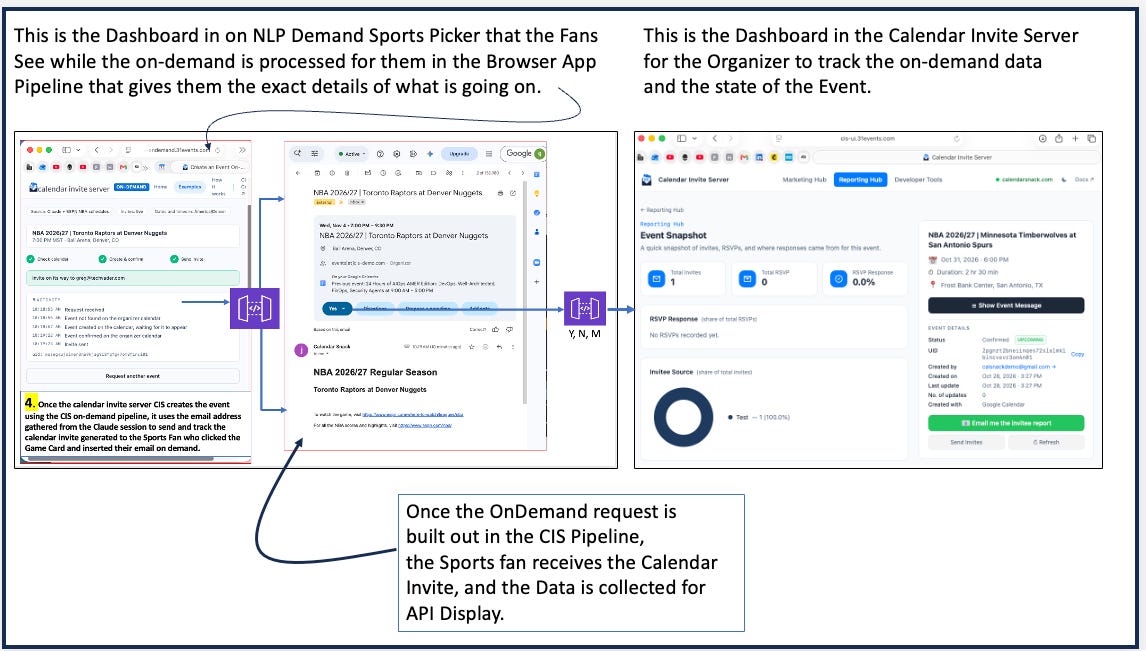
Figure 4: End-to-end data flow mapping fan selection to headless Google Calendar transport, automated invite delivery, RSVP collection, and CIS Reporting Hub telemetry.
Conclusion: The Future of On-Demand Fan Engagement
Combining LLM-driven natural language interaction with an automated Calendar Invite Server framework creates a scalable paradigm for modern digital engagement.
By replacing static .ics downloads with a headless Google Calendar transport architecture deployed inside tenant AWS accounts, calendar reminders evolve into dynamic messaging pipelines. Organizers obtain real-time RSVP analytics while retaining the ability to update event text, promotional messaging, ticketing links, or schedule changes long after an invite has landed in a fan’s calendar.
As natural language discovery becomes the primary interface for schedule search, static downloads are quickly becoming obsolete.
How will your application architecture evolve to turn static event lookups into persistent, high-value calendar channels?
For more see - https://31events.com


